BPAS

Boyum ITBoyum IT Solution for SAP Business One

Perfion PIM for SAP Business One

Product information kept in one place, shown on Item Master Data and imported into SAP Business One. BPAS works with SME manufacturers across India.

One product record, four questions answered

  1. 01 · Keep Where does product data live? Perfion PIM keeps product information in one place, with values per language.
  2. 02 · See Can sales see it in SAP B1? A Perfion tab on Item Master Data shows the item’s Perfion details.
  3. 03 · Import Do we type items in twice? Release2ERP imports items from Perfion into SAP Business One.
  4. 04 · Print Can we print a datasheet? Reports on the Perfion tab opens the report creation wizard for a product report.
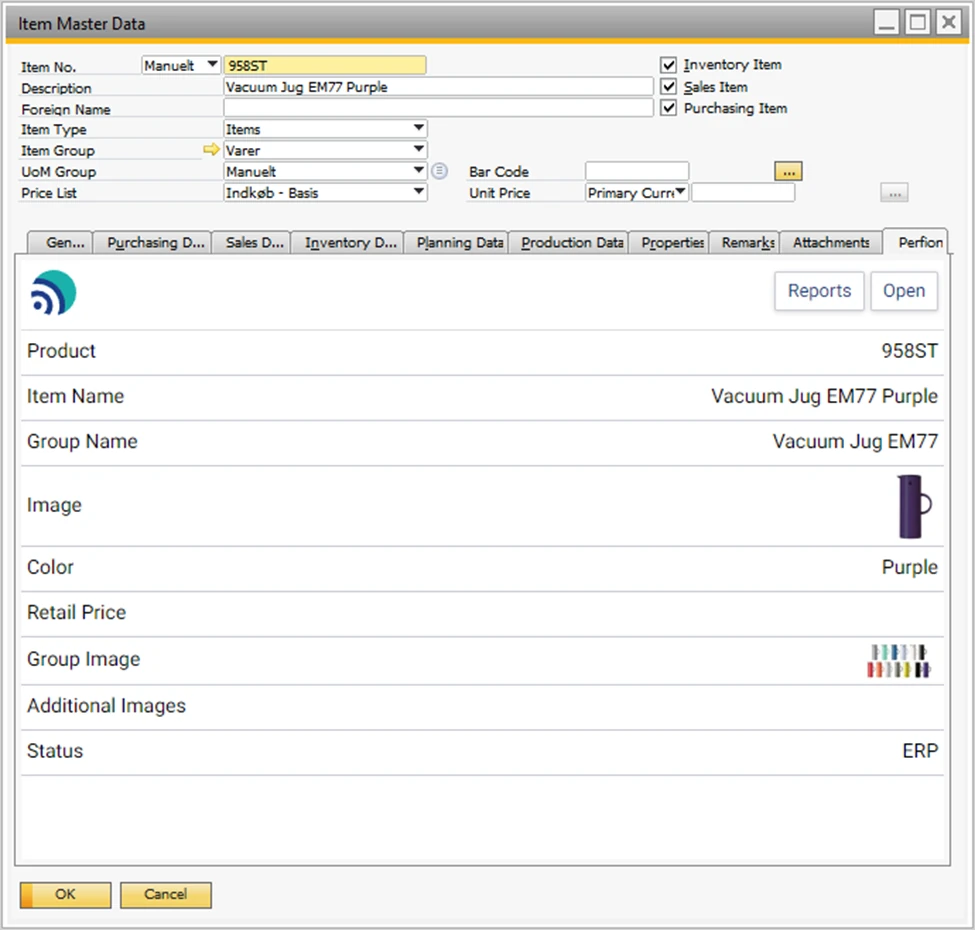
The Item Master Data window in SAP Business One with the Perfion tab open, showing the item's product details from Perfion, including its name, group, image and colour, with Reports and Open buttons.
The Perfion tab on Item Master Data: product details from Perfion for the item in view, with Reports and Open.
Where Standard SAP B1 Stops

Two B1 modules, extended by Perfion PIM

If product information sits in spreadsheets and shared folders next to SAP Business One, you do not need to replace your ERP. Perfion PIM keeps it in one place and reaches SAP Business One through the B1 Usability Package. Each card shows what B1 does on its own and what Perfion adds.

  • B1 Module 09

    Perfion Extension for SAP B1 Inventory

    SAP B1 on its own
    Item Master Data marks each item as an inventory, sales and/or purchase item, with its item group, unit of measure group and planning data.
    Perfion adds
    A Perfion tab on Item Master Data with the Perfion product details of the item in view, Open to edit the item in Perfion and Reports for a product report; Release2ERP imports items from Perfion into SAP Business One.
  • B1 Module 11

    Perfion Extension for SAP B1 Production

    SAP B1 on its own
    A Bill of Materials is of type Production, Assembly, Sales or Template, with lines of type Item, Resource, Text or Route Stage.
    Perfion adds
    A bill of materials kept in Perfion, commonly as a Swap Relation Table, imported into SAP Business One with Release2ERP once the items it lists exist there.
BPAS proprietary

misBoost

A management layer for SAP Business One

Management numbers from your SAP Business One, sent on autopilot

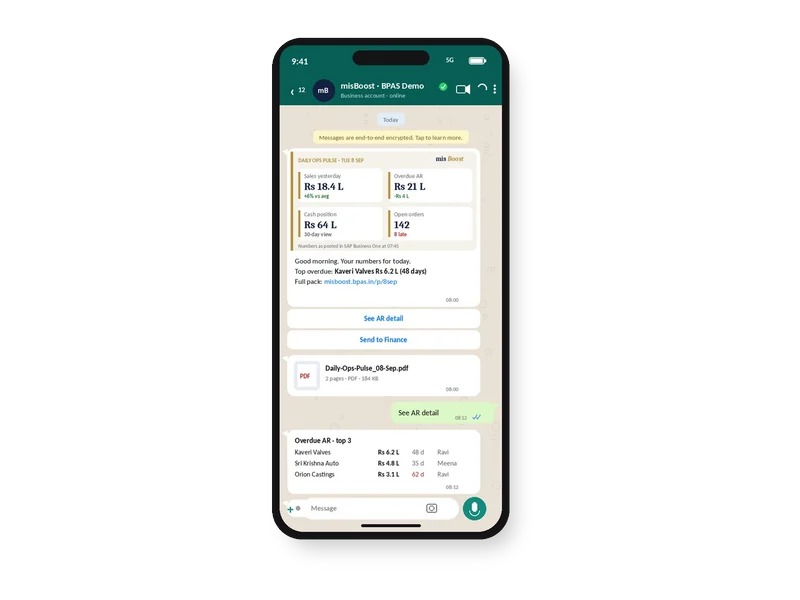
The packs build themselves from your SAP Business One data and arrive on their own, so nobody prepares or sends them. It works on any SAP Business One installation, with no manufacturing or warehouse project needed.
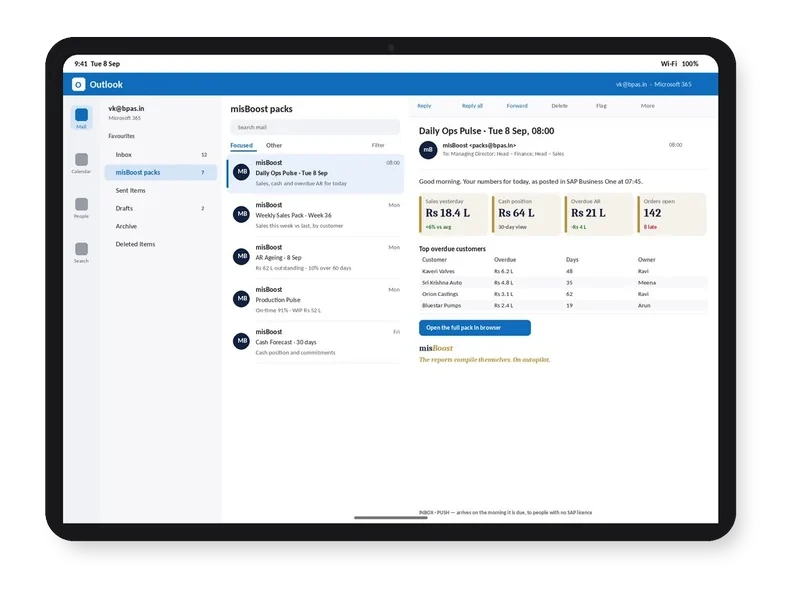
misBoost morning pack arriving in Outlook on a tablet, headline numbers in the email itself
Email
misBoost pack on WhatsApp on a phone, headline numbers with the PDF attached
WhatsApp
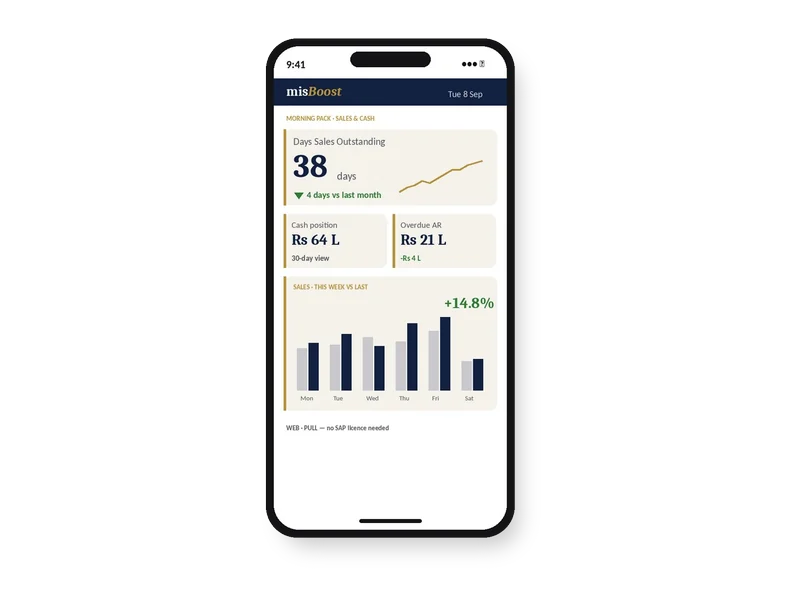
misBoost KPIs and dashboards on a phone, as a published page with no app
Mobile
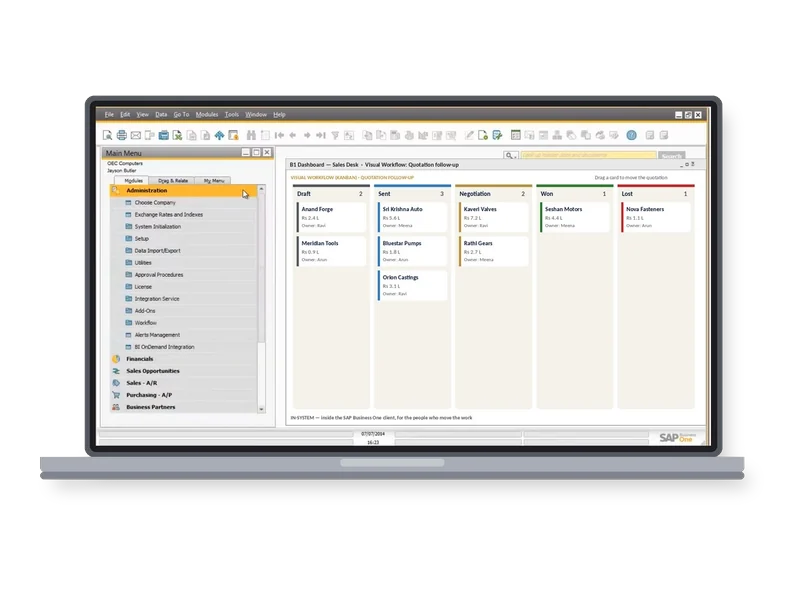
misBoost Visual Workflow board inside the SAP Business One client on a laptop
Inside SAP
Explore misBoost
235
boosters in ten domains Sent on autopilot
Perfion PIM Features

What Perfion PIM does for your product data, and what it returns

Open any feature to see how it works and what it means for time, accuracy and cash. Rows 01 to 04 are the connection to SAP Business One; the other rows are Perfion PIM itself. Each one gets its own guide, with core concepts, best practices and a vocabulary.

Perfion in SAP Business One

Operational Reality (Capabilities)

The Perfion ERP Add-in for SAP Business One adds a Perfion tab to the Item Master Data form, showing the Perfion product details of the item in view. The tab follows the item on the form, and refreshing the record also refreshes the Perfion tab, so changes made in Perfion show without leaving SAP Business One.

  • A Perfion tab on Item Master Data
  • Follows the item in view
  • Refreshed with the record

Licence and prerequisites: A Perfion subscription; the B1 Usability Package (the Perfion Extension, from B1UP 2023.09); Perfion Database and Perfion API 5.2 or above; the Perfion Web Client 2023-R1 or above, reachable from the SAP Business One server

Executive ROI Value

Sales, purchasing and production staff see the product information kept in Perfion without opening a second system.

  • One source of product facts at the desk
  • Fewer calls to the product team

Operational Reality (Capabilities)

From the Perfion tab, Open opens the Perfion editor for the same item in the default browser, where its Perfion product data can be updated. Reports opens the report creation wizard, and Generate downloads the resulting report through the browser.

  • Open the item in the Perfion editor
  • Update Perfion product data
  • Generate a product report

Licence and prerequisites: A Perfion subscription; the B1 Usability Package (the Perfion Extension, from B1UP 2023.09); Perfion Database and Perfion API 5.2 or above; the Perfion Web Client 2023-R1 or above, reachable from the SAP Business One server

Executive ROI Value

A product report for the item in view can be generated without leaving SAP Business One.

  • Product reports on request
  • Corrections made where the data is kept

Operational Reality (Capabilities)

Release2ERP for SAP Business One imports Perfion items into SAP Business One through the Perfion API. Import setups define which data is imported and how it is mapped to SAP Business One fields, and the mapping decides which SAP Business One business object is created, such as items or bills of materials. Several import setups can exist side by side, and setups can be exported and imported.

  • Items imported through the Perfion API
  • Import setups for what and how
  • Items and bills of materials

Licence and prerequisites: A Perfion subscription; the B1 Usability Package (Release2ERP, from B1UP 2023.12); Perfion Database and Perfion API 5.2 or above

Executive ROI Value

New and changed items reach SAP Business One from Perfion instead of being typed in twice.

  • No double entry of item data
  • One import for many items

Operational Reality (Capabilities)

A scheduled import runs chosen import setups on a recurrence from minutely to monthly, with success and error emails. A manual import shows how many business objects were found, then a result for each object: added, updated, or the error that stopped it. Debug mode tests each object for issues without creating or updating anything in SAP Business One.

  • Scheduled imports with email reports
  • A result line for each object
  • Debug mode without changes

Licence and prerequisites: Scheduled imports need the B1UP Server Component, with email settings

Executive ROI Value

Item data in SAP Business One follows Perfion on a schedule you set, and failed imports are reported by email.

  • Imports that run on their own
  • Import errors reported

Product Data Model

Operational Reality (Capabilities)

Features are the building blocks of the Perfion data model, each of a data type such as String, Number, Date, Image, File or Link. A configuration is the data model of a selectable feature, such as Product, and every selectable feature can have one. Localizable features hold values in several languages, and Inheritable features pass values from a parent item to its children.

  • Features by data type
  • Configurations as data models
  • Localizable and Inheritable values
Executive ROI Value

Product information follows one agreed model instead of a different spreadsheet layout in each department.

  • One product model for every team
  • Values set once on a parent item

Operational Reality (Capabilities)

Feature Data holds the values of selectable features, such as categories, colours and materials, and can be exported to Excel and imported again. Filtered Values limit the values allowed for one selectable feature by the value of another, for example the colours allowed in a category, in the grid, the Item Editor, copy and paste and the Perfion API.

  • Pick lists for selectable features
  • Export to Excel and import again
  • Allowed values filtered by another value
Executive ROI Value

Products are described with agreed values, so the same colour or material is not spelt three ways.

  • Consistent values across products
  • Only allowed combinations offered

Operational Reality (Capabilities)

The grid shows many items at once in Table or Grid layout, both editable, in Dynamic layout or as cards, with filters, extra language columns and Replace for changing values across items. The Item Editor focuses on one item at a time, with its features in Top View Groups, its place in the hierarchy and its values in the languages chosen.

  • Editable grid layouts
  • Languages side by side
  • One item in the Item Editor
Executive ROI Value

Product teams update many items in one grid and still have a full view of a single item.

  • Bulk changes in one place
  • A full item view when needed

Operational Reality (Capabilities)

The Item Creator creates items for all combinations of the values chosen for selectable features, for example every colour in every size, and can also create virtual items as parents. Default Values, set per feature in a configuration, fill chosen features on new items.

  • Items for every combination
  • Virtual items as parents
  • Default Values on new items

Licence and prerequisites: Item Creator: Perfion 4.5.3 or later

Executive ROI Value

A new product range with many variants is created in one step, with common values already filled in.

  • Faster variant creation
  • Fewer missing values on new items

Rules and Quality

Operational Reality (Capabilities)

Related Values show on an item the values that belong to another item, such as the details of its colour. Formulas compose feature data into display values used in the grid, reports and exports. Swap Relation Tables add table data with rows and columns to a product, such as an ingredient list or a bill of materials, visible in the Item Editor.

  • Values shown from related items
  • Formulas for composed texts
  • Tables such as bills of materials
Executive ROI Value

Titles and descriptions are composed from the data itself, and a bill of materials kept in Perfion can be imported into SAP Business One.

  • Texts composed from the data
  • One place for component lists

Operational Reality (Capabilities)

Business rules on Number, String and Text features are checked in the user interfaces and on import, with values that break a soft rule highlighted in yellow and a hard rule in red. Item Triggers make a change to an item start a reaction, such as setting a status to review or notifying a product manager.

  • Business rules per feature
  • Soft and hard rules
  • Item Triggers on change

Licence and prerequisites: Item Triggers: Perfion 2021-R2 or later, activated by an administrator

Executive ROI Value

Values that break a rule are highlighted in Perfion, so problems are visible before items are imported into SAP Business One.

  • Problems visible at entry
  • Reviews started by changes

Languages, AI and Suppliers

Operational Reality (Capabilities)

Localizable features hold one value per language, and the grid and the Item Editor show languages side by side. Machine translation works through Google Translate or DeepL with an API key for the chosen service, and DeepL glossaries keep company terms translated the same way. Spell checking works with dictionaries per language.

  • Values per language
  • Google Translate or DeepL
  • DeepL glossaries and spell checking
Executive ROI Value

Datasheets and catalogues in other languages come from the same product record.

  • One record, many languages
  • Company terms translated consistently

Operational Reality (Capabilities)

Create with AI generates values for explicit String and Text features that hold a single value, from a prompt that can use the product’s own features, and images and files where the model supports them. Enrichment Templates store prompts per base feature and feature, and from Perfion 2026-R1 a template can be applied to several items at once.

  • Texts generated from product data
  • Enrichment Templates per feature
  • Templates applied to many items

Licence and prerequisites: An API key in AI Setup; templates are managed by users with the Can manage AI Integration role

Executive ROI Value

Product descriptions are drafted from the data already in Perfion, ready for review.

  • Faster drafts
  • A consistent text structure

Operational Reality (Capabilities)

The Supplier Portal is a browser-based tool in which suppliers manage data for their own products. Suppliers either create items and submit them for acceptance, or enrich items exposed to them, and their updates can be accepted or rejected in Perfion. The Expose and Expose Read Only views decide which features a supplier sees and manages.

  • Suppliers create or enrich items
  • Accept or reject supplier updates
  • Control over what suppliers see
Executive ROI Value

Supplier data for bought-in components arrives in the agreed structure, and supplier updates are accepted or rejected in Perfion.

  • Less retyping of supplier data
  • Full control of accepted data

Images, Print and Import

Operational Reality (Capabilities)

Images and files are held with the product. The Image Previewer shows a preview with the image metadata and sets a point of interest, media services deliver images and files out of Perfion with image processing, and Perfion Asset Cloud, offered as a service, can move them out of the database into Azure Blob Storage.

  • Images and files with the product
  • Image Previewer and point of interest
  • Perfion Asset Cloud
Executive ROI Value

Product photos and drawings are found in one place instead of shared folders.

  • One home for product images
  • The right image size for each use

Operational Reality (Capabilities)

Reports generate printed material such as datasheets, pricelists and simple catalogues straight out of Perfion, and Publishing combines many reports into one publication with chapters and an index. Tables built in the Table Designer render inside reports.

  • Datasheets and pricelists
  • Catalogues as publications
  • Tables in reports

Licence and prerequisites: Designing reports needs the role Can design reports; the Perfion Application Service must be running

Executive ROI Value

Datasheets and catalogues come from the same product record that feeds SAP Business One.

  • No hand-built datasheets
  • One source for print and ERP

Operational Reality (Capabilities)

The Import Wizard brings product data in from Excel and other formats, with images in a zipped folder, in four steps: Select File, Configuration, Mapping and Validate. It replaces the old Import Items overlay, and from Perfion 2025-R3 mappings can be saved and loaded and columns mapped with AI.

  • Excel, CSV, XML and XLIFF files
  • Images in a zipped folder
  • Validate before import

Licence and prerequisites: Perfion 2025-R1 or later

Executive ROI Value

Existing item spreadsheets are brought into Perfion with a check before anything is loaded.

  • A faster start from existing data
  • Errors found before loading
Licensing

Perfion licence. The Perfion Extension of the B1 Usability Package, with the Perfion tab on Item Master Data and Release2ERP, requires a Perfion subscription. It runs with B1UP installed (the Perfion tab from B1UP 2023.09, Release2ERP from B1UP 2023.12), Perfion Database and Perfion API 5.2 or above, and a Perfion Web Client that the SAP Business One server can reach.

Through B1UP, Inside SAP Business One

Perfion data inside your SAP B1

Perfion PIM keeps product information in its own database, and the Perfion Extension of the B1 Usability Package brings it into SAP Business One: a Perfion tab on Item Master Data, and items imported through the Perfion API.

  • Exclusive Boyum Practice. India's No.1 Customer-referred Boyum IT Partner.
  • Boyum APJ Partner Excellence Award 2024
Inside SAP Business One: the Perfion Extension of B1UP shows Perfion product details on Item Master Data, opens the report creation wizard and imports items and bills of materials from Perfion PIM through the Perfion API. SAP BUSINESS ONE B1UP Perfion tab Release2ERP Reports Item Master Data with a Perfion tab imported through the Perfion API Items and BOMs from Perfion PIM
Perfion product data reaches SAP Business One through B1UP.
  1. SAP Certified

    The Perfion Extension is part of the B1 Usability Package, a Boyum IT product SAP certified for SAP Business One.

  2. Standard integration

    The Perfion tab on Item Master Data and Release2ERP are standard integrations between Perfion and SAP Business One.

  3. Imported, not retyped

    Release2ERP imports Perfion items into SAP Business One through the Perfion API, on a schedule or by hand.

  4. Checked before it lands

    Debug mode tests an import on each object without creating or updating anything in SAP Business One.

How BPAS Deploys Perfion PIM

From scattered product data to Perfion PIM in SAP B1

Three steps from the first conversation to Perfion PIM working with your SAP Business One.

  1. Step 01

    Gap Review on Your Plant

    In a BPAS gap review you get a short list of what is costing your plant dates and money today, and the order to fix it in.

    You get Your fix list, in order

  2. Step 02

    Perfion PIM Deployment on a Test Copy

    Perfion PIM and the Perfion Extension run on a test copy of your SAP Business One company with your own items, before they touch live data.

    You get Perfion PIM proven on your own items

  3. Step 03

    Go-Live and Ongoing Support

    Your team sees Perfion product data on Item Master Data from go-live, and BPAS stays with your plant after it.

    You get Your product information kept in Perfion PIM

BPAS proprietary · ViSA Services

BPAS ViSA Services for SAP Business One

Seven services around the Boyum solutions on your SAP Business One, from the first maturity check to AI inside SAP Business One.

The ViSA wheelViSA, Vipin’s Solution Approach for SME business transformation, at the centre of five segments. Body of Knowledge: 32+ years in IT services; process, automation, analytics. Strategy: transformation clarity; BMM, CJM, KPIs. Process: process implementation; best practices, process models, APQC PCF. Automation: transaction automation; Boyum IT, SAP Business One. Institutionalisation: continuous growth; ADKAR, BSC, audits.Body of Knowledge 32+ years in IT services Process · Automation · AnalyticsStrategy Transformation clarity BMM · CJM · KPIsProcess Process implementation Best practices · Process models · APQC PCFAutomation Transaction automation Boyum IT · SAP Business OneInstitutionalisation Continuous growth ADKAR · BSC · AuditsViSA Vipin’s Solution Approach for SME business transformation
The ViSA wheel: Vipin’s Solution Approach for SME business transformation, the foundation of every service.
Explore ViSA Services
  1. LocategapScanA maturity check and gap discovery: an as-is score for every step, and a clear next move.
  2. AlignprocEnactStrategy first, then the process, then the software.
  3. DeploytoolDeployImplements the Boyum Solutions on your existing SAP Business One, process-first.
  4. ExtenddevCenterCustomises Beas Manufacturing, Produmex WMS and B1UP where standard configuration stops.
  5. SupportmaxValueSupport in measured cycles, from the day after go-live.
  6. CostcostAbsorbAbsorption costing in Beas Manufacturing, on stock held and on goods sold.
  7. IntelligenceaiEnableAI inside SAP Business One, once there is real manufacturing history to learn from.
This Week on LinkedIn

One Perfion idea every week

Every week BPAS posts a short carousel for SME manufacturers on keeping product information in one place with Perfion PIM and SAP Business One. Swipe through this week's here, or follow BPAS to get the next one in your feed.

In every carousel

  • A product data problem
  • Where standard SAP B1 stops
  • How Perfion handles it
  • Illustrative ₹ impact for an Indian SME plant
New carousel every week

This week's carousel appears here.

BPAS Weekly carousel · Perfion
Slide 1 · Hook Your weekly carousel appears here Seven slides, posted on LinkedIn every week.
Slide 2 · Shop-floor pain One problem every plant knows Swipe or use the arrows to move through the slides.
Slide 3 · How Perfion works The Perfion answer, step by step Then open the post on LinkedIn to comment or share.
Release Updates

What's new in Perfion PIM

The latest Perfion releases in plain words: what changed in each version.

Latest Boyum IT releases Newest Perfion release Jun 2026

3 releases, newest first

All release updates