BPAS

Boyum ITSAP Certified Boyum Add-on

B1 Print & Delivery for SAP Business One

Documents designed in Crystal Reports, then shown, printed, saved and emailed from SAP Business One. BPAS works with SME manufacturers across India.

One document, four questions answered

  1. 01 · Layout Our own layouts? Documents are designed in Crystal Reports instead of the PLD.
  2. 02 · Print Which printer? A Print Action sets the printer, the copies and the page range.
  3. 03 · Email Email the invoice? An Email Action sends it to the business partner’s contacts.
  4. 04 · Mass Send all at once? Mass delivery prints, emails or saves many documents in one run.
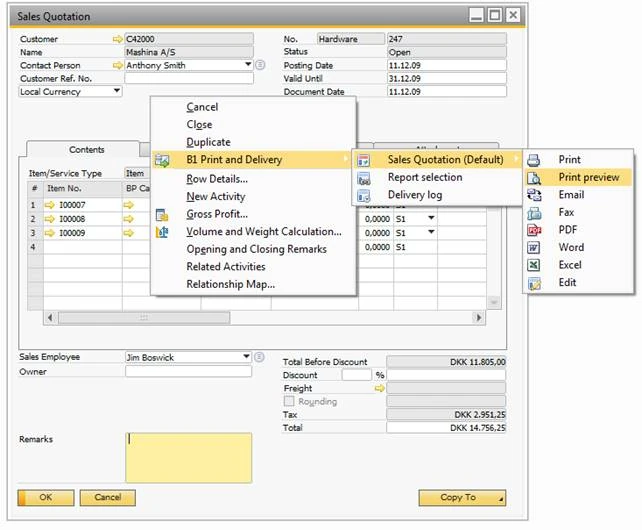
A sales quotation in SAP Business One with the B1 Print and Delivery menu open: the default sales quotation configuration offers Print, Print preview, Email, Fax, PDF, Word, Excel and Edit, next to Report selection and Delivery log.
The B1 Print & Delivery menu on a sales quotation: its actions, report selection and delivery log.
Where Standard SAP B1 Stops

Four B1 modules, extended by B1 Print & Delivery

If documents leave SAP Business One by hand, saved as a PDF and attached to an email one at a time, you do not need to replace your ERP. B1 Print & Delivery works on the windows your team already uses. Each card shows what B1 does on its own and what B1 Print & Delivery adds.

  • B1 Module 05

    B1 Print & Delivery for SAP B1 Sales – A/R

    SAP B1 on its own
    A sales quotation copies into a sales order, a delivery and an A/R invoice, each the target document of the one before, and the Dunning Wizard creates letters for overdue invoices.
    B1 Print & Delivery adds
    Print, Print preview, Email and PDF on A/R documents run the report actions set up for them, in Crystal Reports layouts, and adding a document can run its own action; mass delivery sends many A/R documents in one run, and the Dunning Wizard can email dunning reminders.
  • B1 Module 06

    B1 Print & Delivery for SAP B1 Purchasing – A/P

    SAP B1 on its own
    A Goods Receipt PO records what the vendor delivered and updates stock, and the A/P invoice posts the payable.
    B1 Print & Delivery adds
    The same buttons on A/P documents run their report actions, so purchase orders reach vendors in the agreed layout; mass delivery and document printing cover purchase documents too.
  • B1 Module 07

    B1 Print & Delivery for SAP B1 Business Partners

    SAP B1 on its own
    Business Partner Master Data holds customers, vendors and leads in one record, with contact persons, addresses, payment terms, accounting and tax data.
    B1 Print & Delivery adds
    BP Selections choose a layout per business partner, language or group; email recipients come from its contact persons and email categories; account balances go to a range of customers in one run, and an activity can record each document sent.
  • B1 Module 08

    B1 Print & Delivery for SAP B1 Banking

    SAP B1 on its own
    Incoming Payments record customer receipts by cash, cheque, bank transfer, credit card or bill of exchange, applied to invoices, and Outgoing Payments pay vendors.
    B1 Print & Delivery adds
    Incoming and outgoing payments have their own report configurations, are covered by document printing, and can be sent in bulk with mass delivery from the banking area.
BPAS proprietary

misBoost

A management layer for SAP Business One

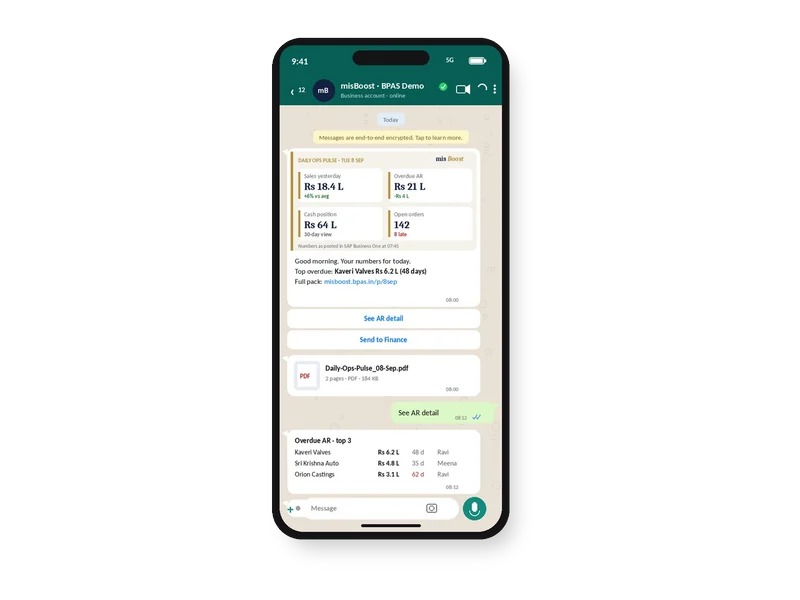
Management numbers from your SAP Business One, sent on autopilot

The packs build themselves from your SAP Business One data and arrive on their own, so nobody prepares or sends them. It works on any SAP Business One installation, with no manufacturing or warehouse project needed.
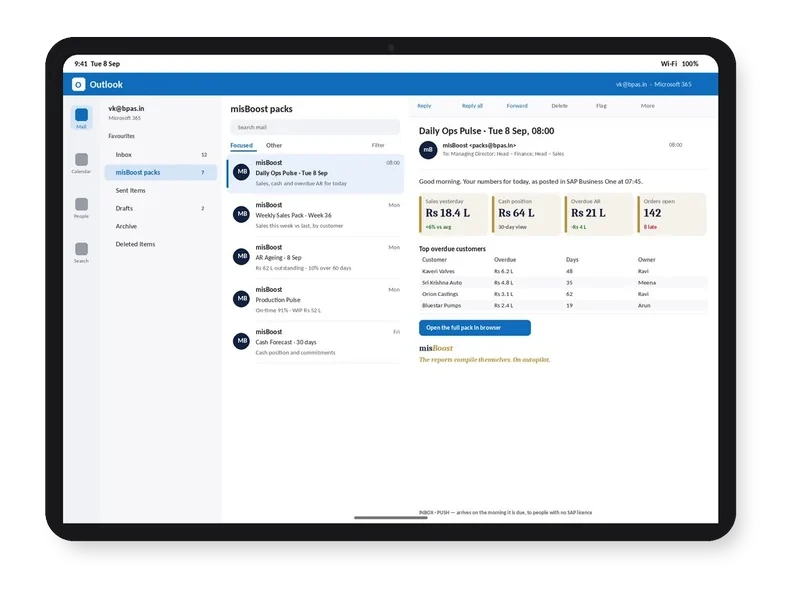
misBoost morning pack arriving in Outlook on a tablet, headline numbers in the email itself
Email
misBoost pack on WhatsApp on a phone, headline numbers with the PDF attached
WhatsApp
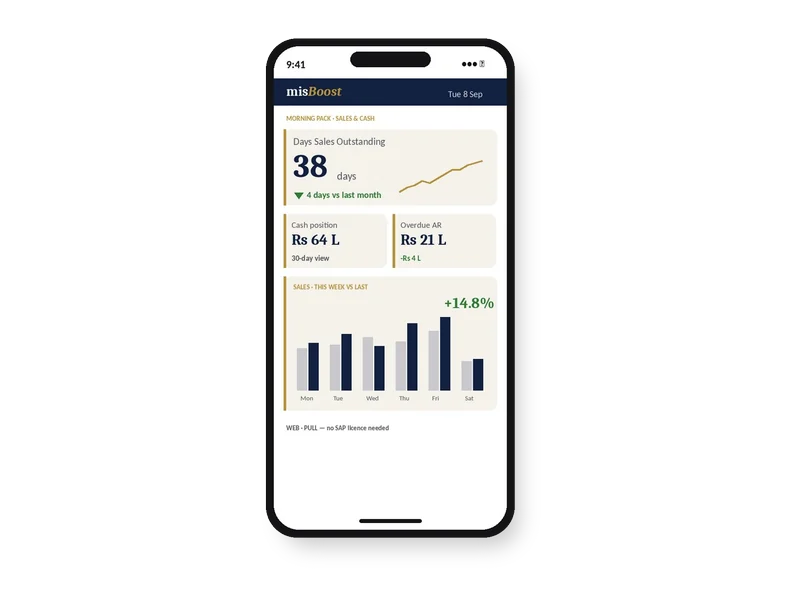
misBoost KPIs and dashboards on a phone, as a published page with no app
Mobile
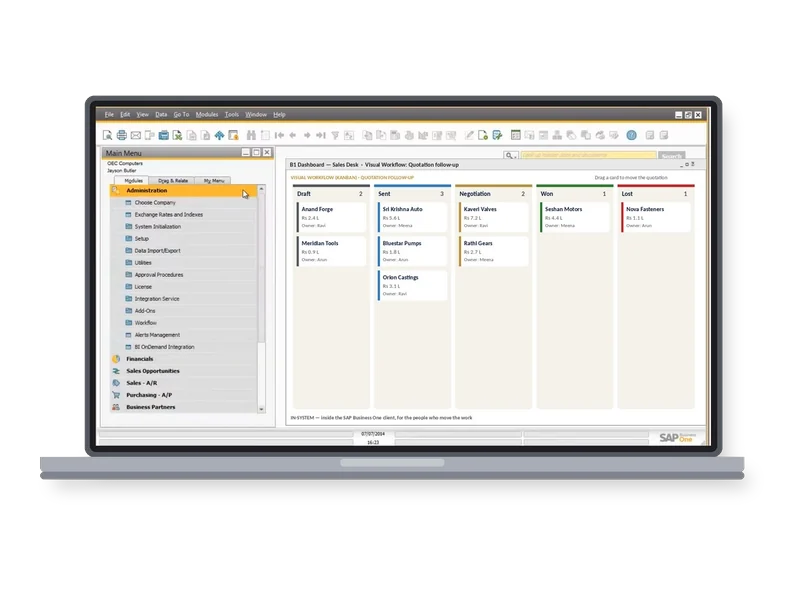
misBoost Visual Workflow board inside the SAP Business One client on a laptop
Inside SAP
Explore misBoost
235
boosters in ten domains Sent on autopilot
B1 Print & Delivery Features

What B1 Print & Delivery does with your documents, and what it returns

Open any feature to see how it works in the system and what it means for time, accuracy and cash. Each one gets its own guide, with core concepts, best practices and a vocabulary.

Layouts and Set-up

Operational Reality (Capabilities)

A report definition tells B1 Print & Delivery where a Crystal Reports layout is kept, as a file, on a shared path when several users run it, or stored in the SAP Business One database, and which parameters it needs. Parameters are read from the layout and filled with fixed values, the document key, header values from the open window or the result of an SQL query, and a layout can run against the company database the user is logged in to. Report file paths can be changed for many definitions in one step.

  • Layouts on a shared path or in the database
  • Parameters filled from the open window
  • File paths changed in one step
Executive ROI Value

One set of Crystal Reports layouts serves every user, and a layout change is made in one place.

  • One home for document layouts
  • Layout changes made once
Guide in preparation Extends SAP B1: Sales – A/R · Purchasing – A/P

Operational Reality (Capabilities)

A report configuration binds report definitions and report actions to a type of window: sales and purchase documents, activities, service windows, sales opportunities, incoming and outgoing payments, pick lists and custom deliveries. Each SAP Business One button gets its own action, including Print, Print preview, Email, PDF, Word and Excel, Add on sales and purchase documents, and document printing. One configuration can carry more than one report, such as an A/R invoice with its specification, and other layouts can be offered on the window for special cases.

  • An action for each SAP button
  • More than one report per document
  • Alternative layouts to choose from

Licence and prerequisites: The Print and Email buttons in the SAP Business One web client need the Web Client Extension and Web Service

Executive ROI Value

Pressing Print, Email or PDF on a sales or purchase document does what the business has decided for that document, every time.

  • The same result from every desk
  • Special layouts one click away
Guide in preparation Extends SAP B1: Sales – A/R · Purchasing – A/P · Business Partners · Banking

Operational Reality (Capabilities)

On a new installation the Startup Wizard sets up the most common scenario: the shared folder for the layouts, the documents the business works with, and default actions for adding a document, account balances, mass delivery and the Dunning Wizard. It creates the report definitions, report actions and configurations, so Print preview shows the report, Print prints it, PDF saves it and Email sends it. On the SAP Business One windows, B1 Print & Delivery then works like printing with the PLD, with the layouts made in Crystal Reports.

  • A starting set-up in one wizard
  • Print, PDF and Email buttons set up
  • Used like PLD printing
Executive ROI Value

Teams keep the buttons they already know, now with Crystal Reports layouts behind them.

  • No new habits at the desk
  • A working base to adjust from
Guide in preparation Extends SAP B1: Sales – A/R · Purchasing – A/P

Print, Email and Save

Operational Reality (Capabilities)

The Show Action opens a Crystal Report in a built-in viewer, inside SAP Business One or in a separate window, and from the web client as a PDF in a new browser tab. The Print Action prints to a chosen printer or the default one, with the number of copies and a page range, or shows the printer dialog each time, and the printer can also be found by the start of its name, when only one printer matches. Extra PDF, TXT or DOCX files can be printed with the main print.

  • Internal or external report viewer
  • Printer, copies and page range
  • Extra files printed with the document
Executive ROI Value

Each document goes to the printer, in the number of copies the business has decided, without choices at every print.

  • Fewer reprints
  • Copies set once, not at each print
Guide in preparation Extends SAP B1: Sales – A/R · Purchasing – A/P

Operational Reality (Capabilities)

The Email Action sends a Crystal Report by email: from the user’s desk through Microsoft Outlook, SMTP, Exchange or the Graph API, and from the server component through SMTP, Exchange or the Graph API. Recipients come from the business partner, its contact persons, the contact person on the document, email categories, a consolidation business partner, or a fixed or calculated address. The report goes as a PDF or another file type, with extra attachments if needed, in a plain-text or HTML email that can be previewed before sending (not in mass delivery or the Dunning Wizard), and emails to the same recipient can be grouped into one.

  • Outlook, SMTP, Exchange or Graph API
  • Recipients from the business partner
  • Grouped emails per document or partner

Licence and prerequisites: Sending through the Graph API needs an app registered in the Azure portal

Executive ROI Value

Invoices, sales orders and purchase orders reach the right person by email straight from the document, in the agreed layout and wording.

  • No manual save-and-attach
  • Fewer emails to the wrong contact
Guide in preparation Extends SAP B1: Sales – A/R · Purchasing – A/P · Business Partners

Operational Reality (Capabilities)

The Save Action saves a Crystal Report as a file, such as PDF, Excel, Word, CSV, text, HTML or XML, with a file name built from the document, for example its number. An existing file of the same name can be replaced or kept beside the new one, and instead of going to a folder the file can be attached to the document itself, in the SAP Business One attachments folder. PDF files can be protected with a password or signed with a digital certificate.

  • Many file formats
  • Files attached to the document
  • Password-protected or signed PDFs

Licence and prerequisites: PDF protection needs ABCpdf version 10.1, a third-party program with its own licence

Executive ROI Value

A copy of each document sent is kept with the document or in a named folder, ready when a customer or an auditor asks for it.

  • Copies found from the document
  • Signed PDFs where needed
Guide in preparation Extends SAP B1: Sales – A/R · Purchasing – A/P

Follow-up Actions

Operational Reality (Capabilities)

The Create Activity Action creates an SAP Business One activity when the report action runs, with its type, subject, remarks, assignee, start time, duration and reminder, and can link the source document and attach the report. The Create Internal Message Action sends an internal message to chosen SAP Business One users, or users found by a query, with a subject, a message, a link to the document and the report attached.

  • An activity for each document sent
  • The report attached to the activity
  • Internal messages to colleagues

Licence and prerequisites: Attaching the report to an activity needs an attachments folder set up in SAP Business One

Executive ROI Value

Sales and accounts staff see in the business partner’s activities which documents were sent, and colleagues are told when a document goes out.

  • A sent history per customer
  • Colleagues informed without a call
Guide in preparation Extends SAP B1: Business Partners · Sales – A/R

Operational Reality (Capabilities)

The HTTP Trigger posts a message to a web address, mainly to channels in Microsoft Teams or Slack, from a template for each or as raw JSON, and the message can include lists built from SQL queries, and tables in Microsoft Teams. The SQL Action runs an SQL statement when the action runs, with values from the document.

  • Posts to Microsoft Teams or Slack
  • Lists from SQL, tables in Teams
  • SQL run with the document’s values
Executive ROI Value

Teams see a message in Microsoft Teams or Slack when a document is processed, in the channel they already watch.

  • News where teams already look
  • Updates without opening SAP Business One
Guide in preparation Extends SAP B1: Sales – A/R · Purchasing – A/P

Operational Reality (Capabilities)

A Conditional Action does nothing by itself: it runs a query on values on the screen and, by the result, starts another report action. For example, a checkbox on an invoice can decide whether it is printed or emailed, the user’s name can choose the printer, and the invoice amount can choose another layout or email text. A Multiple Action runs several actions in one, such as print and email, and an action can mark sales and purchase documents as printed.

  • Actions chosen by a condition
  • Print and email in one action
  • Documents marked as printed
Executive ROI Value

Customers who want paper get paper and customers who want email get email, from the same button.

  • One button, the right outcome
  • Fewer decisions per document
Guide in preparation Extends SAP B1: Sales – A/R · Purchasing – A/P

Business Partners

Operational Reality (Capabilities)

BP Selections choose the layout for a business partner by its code, language or group, then the default layout. The order of these levels can be changed, and user-defined fields and properties of the business partner can be added as further levels. Selections work on windows that carry one business partner in the header.

  • Layout by partner, language or group
  • User-defined fields and properties
  • A default when nothing is set
Executive ROI Value

A customer that needs its own document format gets it automatically, without a separate print routine.

  • Customer formats kept without effort
  • Layouts per language
Guide in preparation Extends SAP B1: Business Partners · Sales – A/R · Purchasing – A/P

Operational Reality (Capabilities)

The Email and Save actions support translatable fields: the Subject, Body and Attachment template of an email, and the File template of a saved report, follow the language set on the business partner, or the language chosen on a sales order.

  • Subject and body per language
  • Attachment and file names per language
  • Language from the business partner

Licence and prerequisites: Multilanguage and translatable fields enabled in SAP Business One

Executive ROI Value

Export customers receive their emails in their own language from the same action as domestic customers.

  • One action for every language
  • Clearer emails for export customers
Guide in preparation Extends SAP B1: Business Partners · Sales – A/R

Operational Reality (Capabilities)

BP Account Balance printing sends account balances (ageing reports) to a range of customers chosen by code, group or properties, by email, print, save or preview. A preview before running lets you choose which customers to include, and where branches are used, the account balance report can be extended to cover the documents of a single branch.

  • Customers chosen by code, group or property
  • Email, print, save or preview
  • Customers picked before sending
Executive ROI Value

Customer statements go out in one run instead of one customer at a time.

  • Statements sent in one run
  • Customers see what they owe
Guide in preparation Extends SAP B1: Business Partners

Operational Reality (Capabilities)

With an active report configuration for the Dunning Wizard, B1 Print & Delivery takes over the last step of the SAP Business One Dunning Wizard: an extra option runs a B1 Print & Delivery action, such as emailing the dunning reminders to the business partners, and the Status column shows the B1 Print & Delivery action performed.

  • Dunning reminders by email
  • Run from the standard Dunning Wizard
  • The action shown in the Status column
Executive ROI Value

Overdue reminders reach customers by email in the agreed layout, as part of the normal dunning run.

  • No printing and posting of reminders
  • A record of what each customer received
Guide in preparation Extends SAP B1: Sales – A/R · Business Partners

Mass Delivery and Logs

Operational Reality (Capabilities)

Mass delivery prints, emails, saves or previews many documents in one run, from the sales opportunities, sales, purchasing, banking and service areas. Ready-made configurations cover every supported document type, with filters such as open documents only or documents not yet handled, and a preview to choose the documents. Configurations can add their own conditions, sorting and columns, and the Custom type delivers on any data in the SAP Business One database.

  • Print, email, save or preview in bulk
  • Documents already handled left out
  • Custom deliveries on any data
Executive ROI Value

A day’s or a month’s invoices go out in one run instead of one document at a time.

  • Less time spent sending documents
  • Documents already handled can be left out
Guide in preparation Extends SAP B1: Sales – A/R · Purchasing – A/P · Banking

Operational Reality (Capabilities)

Schedules run mass delivery configurations through the server component, every set number of minutes or hours, daily, weekly, monthly, once, or on the last day of the month, with the report action to run: print, email or save. A success email can confirm each run and an error email can report problems.

  • Minutely to monthly schedules
  • Print, email or save
  • Success and error emails

Licence and prerequisites: Schedules need the server component, installed and activated

Executive ROI Value

Routine sending happens on the schedule set, without anyone starting it.

  • No one has to remember to send
  • Problems reported by email
Guide in preparation Extends SAP B1: Sales – A/R · Purchasing – A/P · Banking

Operational Reality (Capabilities)

In the SAP Business One document printing window, the print preview, print and email buttons run the report actions for all selected documents. This covers sales and purchase documents and incoming and outgoing payments, and business partners without a report action are skipped. With the delivery log in use, each delivery is recorded in the Delivery Log, and errors are recorded in the Error Log.

  • Selected documents in one batch
  • Delivery Log per document
  • Error Log for failures
Executive ROI Value

When a customer says a document never arrived, the Delivery Log can show what B1 Print & Delivery did with it.

  • An answer to “did you send it?”
  • Failures visible in one place
Guide in preparation Extends SAP B1: Sales – A/R · Purchasing – A/P · Banking
Licensing

B1 Print & Delivery licence. B1 Print & Delivery is set up within the B1 Usability Package, and its changes ship in B1UP releases. Running B1 Print & Delivery from a B1UP command requires the user to have a B1 Print & Delivery licence. Schedules need the server component, PDF protection needs ABCpdf 10.1 with its own licence, and the Print and Email buttons in the SAP Business One web client need the Web Client Extension and Web Service. With SAP Business One browser access, every action runs as print preview.

SAP Certified, Built on SAP Business One

B1 Print & Delivery works inside your SAP B1

B1 Print & Delivery works on the SAP Business One windows: the buttons your team already presses show, print, save and email documents in Crystal Reports layouts, with deliveries recorded in the Delivery Log.

  • Exclusive Boyum Practice. India's No.1 Customer-referred Boyum IT Partner.
  • Boyum APJ Partner Excellence Award 2024
Inside SAP Business One: the Print, Email and PDF buttons on sales, purchase and payment windows run B1 Print & Delivery report actions on Crystal Reports layouts, set up by configuration, and deliveries are written to the Delivery Log. SAP BUSINESS ONE Print & Delivery Print Email Save SAP B1 windows the ones in use today set up by configuration Delivery Log deliveries recorded
B1 Print & Delivery works on the SAP B1 windows the team already uses.
  1. SAP Certified

    B1 Print & Delivery is a Boyum IT solution for SAP Business One, SAP certified.

  2. Crystal Reports layouts

    Documents are designed in Crystal Reports and used from the SAP Business One windows, like printing with the PLD.

  3. One action, many outputs

    A report action shows, prints, saves or emails a document, and one action can do several at once.

  4. Deliveries on record

    With the delivery log in use, the Delivery Log records each delivery and the Error Log records errors.

How BPAS Deploys B1 Print & Delivery

From manual sending to B1 Print & Delivery

Three steps from the first conversation to B1 Print & Delivery running in your SAP Business One.

  1. Step 01

    Gap Review on Your Plant

    In a BPAS gap review you get a short list of what is costing your plant dates and money today, and the order to fix it in.

    You get Your fix list, in order

  2. Step 02

    B1 Print & Delivery Deployment on a Test Copy

    B1 Print & Delivery runs on a test copy of your SAP Business One company with your own layouts and documents, before it touches live data.

    You get B1 Print & Delivery proven on your own documents

  3. Step 03

    Go-Live and Ongoing Support

    Your team prints, saves and emails its documents in the agreed layouts from go-live, and BPAS stays with your plant after it.

    You get Your SAP Business One running with B1 Print & Delivery

BPAS proprietary · ViSA Services

BPAS ViSA Services for SAP Business One

Seven services around the Boyum solutions on your SAP Business One, from the first maturity check to AI inside SAP Business One.

The ViSA wheelViSA, Vipin’s Solution Approach for SME business transformation, at the centre of five segments. Body of Knowledge: 32+ years in IT services; process, automation, analytics. Strategy: transformation clarity; BMM, CJM, KPIs. Process: process implementation; best practices, process models, APQC PCF. Automation: transaction automation; Boyum IT, SAP Business One. Institutionalisation: continuous growth; ADKAR, BSC, audits.Body of Knowledge 32+ years in IT services Process · Automation · AnalyticsStrategy Transformation clarity BMM · CJM · KPIsProcess Process implementation Best practices · Process models · APQC PCFAutomation Transaction automation Boyum IT · SAP Business OneInstitutionalisation Continuous growth ADKAR · BSC · AuditsViSA Vipin’s Solution Approach for SME business transformation
The ViSA wheel: Vipin’s Solution Approach for SME business transformation, the foundation of every service.
Explore ViSA Services
  1. LocategapScanA maturity check and gap discovery: an as-is score for every step, and a clear next move.
  2. AlignprocEnactStrategy first, then the process, then the software.
  3. DeploytoolDeployImplements the Boyum Solutions on your existing SAP Business One, process-first.
  4. ExtenddevCenterCustomises Beas Manufacturing, Produmex WMS and B1UP where standard configuration stops.
  5. SupportmaxValueSupport in measured cycles, from the day after go-live.
  6. CostcostAbsorbAbsorption costing in Beas Manufacturing, on stock held and on goods sold.
  7. IntelligenceaiEnableAI inside SAP Business One, once there is real manufacturing history to learn from.
This Week on LinkedIn

One B1 Print & Delivery idea every week

Every week BPAS posts a short carousel for SME manufacturers on printing and emailing documents from SAP Business One with B1 Print & Delivery. Swipe through this week's here, or follow BPAS to get the next one in your feed.

In every carousel

  • A document problem
  • Where standard SAP B1 stops
  • How B1 Print & Delivery handles it
  • Illustrative ₹ impact for an Indian SME plant
New carousel every week

This week's carousel appears here.

BPAS Weekly carousel · B1 Print & Delivery
Slide 1 · Hook Your weekly carousel appears here Seven slides, posted on LinkedIn every week.
Slide 2 · Shop-floor pain One problem every plant knows Swipe or use the arrows to move through the slides.
Slide 3 · How B1 Print & Delivery works The B1 Print & Delivery answer, step by step Then open the post on LinkedIn to comment or share.
Release Updates

What's new in B1 Print & Delivery

The latest B1 Print & Delivery changes in plain words: what changed in each release.

Latest Boyum IT releases Newest B1 Print & Delivery release May 2026

2 releases, newest first

All release updates
  1. B1 Print & Delivery

    B1 Print & Delivery in B1UP 2026.05: personal email

    Print & Delivery adds personal email functionality, and 2026.05 (HF 01) fixes an error that occurred when attempting to add a schedule with a Graph API configuration.

See It Working

See your own documents with B1 Print & Delivery

Bring one document your team prints or emails today, such as an invoice or a purchase order. We show it to you in a Crystal Reports layout, printed, saved and emailed with B1 Print & Delivery, before you commit to anything.

World first · 2025 The world's first Boyum Partner Center of Excellence. Spanning the entire Boyum Solutions portfolio — SAP Business One, B1UP, Beas Manufacturing, and Produmex WMS & Scan. Hosted in the cloud, available for evaluation and proof-of-concept work. See it to believe it — get convinced by working on it. Try B1UP first in the PACE sandbox