BPAS

BPAS Custom Libraries · SAP Business One

Built once by BPAS. Ready for your SAP Business One.

Two BPAS Custom Libraries for SME manufacturers on SAP Business One. misBoost sends management numbers on its own. proBoost adds ready-made boosters for the people who use the system every day.

  • 2 BPAS Custom Libraries
  • 235 misBoost boosters
  • proBoost in 4 libraries

misBoost packs arrive by email, on WhatsApp, on the phone and inside SAP Business One. proBoost comes in four libraries: proBoost 313, mfgBoost 409, wmsBoost 409 and scmBoost 529 boosters to choose from, all on your SAP Business One.

Two libraries, two jobs

One for the people who decide. One for the people who use it daily.

Both are BPAS’s own, both are already built, and both work on your SAP Business One. Take one, or take both.

BPAS proprietary

misBoost

A management layer for SAP Business One

For the people who decide

  • Daily management numbers that build themselves from your SAP Business One data
  • Packs that arrive on their own, so nobody prepares or sends them
  • By email, on WhatsApp, on the phone and inside SAP Business One

235boosters in ten domains

See misBoost (on this page)
BPAS proprietary

proBoost

BPAS Custom Libraries for SAP Business One

For the people who use it every day

  • Ready-made boosters, already built and tested, for your SAP Business One
  • Four libraries, one for each SAP Business One set-up
  • You choose the boosters your plant needs

4libraries, from 313 to 529 boosters to choose from

See the four libraries (on this page)
misBoost · For the people who decide

Management numbers that arrive on their own. No one has to prepare or send them.

  1. FromYour SAP Business One data
  2. ThenThe pack builds itself
  3. ArrivesBy email, on WhatsApp, on the phone and inside SAP Business One
BPAS proprietary

misBoost

A management layer for SAP Business One

235 boosters in ten domains. The packs build themselves from your SAP Business One data and arrive on their own, so nobody prepares or sends them.
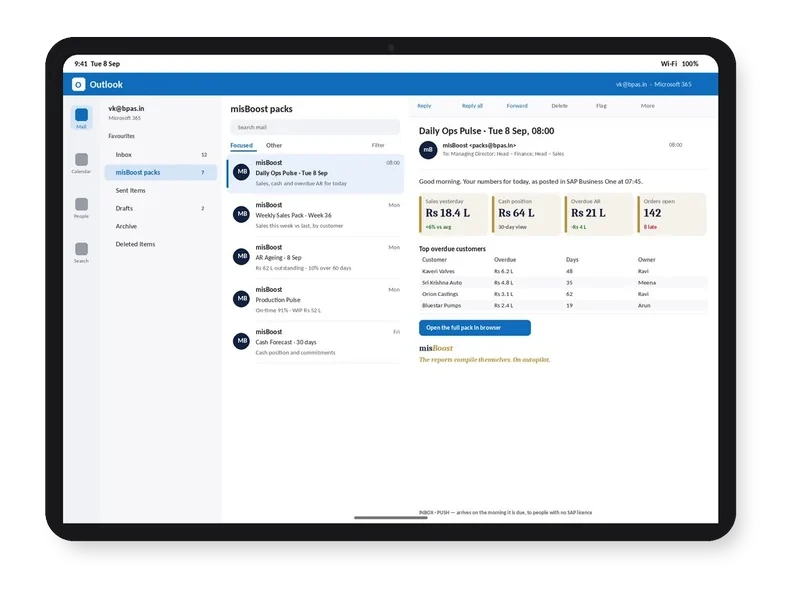
misBoost pack arriving in Outlook on a tablet, headline numbers in the email itself
Email
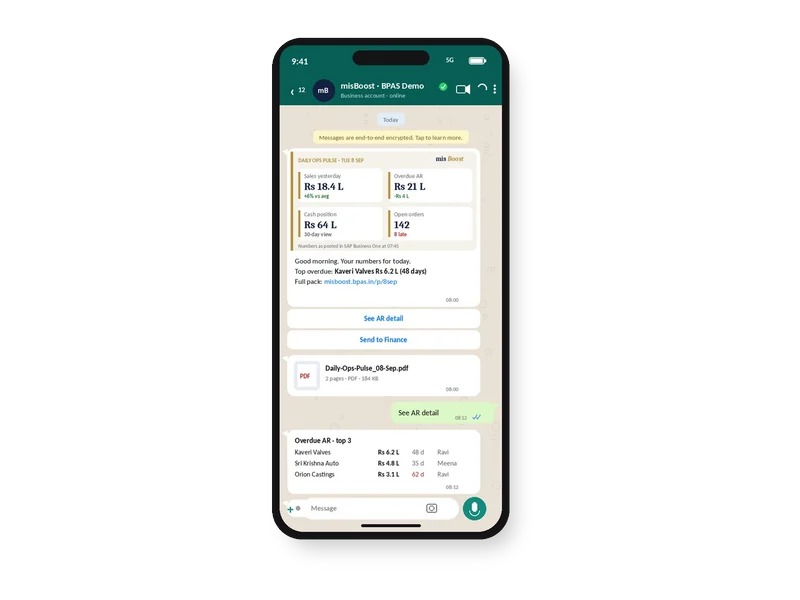
misBoost pack on WhatsApp on a phone, headline numbers with the PDF attached
WhatsApp
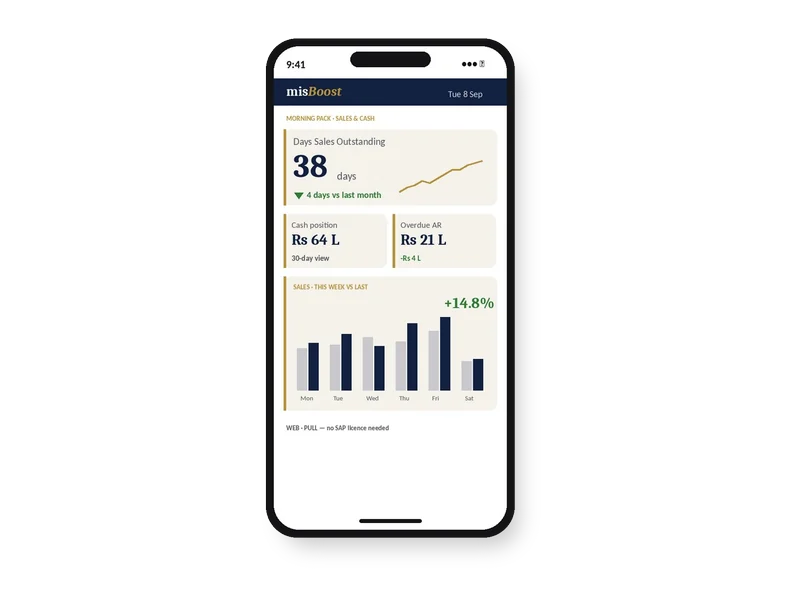
misBoost KPIs and dashboards on a phone, no app needed
Mobile
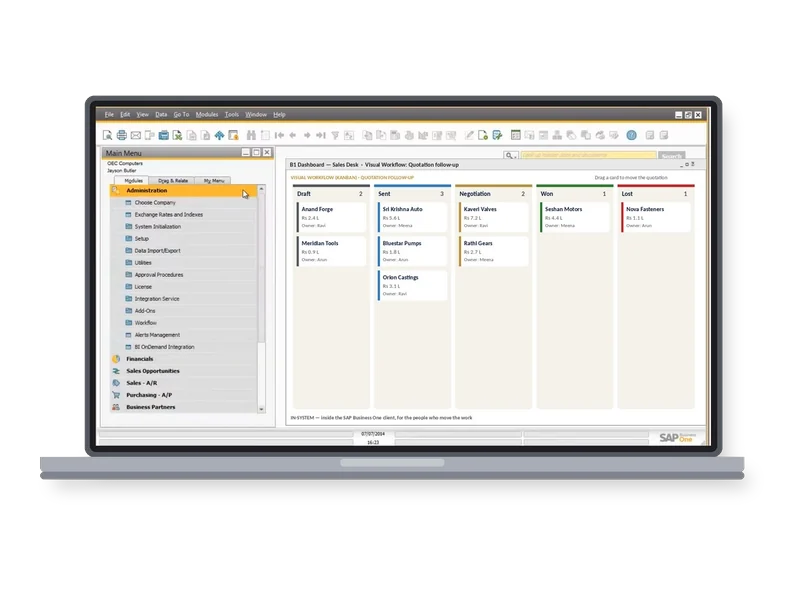
misBoost workflow board inside the SAP Business One client on a laptop
Inside SAP
Explore misBoost →
235 boosters in ten domains Sent on autopilot
proBoost · For the people who use it daily

Four libraries. One for each SAP Business One set-up.

Your set-up decides the library. Your plant decides the boosters. Choose what you run to see its library.

SAP Business One

proBoost

313boosters to choose from

The core library for SAP Business One on its own: sales, purchasing, inventory, finance, banking and business partners.

313 proBoost core

Explore proBoost →

313 boosters, by type

313boosters
  • Function buttons57
  • Macros and automation22
  • Validations67
  • Dashboards40
  • KPIs47
  • Visual Workflow36
  • Print and send44

Already built313 to choose from

SAP Business One + Beas Manufacturing

mfgBoost

409boosters to choose from

Everything in proBoost, plus 96 manufacturing boosters for Beas plants: planning, subcontracting, quality and the shop floor.

313 proBoost core96 manufacturing409

Explore mfgBoost →

409 boosters, by type

409boosters
  • Function buttons70
  • Macros and automation36
  • Validations78
  • Dashboards59
  • KPIs65
  • Visual Workflow44
  • Print and send57

Already built409 to choose from

SAP Business One + Produmex WMS

wmsBoost

409boosters to choose from

Everything in proBoost, plus 96 warehousing boosters for Produmex WMS: put-away, picking, cycle counting, replenishment and shipping.

313 proBoost core96 warehousing409

Explore wmsBoost →

409 boosters, by type

409boosters
  • Function buttons73
  • Macros and automation38
  • Validations79
  • Dashboards59
  • KPIs61
  • Visual Workflow43
  • Print and send56

Already built409 to choose from

SAP Business One + Beas + Produmex WMS

scmBoost

529boosters to choose from

Everything in proBoost, the manufacturing and the warehousing boosters, plus 24 cross-domain boosters that tie production, stock and dispatch together.

313 proBoost core96 manufacturing96 warehousing24 cross-domain529

Explore scmBoost →

529 boosters, by type

529boosters
  • Function buttons89
  • Macros and automation57
  • Validations91
  • Dashboards84
  • KPIs83
  • Visual Workflow54
  • Print and send71

Already built529 to choose from

How the counts add up

Every library carries the proBoost core. Each adds the depth you run.

These are the boosters you choose from.

  • proBoostSAP Business One313313 proBoost core boosters
  • mfgBoostSAP Business One + Beas Manufacturing409313 proBoost core + 96 manufacturing = 409
  • wmsBoostSAP Business One + Produmex WMS409313 proBoost core + 96 warehousing = 409
  • scmBoostSAP Business One + Beas + Produmex WMS529313 proBoost core + 96 manufacturing + 96 warehousing + 24 cross-domain = 529
What a booster can be

Seven types of booster. In every proBoost library.

Every booster is one of seven types. Your choice can be all of one type, or any mix.

  • Function buttons

    One click on the screen you are already on, instead of four screens and a phone call.

    In the four libraries: proBoost 57, mfgBoost 70, wmsBoost 73, scmBoost 89.
  • Macros and automation

    Routine fields fill themselves in as a document is created, the same way every time.

    In the four libraries: proBoost 22, mfgBoost 36, wmsBoost 38, scmBoost 57.
  • Validations

    Bad data stopped at the point of entry, not found at month end.

    In the four libraries: proBoost 67, mfgBoost 78, wmsBoost 79, scmBoost 91.
  • Dashboards

    Live views on your own SAP Business One data, so the number on screen is the number now.

    In the four libraries: proBoost 40, mfgBoost 59, wmsBoost 59, scmBoost 84.
  • KPIs

    One tile, one number, one owner, red or green at a glance.

    In the four libraries: proBoost 47, mfgBoost 65, wmsBoost 61, scmBoost 83.
  • Visual Workflow

    Work you can watch moving, instead of a status field nobody updates.

    In the four libraries: proBoost 36, mfgBoost 44, wmsBoost 43, scmBoost 54.
  • Print and send

    Documents out of the door, branded, without manual effort.

    In the four libraries: proBoost 44, mfgBoost 57, wmsBoost 56, scmBoost 71.
  • 4 × 7

    The same seven types in all four proBoost libraries. Any mix of them.

Where they fit

On the smartStep ladder, and beside the ViSA services.

Step 06 · See

misBoost is step 06 of smartStep: daily numbers for the people who decide.

The ladder runs from a maturity check to AI. misBoost is the step where the numbers reach the people who decide, without anyone preparing them.

See the smartStep ladder →
BPAS ViSA

BPAS Custom Libraries sit alongside the seven ViSA services.

Each ViSA service is a complete engagement on its own. misBoost and proBoost are libraries you can take with them, or on their own.

The seven ViSA services: gapScan, procEnact, toolDeploy, devCenter, maxValue, costAbsorb and aiEnable; misBoost and proBoost sit beside them.

See the seven ViSA services →

In a BPAS gap review you get a short list of what is costing your plant dates and money today, and the order to fix it in.

Learn with BPAS

Plan your next step. A little every month.

Two newsletters and a webinar series, each written for a different person in the plant.

  • Newsletter · For owners and CXOs

    smartStep CXO Compass

    Navigating Towards Industry 5.0

    A five-minute monthly briefing: one step of the smartStep ladder each month, explained in business terms, with one practical thing to do before the next issue.

    How often
    Second Wednesday of every month
    Format
    A five-minute read, by invitation
    Request an invitation →

    For SME manufacturers.

  • Newsletter · For your power users

    For the internal champions and power users

    One SAP Business One practice, one Boyum practice, a ten-minute quick win and stories from factories like yours, for the people who keep the system healthy.

    How often
    Third Wednesday of every month
    Format
    Practices you can apply in ten minutes
    Subscribe →
  • Webinar series · For owners, CXOs and plant heads

    smartStep webinars

    Industry 5.0 is for every factory

    Twelve monthly sessions that take SME manufacturers from Excel to Intelligence on SAP Business One and the Boyum Solutions, one step of the ladder at a time. Every session stands on its own.

    How often
    Third Thursday of every month
    Format
    12 sessions of 40 minutes: a 30-minute session and 10 minutes of live Q&A · free, online
    See the 12 sessions →
Sister company of BPAS

No ERP yet? Start with MEIS

For SME manufacturers putting in their first ERP, MEIS implements SAP Business One.

Live in weeks, not months.

Visit meis.in (opens in a new tab)
  1. Still on spreadsheetsNo ERP yet
  2. MEIS implements SAP Business OneYour manufacturing ERP, live
  3. Add the Boyum Solutions
    • Beas Manufacturing
    • B1UP
    • B1 Print & Delivery
    • Produmex WMS
    • Produmex Scan
    • Perfion PIM
  4. Choose your ViSA servicesSeven services, from gapScan to aiEnable
Who builds the libraries

BPAS. Exclusive Boyum Practice. India’s No.1 Customer-referred Boyum IT Partner.

Boyum APJ Partner Excellence Award 2024

We don’t just sell; we make customers excel!™

Why BPAS →