

 Microsoft AppSource-approved App
Visual Advanced Production Scheduler for Business Central
VAPS (Visual Advanced Production Scheduler) is a drag-and-drop production schedule inside Business Central that plans machine centers within their capacity. BPAS works with SME manufacturers across India.
One schedule, four questions answered
-
01 · Plan Can the machines take this load? Finite capacity scheduling schedules with limited capacities, and any change recalculates the entire schedule.
-
02 · Try What if we change the plan? A simulation is a copy of the production schedule; Business Central does not change while you try things.
-
03 · Publish When does Business Central change? Publishing a simulation updates Business Central, and the simulation becomes the new production schedule.
-
04 · Promise Will the sales order ship on time? The Sales Order View alerts when a production order finishes after the requested delivery date.
- Plan
- Try
- Publish
- Promise
Three Business Central areas, extended by VAPS
If your production schedule lives in a spreadsheet next to Business Central, you do not need to replace your ERP. VAPS works with the production orders, routings and machine centers your team already keeps in Business Central. Each card shows what Business Central does on its own and what VAPS adds.
-
Business Central Area 02
VAPS Extension for Business Central Sales
- Business Central on its own
- Sales orders are used for partial shipments and drop shipments, and order promising gives customers delivery dates by calculating either the capable-to-promise date or the available-to-promise date.
- VAPS adds
- The Sales Order View shows the sales orders that have production orders against them and gives a visual alert when a production order finishes after the requested delivery date; the optional sales order integration shifts the expected shipment date when production is delayed.
-
Business Central Area 07
VAPS Extension for Business Central Planning
- Business Central on its own
- Supply planning balances demand and supply for items that are purchased, assembled, manufactured or transferred. On the Planning Worksheet, MPS and MRP runs suggest purchase, transfer, assembly and production orders, and the planning calculation results in suggestions called Action Messages.
- VAPS adds
- VAPS takes the shorter-term finite capacity scheduling, while MRP and the planning worksheet keep the mid-term demand planning; the planning worksheet shows the orders VAPS schedules and warns before action messages might change them.
-
Business Central Area 09
VAPS Extension for Business Central Manufacturing
- Business Central on its own
- Manufacturing helps plan, schedule, execute and analyse production: routings define operations, and work centers and machine centers model capacity and costs. Manufacturing needs the Premium experience.
- VAPS adds
- Finite capacity scheduling of production orders on work centers and machine centers, drag and drop in the Capacity View, simulations that change Business Central only when published, and shop floor actuals in the schedule.
What VAPS does with your production schedule, and what it returns
Open any feature to see how it works in Business Central and what it means for dates, capacity and cash. Each one gets its own guide, with core concepts, best practices and a vocabulary.
Finite Capacity Scheduling
Operational Reality (Capabilities)
Finite capacity scheduling means scheduling with limited capacities: VAPS makes sure a machine center is never overloaded, except a work center or machine center that schedules with infinite capacity. Any change in the schedule leads to an automatic recalculation of the entire schedule, for serial and parallel routings.
- Machine centers scheduled within their capacity
- Automatic recalculation of the entire schedule
- Serial and parallel routings
Executive ROI Value
Dates on the schedule respect the limited capacity of the machine centers.
- Promises the floor can keep
- Overloads seen before they happen
Operational Reality (Capabilities)
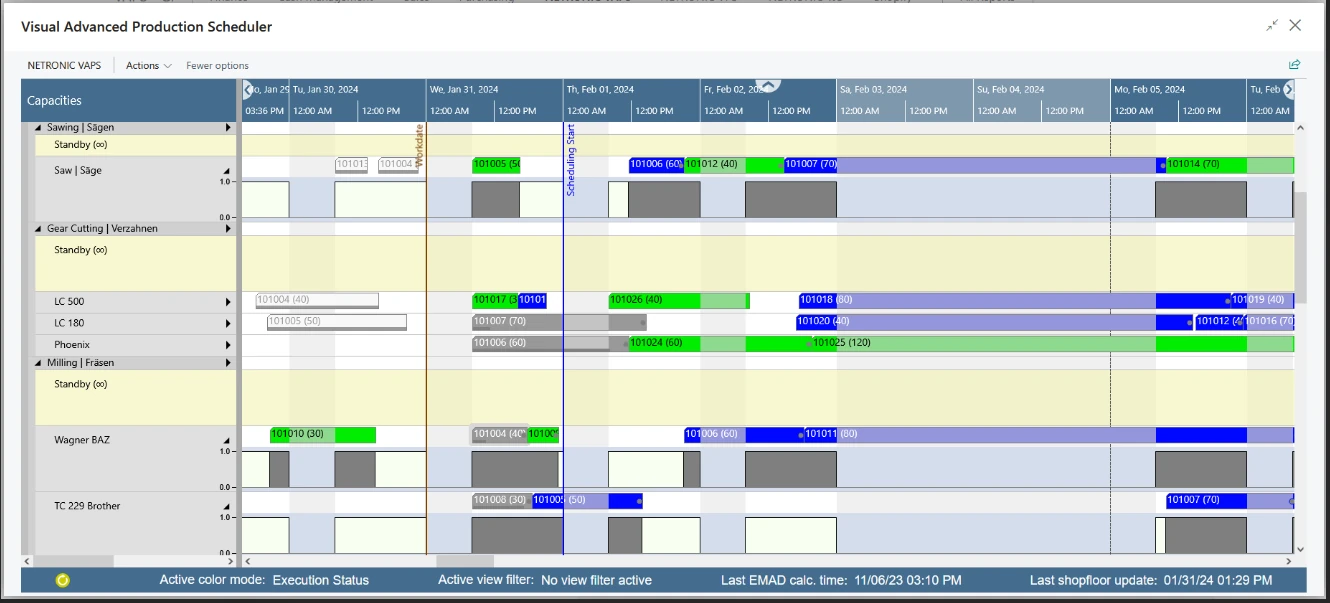
VAPS shows the schedule in three views: the Capacity View, the read-only Production Order View and the read-only Sales Order View. The Capacity View shows the capacity loads of work centers and machine centers, grouped by work center groups, and is the view in which operations are moved; the Production Order View groups production orders by status. In the World View, a small window below the plan, dragging its rectangle moves to another part of a large plan.
- Capacity View for work and machine centers
- Production Order View by status
- World View for large plans
Executive ROI Value
Planners, production heads and sales see the same schedule from the angle each one needs.
- One schedule, three angles
- Large plans easy to move around
Operational Reality (Capabilities)
The histogram shows work centers and their machine centers: the outer line shows the maximum available capacity per selected aggregation, grey shows the capacity used, and red shows where the schedule needs more capacity than is available.
- Maximum available capacity as a line
- Capacity used in grey
- Shortfalls of capacity in red
Executive ROI Value
Periods that need more capacity than the plant has stand out in red.
- Bottleneck periods visible
- Capacity discussions based on one picture
Operational Reality (Capabilities)
Operations are moved with drag and drop: a horizontal move changes the timing and a vertical move changes the machine center, while a phantom bar marks the original position during the move. The routing structure is kept, except for pinned operations: predecessors are never affected, and moving an operation later pushes its successors. Started operations are moved with Move Pinned/Started Operation, and Change Duration changes the duration of an operation.
- Horizontal for time, vertical for machine center
- Routing structure kept
- Move Pinned/Started Operation and Change Duration
Executive ROI Value
Planners reshape the schedule directly on the screen, and the routing stays intact.
- Changes made where the problem is seen
- Successors follow automatically
Scheduling Instruments
Operational Reality (Capabilities)
Production orders not yet scheduled in VAPS wait on a standby resource, and Add all schedules them in one go. Released production orders come first, then firm planned, then planned; within each group the lowest buffer time, the required due date minus the end date of the last operation, comes first. Add all incl. alternatives, Add all from selected production orders and Add all from selected sales orders narrow the run, and unhandled orders can be moved back to standby in one go.
- Standby resource for orders not yet scheduled
- Order of scheduling by status and buffer time
- Variants with alternatives or selected orders
Executive ROI Value
Many waiting orders join the schedule in one action, by the same rule every time.
- One action for many orders
- A rule the whole team can follow
Operational Reality (Capabilities)
Fill idle times tries to move all operations forward to avoid idle times on machine centers; production orders already scheduled are not pushed out, only squeezed in, with the same priority rules as Add all. Tighten queues minimises the gaps between operations on a resource without changing their order, and operations before the scheduling start are not affected. Both run for one resource or for all of them.
- Operations moved forward into idle time
- Gaps closed without changing the order
- One resource or all resources
Executive ROI Value
Machine time that would stand idle is used for work that is waiting.
- Less idle time on machine centers
- Existing sequence kept
Operational Reality (Capabilities)
Schedule successors schedules all successors of the marked operation and gives that production order top priority from that point; it does not change the sequence on the machine where it is triggered and does not violate the routing structure. Recalculate current schedule resolves conflicts due to overloads or link constraints, so the schedule has no sequence conflicts or overloads, without moving operations earlier.
- Successors scheduled from one operation
- Overloads and link conflicts resolved
- Operations not moved earlier
Executive ROI Value
After shop floor updates or capacity changes, the schedule is made consistent again in one action.
- One order given top priority
- A clean schedule after changes
Operational Reality (Capabilities)
An alternate routing set lists the work centers and machine centers that can do the same job, each with a setup multiplier and a runtime multiplier that apply when an operation is moved to it. While an operation with an alternate routing set is dragged, the alternative centers are highlighted, and Apply alternative routing moves an order from standby to a center so that it finishes as early as possible without changing the rest of the schedule.
- Alternative work and machine centers per operation
- Setup and runtime multipliers
- Apply alternative routing
Executive ROI Value
Overflow work can go to another machine that can do the job, with that machine’s own setup and run times.
- Load spread across capable machines
- Realistic times on the alternative
Material, Setups and Dates
Operational Reality (Capabilities)
VAPS calculates the earliest material availability date (EMAD) for each production order line from day-by-day component demand and supply, and takes the latest EMAD of all component lines as the EMAD of the production order. The allocation is kept inside VAPS, not as Business Central reservations. The Availability View shows production orders in green where the material is available and in red where they are scheduled before the required material is available.
- EMAD per production order line
- Allocation inside VAPS
- Availability View in green and red
Executive ROI Value
The schedule shows which production orders would start before their material is available.
- Material shortages visible on the schedule
- Fewer starts held up by missing components
Operational Reality (Capabilities)
Lightweight SDST (Sequence Dependent Setup Times) groups operations on specific machines to minimise overall setup times. Setup times depend on item attributes, and SDST configurations are linked to work centers or machine centers and applied in a simulation.
- Setup times by item attributes
- Linked to work or machine centers
- Applied in a simulation
Executive ROI Value
Operations that share a setup run together, so less machine time goes to setups.
- Shorter total setup time
- Sequences planned with setups in view
Operational Reality (Capabilities)
The Earliest Start Date on the production order, the production order line and the production order routing line limits automatic scheduling, while a planner can still drag an operation earlier by hand. Earliest Start Date Calculation can work it out from the Required Due Date, with a simple date formula or the weighted production order time demand, at production order level; line and routing line values are filled in manually.
- Earliest Start Date on three levels
- Calculated from the Required Due Date
- Manual moves still possible
Executive ROI Value
Work starts when it is needed, so material and machine time are not tied up too early.
- Less work started too early
- Due dates drive the start
Simulations
Operational Reality (Capabilities)
A simulation takes a snapshot of the production schedule and saves it as a copy; there can be as many as needed, and every change in a simulation is saved in the simulation table. As long as a simulation is not published, the Business Central database does not change. Publishing updates the Business Central database, and the simulation becomes the new production schedule. A production order with warehouse activity lines cannot be changed, and its simulation cannot be published.
- As many simulations as needed
- Business Central unchanged until publish
- Publish makes it the production schedule
Executive ROI Value
A planner can try a rush order on a copy and publish only the version that works.
- What-if planning without touching live data
- Only the chosen plan reaches Business Central
Operational Reality (Capabilities)
Compare simulations measures simulations on the Simulations KPI page: number of production orders, number of operations on standby, number of late production orders, total delay in hours, total setup time, total buffer time and number of production orders without a required due date. A simulation is marked outdated when production orders are added, deleted or changed in Business Central.
- Simulations KPI page
- Late production orders and total delay
- Total setup time and buffer time
Executive ROI Value
The choice between two plans rests on late orders, delay and setup time.
- Plans compared on the same measures
- Decisions the team can explain
Business Central Integration
Operational Reality (Capabilities)
VAPS is responsible for the shorter-term finite capacity scheduling, while MRP and the planning worksheet are responsible for the mid-term demand planning. A frozen period and the production order status decide which production orders VAPS is responsible for; the planning worksheet shows the orders VAPS schedules and warns that carrying out action messages might change them. The MRP View colour mode shows the split on the schedule.
- Frozen period and production order status
- VAPS orders shown on the planning worksheet
- Warning before action messages
Executive ROI Value
MRP and the finite schedule each keep their own horizon, with a warning before one changes the other’s orders.
- A clear line between planning and scheduling
- Fewer scheduled orders changed by accident
Operational Reality (Capabilities)
The optional sales order integration keeps the reservations between production orders and sales orders when production is delayed, shifts the expected shipment date of the sales order automatically and lists the changes on the Sales Line Changes page. When sales dates are postponed, it can update the due date of the connected production order; when they are moved earlier, production orders are not rescheduled automatically. The Sales Order View gives a visual alert when a production order finishes after the requested delivery date of the sales order.
- Reservations kept when production is delayed
- Expected shipment dates shifted
- Late-delivery alert in the Sales Order View
Executive ROI Value
Sales sees the delivery dates that production can meet.
- Fewer surprise late deliveries
- Customer dates based on the schedule
Operational Reality (Capabilities)
VAPS lets planners see the impact on their schedule when unexpected incidents happen on the shop floor: recent capacity ledger entries are loaded into the simulation, and update according to actuals writes them into the production order routing lines. On a released production order, a progress bar under the routing line shows finished and in-progress work; the Execution Status View colour mode shows the state of each operation, and the Shop Floor Status View highlights deviations between the actuals and the schedule.
- Capacity ledger entries in the simulation
- Progress bar on released production orders
- Execution Status View and Shop Floor Status View
Executive ROI Value
The schedule starts from what actually happened on the floor, not only from the plan.
- Delays visible once actuals are loaded
- Replanning from the real position
VAPS licence. In Business Central online, VAPS is bought on Microsoft AppSource as a monthly or yearly subscription, or through a partner, and each licence is assigned to an individual user. A licence on its own gives no rights inside Business Central: every user who works with VAPS also needs the NETRONIC VAPS permission set. For Business Central on-premises, the VAPS module must be part of the Business Central licence. VAPS is available for Business Central online and on-premises.
VAPS works inside your Business Central
VAPS schedules the production orders, routings, work centers and machine centers already in Business Central, and Business Central does not change until a simulation is published.
- ◆Exclusive Boyum Practice. India's No.1 Customer-referred Boyum IT Partner.
- ★Boyum APJ Partner Excellence Award 2024
Swipe sideways to see the full diagram
-
01
Microsoft AppSource-approved
VAPS is a Microsoft AppSource-approved Boyum IT app, available for Business Central online and on-premises.
-
02
Business Central unchanged until you publish
As long as a simulation is not published, the Business Central database does not change.
-
03
Your own manufacturing data
VAPS works with the Business Central production orders, routings, work centers, machine centers and shop calendars.
-
04
Inside the Business Central client
VAPS runs inside Business Central, under its own NETRONIC VAPS menu ribbon item.
From a spreadsheet schedule to VAPS in Business Central
Three steps from the first conversation to VAPS running in your Business Central.
-
01Step 01
Gap Review on Your Plant
In a BPAS gap review you get a short list of what is costing your plant dates and money today, and the order to fix it in.
You get Your fix list, in order
-
02Step 02
VAPS Deployment on a Test Copy
VAPS runs on a test copy of your Business Central company with your own production orders, routings and machine centers, before it touches live data.
You get VAPS proven on your own data
-
03Step 03
Go-Live and Ongoing Support
Your planners work in the VAPS schedule from go-live, and BPAS stays with your plant after it.
You get Your production schedule running in VAPS
One VAPS idea every week
Every week BPAS posts a short carousel for SME manufacturers on planning production in Business Central with VAPS. Swipe through this week's here, or follow BPAS to get the next one in your feed.
In every carousel
- A planning problem 01
- Where standard Business Central stops 02
- How VAPS handles it 03
- Illustrative ₹ impact for an Indian SME plant 04
This week's carousel appears here.
What's new in VAPS
The latest VAPS releases in plain words: what changed in each version.
3 releases, newest first
All release updates →- VAPS
VAPS 1.20: automatic notification of warehouse activity lines and shop floor feedback
VAPS notifies planners automatically of warehouse activity lines and shop floor feedback, and can show the Required Due Date and Earliest Start Date lines in the Capacity view when hovering with the mouse.
Read the update → - VAPS
VAPS 1.19: reorder the Capacity view by drag and drop
The table in the Capacity view can be reordered by drag and drop, a new cue on the NETRONIC VAPS Role Center shows the number of warehouse activity lines, and new warning messages flag inconsistent data when simulations are created or opened.
Read the update → - VAPS
VAPS 1.18: setup times that depend on the sequence of operations
Setup times can change with the sequence in which operations are executed (lightweight SDST), operations can be moved with a custom sort order, and EMAD can use different pre-defined location codes.
Read the update →
See your own schedule in VAPS
Bring the production orders your planners find hardest to schedule. We show you the same orders in the VAPS Capacity View and in a simulation, before you commit to anything.