

 Microsoft Dynamics 365 Business Central
Boyum IT Apps for Microsoft Dynamics 365 Business Central
For SME manufacturers already running Business Central, BPAS adds the Boyum IT apps that extend it: VAPS, VPS, VJS, FORNAV and Perfion PIM.
- Microsoft AppSource-approved for Business Central
- Works with the Business Central you already run
- 5Microsoft AppSource-approved Boyum IT apps for Business Central
- 16Business Central areas, explained one by one
- 3in-depth guides behind every area
You run Business Central. We extend it with Boyum IT.
Business Central is a business management solution for small and mid-sized organisations that automates and streamlines business processes and helps you manage your business.
BPAS works with SME manufacturers, and only on the Boyum IT apps that extend Business Central where the standard system stops.
Exclusive Boyum Practice. India's No.1 Customer-referred Boyum IT Partner.
Why BPAS→Every Business Central area, and where Boyum extends it
Sixteen areas of Business Central, and the Boyum IT app that extends them where one does.
Chart of Accounts, Budgets and Bank Reconciliation
In standard Business Central
- Business Central includes a standard chart of accounts and standard posting groups that assign default general ledger posting accounts to customers, vendors and items.
- Dimensions categorise entries, for example by project or department, for analysis without a complicated chart of accounts.
- G/L budgets can be created for any period, with up to four dimensions, to compare budgeted and actual amounts.
- Bank accounts are reconciled on the Bank Acc. Reconciliation page or the Payment Reconciliation Journal, with statement import and automatic matching suggestions.
- Chart of accounts and posting groups
- G/L budgets with dimensions
- Bank Acc. Reconciliation
Extend with Boyum IT
- Reminders, finance charge memos and customer statements as FORNAV reports, with the number of copies, watermark and language set per report.
Sales Quotes, Orders, Invoices and Returns
In standard Business Central
- A sales quote offers products on negotiable terms and can be converted to a sales order or sales invoice when the sale is agreed.
- Sales orders are used for partial shipments and drop shipments, and support order promising with capable-to-promise or available-to-promise dates.
- Blanket sales orders cover large quantities delivered over time, and several shipments can be combined on one invoice.
- Posted, unpaid invoices can be corrected or cancelled; once paid, a sales credit memo or sales return order reverses the sale.
- Sales quotes to orders and invoices
- Drop shipments and partial shipments
- Capable-to-promise order promising dates
Extend with Boyum IT
- Order confirmations, sales quotes, sales invoices, credit memos and sales shipments as FORNAV reports, sent straight to a printer with Direct Print.
- The VAPS Sales Order View shows the sales orders that have production orders against them, and flags a production order that will finish after the requested delivery date.
Purchase Quotes, Orders, Invoices and Returns
In standard Business Central
- Purchase invoices and purchase orders record purchase costs, track accounts payable and, where inventory is controlled, update inventory levels.
- Purchase orders are needed for partial receipts and drop shipments.
- A purchase quote reflects a request for quote from a vendor and can be converted to a purchase order.
- Blanket purchase orders cover large quantities delivered over time, and several receipts from one vendor can be combined on one invoice.
- With the OCR service, PDF vendor invoices can become purchase invoices through a workflow.
- Purchase quotes to purchase orders
- Blanket Purchase Orders
- Incoming documents with OCR service
Extend with Boyum IT
- Purchase orders, purchase quotes, purchase invoices, credit memos, purchase receipts and return documents as FORNAV reports.
Items, Item Tracking, Transfers and Inventory Costs
In standard Business Central
- Each physical product is set up as an item card of the Inventory type; items offered but not stocked can be catalog items.
- Item categories and attributes help with searching and sorting.
- Inventory can be counted with the Physical Inventory Order and Physical Inventory Recording pages or with journals, and transferred between locations with transfer orders.
- Item tracking covers serial, lot and package numbers.
- Inventory costs post automatically to the general ledger, and cost adjustment assigns item costs to the related outbound sales transactions.
- Item tracking: serial, lot, package
- Transfer orders between locations
- Cost adjustment and G/L reconciliation
Bins, Picks, Shipments and Directed Put-away and Pick
In standard Business Central
- Warehouse features add bins, warehouse shipments, inventory picks and the movement worksheet, and can be combined as complexity grows.
- Basic flows work order by order with Inventory Put-away and Inventory Picks documents; advanced flows consolidate several orders through Warehouse Receipt, Warehouse Shipment, Pick Worksheet and Warehouse Picks.
- Advanced warehousing adds zones, bin ranking and warehouse classes; directed put-away and pick, the most advanced level, adds bin types and bin capacity and weight restrictions.
- Item-tracked items can be picked by expiration date (FEFO).
- Bins, zones and bin ranking
- Directed put-away and pick
- FEFO picking for item-tracked items
Depreciation Books, Maintenance, Insurance and Disposal
In standard Business Central
- Each fixed asset has a card, and assets can be grouped by class, department or location.
- One or more depreciation books per asset track depreciation and other transactions, for example one for tax reporting and another for internal reporting.
- Business Central supports eight depreciation methods, including Straight-Line, Declining-Balance 1, Declining-Balance 2 and User-defined depreciation.
- Maintenance costs, the next service date and insurance policies can be recorded, and assets can be revalued, transferred, split, combined or disposed of, including partial disposals.
- Multiple depreciation books per asset
- Eight depreciation methods
- Maintenance and insurance tracking
Supply Planning with MPS, MRP and Worksheets
In standard Business Central
- Supply planning helps balance demand and supply for items that are purchased, assembled, manufactured or transferred between locations, covering independent demand from sales and forecasts and dependent demand for components.
- On the Planning Worksheet, master production schedule (MPS) and material requirements planning (MRP) runs suggest purchase, transfer, assembly and production orders as Action Messages.
- Demand forecasts can be created, and the Order Planning page supports manual planning one production BOM level at a time.
- MPS and MRP on Planning Worksheet
- Requisition Worksheet for wholesale
- Demand forecasts and Order Planning
Extend with Boyum IT
- With the MRP integration, production orders that VAPS is responsible for (by frozen period and production order status) stay untouched by the planning worksheet, and a warning appears before action messages change VAPS-scheduled orders.
Assembly BOMs, Assemble to Order and Stock
In standard Business Central
- Assembly combines components into products without using manufacturing features, and works with sales, planning, reservations and warehousing.
- An assembly item is a sellable item with an assembly BOM.
- Assembly orders are internal orders that post both output and consumption.
- Items can be assembled to stock or assembled to order: entering an assemble-to-order item on a sales order line creates a linked assembly order, so the item can be customised and delivery dates follow component availability.
- Assembly BOMs
- Assemble to order and assemble to stock
- Assemble-to-order from sales orders
Production BOMs, Routings, Capacity and Production Orders
In standard Business Central
- Manufacturing in Business Central covers planning, scheduling, executing and analysing production.
- Production BOMs define components, Routings define operations, and Work Centers and Machine Centers model capacity and costs.
- Production orders coordinate material consumption, operation time, output and finished goods through to completion.
- Consumption, output, scrap and operation time are recorded in production journals, or partly automated through flushing methods and warehouse activities.
- All or selected operations in a production order can be outsourced to a subcontractor.
- Manufacturing needs the Premium experience.
- Production BOMs and Routings
- Work Centers and Machine Centers
- Production journals and flushing methods
Extend with Boyum IT
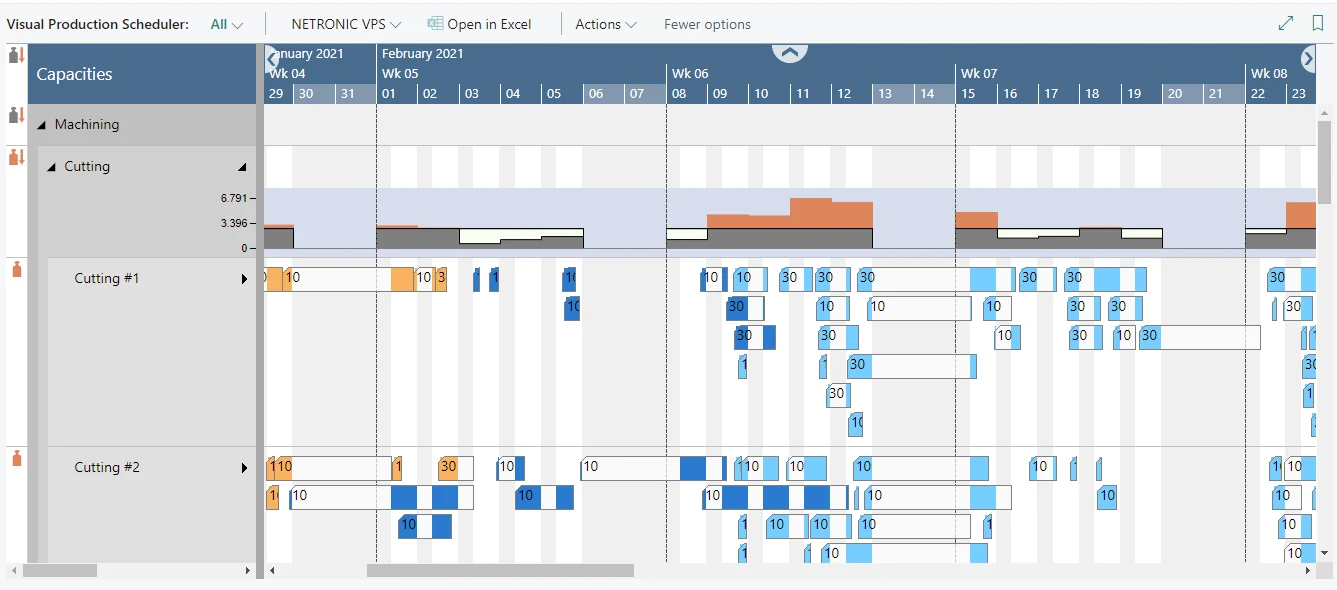
- VAPS schedules production orders against the limited capacity of each work center and machine center, and keeps changes in a simulation until you publish them to Business Central.
- VPS shows each operation of a production order as a bar in a Gantt chart; operations can be dragged to another date, or in the Capacity View to a different work or machine center, and the changes saved to Business Central.
Projects: Planning, Budgets, Time Sheets and Invoicing
In standard Business Central
- Project management in Business Central supports project accounting, from creating projects and scheduling resources to providing budget information and monitoring progress.
- Machine and employee hours on projects are tracked with time sheets.
- Actual item and resource usage can be compared with budgeted usage.
- Work in process (WIP) is monitored so that financial statements stay correct even when project expenses are posted before the project is invoiced.
- The customer is invoiced when the project is finished or according to an invoicing schedule.
- Project tasks and planning lines
- Time sheets for projects
- Project budgets and WIP monitoring
Extend with Boyum IT
- Each job, job task and job planning line as a bar in the VJS Job View; in creation mode, dragging a resource from the list to the chart creates a new job planning line.
Resources, Resource Groups, Capacity and Time Sheets
In standard Business Central
- Each resource has a default amount per hour, and its price and cost amounts apply when it is used or sold in a project.
- Resources can be combined in resource groups, whose capacities and budgets accumulate from the individual resources.
- Capacity represents a resource's available time for a period on the work calendar.
- Alternate costs, such as an overtime rate, and alternate prices can be set up for each resource.
- Time sheets record resource time in weekly increments of seven days.
- Resource groups and resource capacity
- Alternate resource costs and prices
- Time sheets for resources
Extend with Boyum IT
- The VJS Resource View shows resource groups and their resources, with a capacity curve that shows free and exceeded capacity and marks an overload in red.
Service Orders, Service Items and Service Contracts
In standard Business Central
- Service Management provides tools for repair shops and field service operations.
- It covers scheduling service calls, managing service orders, tracking repair parts and supplies, assigning service personnel based on skill and availability, and providing service estimates and service invoices.
- Service items record the skills a service requires and troubleshooting guidance.
- Service contracts can be created manually or from a service contract quote.
- Service Management needs the Premium experience.
- Service orders and service items
- Service contracts and contract quotes
- Service personnel by skill and availability
Extend with Boyum IT
- Service orders, service quotes, service invoices, service credit memos, service shipments, service contracts and service contract quotes as FORNAV reports.
Contacts, Interactions, Segments, Opportunities and Campaigns
In standard Business Central
- Relationship management records the contacts a company does business with, such as customers, prospective customers, vendors, lawyers and consultants, as Person or Company type.
- Interactions record communications with contacts by email, letter, telephone and meetings.
- Segments select groups of contacts by criteria such as industry.
- Sales opportunities follow sales cycles and stages, with estimates of sales value and chance of success.
- Marketing campaigns support plans to identify, attract and retain customers.
- Contacts and interactions
- Segments and marketing campaigns
- Sales opportunities and sales cycles
Employee Records, Qualifications and Absence Registration
In standard Business Central
- Human Resources in Business Central keeps detailed employee records, including employment contracts, confidential information, qualifications and employee contacts.
- New employees are registered on the Employee Card page, manually or from templates that contain predefined information.
- Union membership, relatives and contracts can also be recorded for each employee.
- Employee absences are registered and can be analysed with absence statistics by various filters.
- Codes associated with an employee allow information to be filtered for specific employees.
- Employee Card and employee templates
- Qualifications, contracts and confidential information
- Employee absence registration and statistics
India Local Functionality: GST, TDS and TCS
In standard Business Central
- The Indian version of Business Central includes Goods and Services Tax (GST), Tax Deducted at Source (TDS) and Tax Collected at Source (TCS) features.
- Their setups come in two kinds: automatic setups pre-configured through the Tax Engine, and manual setups made by business users.
- India features also include GST E-Invoice, GST E-Way Bill, GST Reconciliation, GST Settlement, and TDS and TCS thresholds and payment to authority.
- The India localisation is available for Business Central online.
- GST E-Invoice and E-Way Bill
- TDS and TCS thresholds
- Tax Engine automatic setups
Analytics, Business Intelligence and Reporting Tools
In standard Business Central
- Business Central comes with more than 300 built-in reports that can be used in Excel, printed or saved as a file.
- Financial Reports analyse general ledger (G/L) account figures and compare general ledger entries with budget entries.
- Built-in Power BI apps cover areas including Finance, Inventory, Manufacturing, Projects, Purchasing and Sales.
- Data analysis groups, filters and pivots data on list pages, and Open in Excel opens list pages in Excel.
- Business Central online is already set up to integrate with Power BI.
- More than 300 built-in reports
- Financial Reports and KPIs
- Power BI apps and Open in Excel
Extend with Boyum IT
- FORNAV Direct Print sends print jobs from Business Central straight to a printer without user interaction, in the cloud or on-premises, and the FORNAV File Service works with local files from Business Central running in the cloud.
BPAS works only with SME manufacturing companies, delivering the Boyum IT apps for Business Central: VAPS, VPS, VJS, FORNAV and Perfion PIM. An SME manufacturer putting in Business Central as its first ERP? Our sister company MEIS implements it
Browse all 16 area guidesNo ERP yet? Meet MEIS
For SME manufacturers putting in their first ERP, MEIS implements SAP Business One or Business Central.
Live in weeks, not months.
Visit meis.in ↗ (opens in a new tab)- Choose your ERPSAP Business One or Business Central
- MEIS implements itYour manufacturing ERP, live
- Add the Boyum solutionsThe ones on this page, for your ERP