


SAP Certified Boyum Add-onProdumex WMS for SAP Business One
Reception, put-away, picking, packing, shipping and cycle counts on the Produmex Mobile Client, with the information transferred to the SAP Business One your team already uses. BPAS works with SME manufacturers across India.
One order, four questions answered
-
01 · Receive Has it arrived? Reception on the Mobile Client books the Goods Receipt PO in SAP Business One.
-
02 · Store Is the stock right? Cycle counts check the stock in SAP Business One against the stock in the warehouse.
-
03 · Pick Which stock goes out? Stock allocation reserves stock for pick lists with inventory locks.
-
04 · Ship Can it be shipped? A quality status decides whether stock can be shipped.
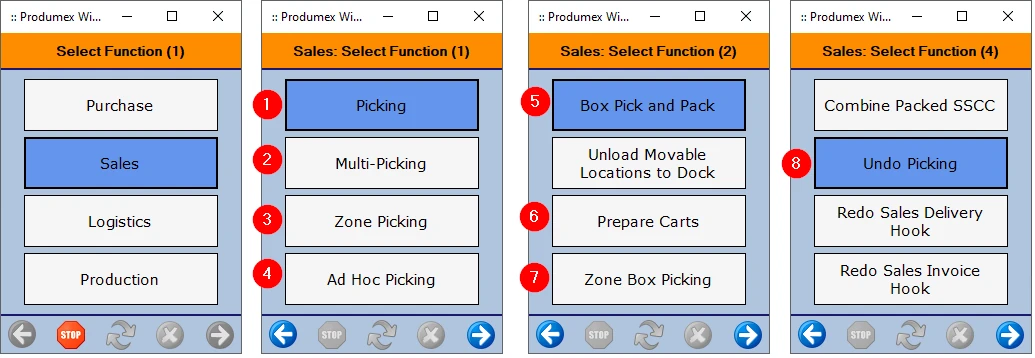
- Receive
- Store
- Pick
- Ship

Four B1 modules, extended by Produmex WMS
If you have reached the operational limits of standard SAP Business One warehouse features, you do not need to replace your ERP. Produmex WMS builds on the modules your team already uses. Each card shows what B1 does on its own, what Produmex WMS adds, and where to read more.
-
B1 Module 05 05
Produmex WMS Extension for SAP B1 Sales – A/R
- SAP B1 on its own
- Sales documents are copied from a base document to a target document, for example quotation to order to delivery to A/R invoice.
- Produmex WMS adds
- Pick lists from sales orders reach the Mobile Client at once; stock allocation and inventory locks; multi-picking and zone picking by wave; a Sales Return Flow that creates the Sales Return document; sales containers.
-
B1 Module 06 06
Produmex WMS Extension for SAP B1 Purchasing – A/P
- SAP B1 on its own
- A Goods Receipt PO records the delivery of goods from a vendor and updates inventory; in a perpetual inventory system it posts the inventory value.
- Produmex WMS adds
- Reception on the Mobile Client books the Goods Receipt PO; bulk reception into silos and tanks; cross-docking to the linked sales order; a Purchase Return Flow that adds the Goods return document; purchase containers.
-
B1 Module 09 09
Produmex WMS Extension for SAP B1 Inventory
- SAP B1 on its own
- Inventory Counting with single or multiple counters and item freeze, and Inventory Posting for the differences.
- Produmex WMS adds
- An Organizational Structure of zones, bin locations, docks and movable locations; Direct Cycle Count, Cycle Count and Recount; quality statuses; returnable items; catch weight in two units of measure.
-
B1 Module 11 11
Produmex WMS Extension for SAP B1 Production
- SAP B1 on its own
- Components are issued for production manually, or backflushed automatically on receipt from production.
- Produmex WMS adds
- Pick lists for production orders with inventory locks; production lines in the Organizational Structure; quality statuses that decide whether stock can be picked for or used in production; production labels.
misBoost
A management layer for SAP Business One
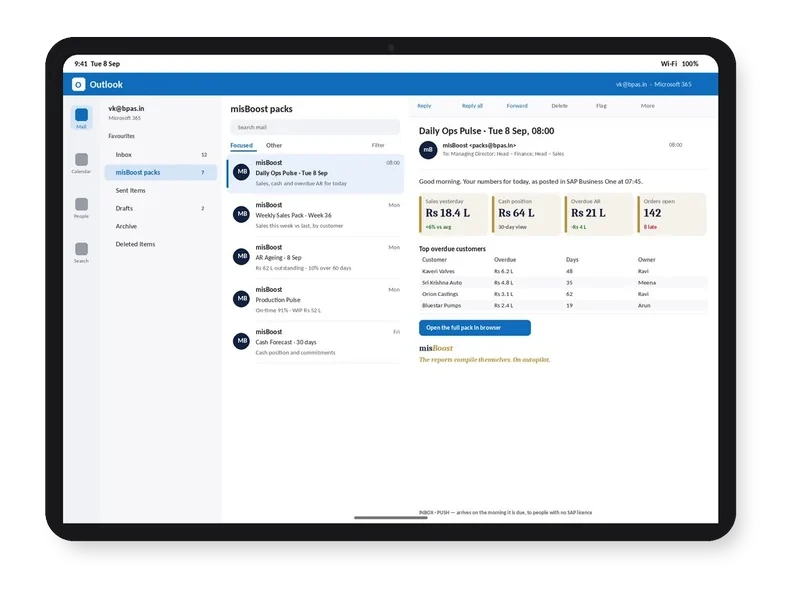
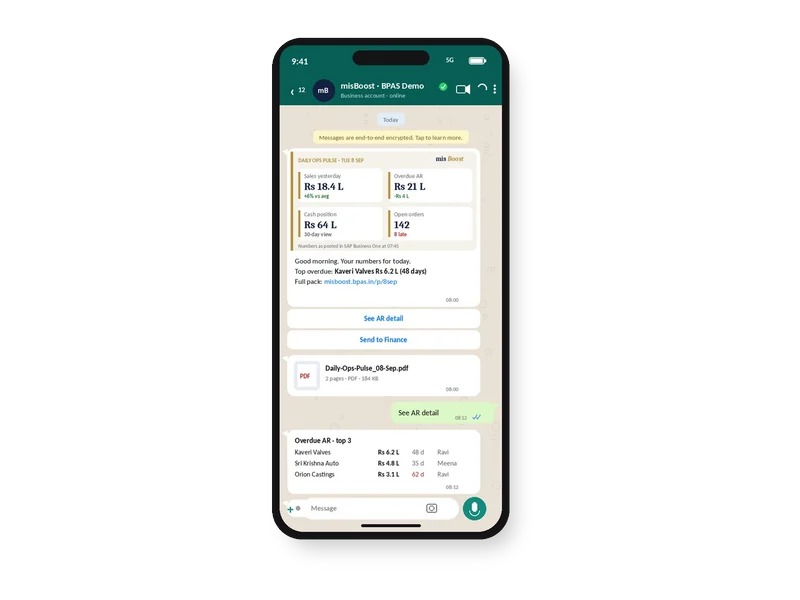
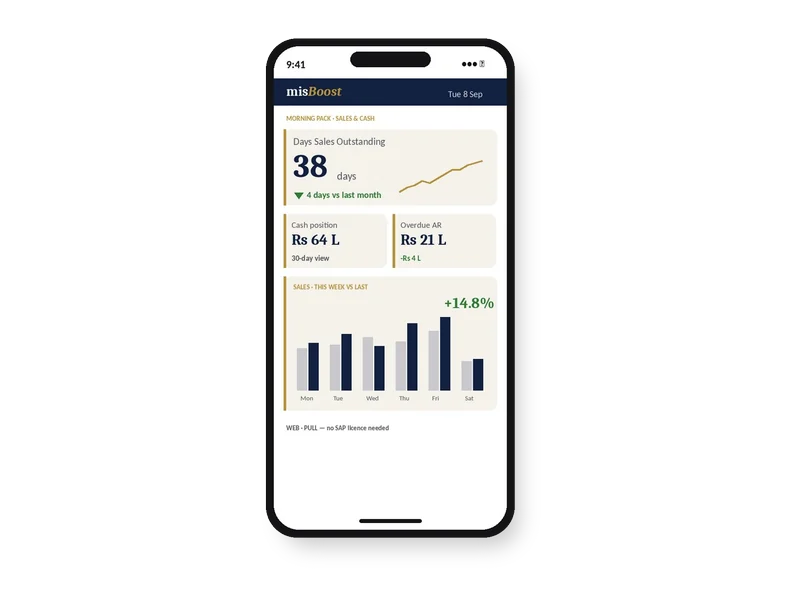
Management numbers from your SAP Business One, sent on autopilot
The packs build themselves from your SAP Business One data and arrive on their own, so nobody prepares or sends them. It works on any SAP Business One installation, with no manufacturing or warehouse project needed.
What Produmex WMS does in the warehouse, and what it returns
Open any feature to see how it works in the system and what it means for stock, space and cash. Each one gets its own guide, with core concepts, best practices and a vocabulary.
Warehouse Structure & Mobile Client
Operational Reality (Capabilities)
The Organizational Structure models the company's warehouses, zones and sub-zones, bin locations, docks, production and packing lines, movable locations and silos or tanks, each with its own settings. Each Produmex warehouse is linked to its SAP Business One warehouse, and zones and bin locations can be imported with the Import Tool.
- Zones, bin locations and docks per warehouse
- Production lines, packing lines and movable locations
- Zones and bin locations imported with the Import Tool
Licence and prerequisites: Location management: Produmex WMS Professional licence
Executive ROI Value
Stock is recorded by warehouse, zone and bin location, not only by SAP Business One warehouse, so the team knows where to find it.
- Less time searching for stock
- One structure for receiving, storing and shipping
Operational Reality (Capabilities)
Shopfloor functions run on the Produmex Mobile Client in scanner or touchscreen mode. Operators carry out production, packaging and logistics operations, and the information is transferred to SAP Business One. Produmex WMS connects to barcode scanners and to label and document printers.
- Scanner mode and touchscreen mode
- Purchase, Sales, Logistics and Production functions
- Barcode scanners, label and document printers
Licence and prerequisites: Produmex WMS Terminal licence for each device connected at the same time
Executive ROI Value
Each operation is recorded on the floor where it happens, not keyed in later from paper.
- Fewer re-keyed transactions
- Floor and office work on the same stock
Operational Reality (Capabilities)
Mobile Client flows cover reception, put-away, cross-docking, ad hoc moves and move orders, picking (including multi-picking and zone picking), packing, shipping, and sales and purchase returns. Pick lists generated in the office are immediately available on the shop floor.
- Reception Flow and Put Away Flow
- Ad hoc moves and move orders
- Picking, packing and shipping flows
Licence and prerequisites: Shopfloor flows: Produmex WMS Terminal licence; office functions: Produmex WMS Professional licence; with EDI files, a Produmex EDI licence is needed in addition to Produmex WMS Professional
Executive ROI Value
Receiving, storing and shipping follow the same guided steps for every operator.
- Consistent steps across shifts
- Office pick lists reach the floor at once
Inbound
Operational Reality (Capabilities)
Products are received directly into silos and tanks on the Mobile Client, without creating a logistic unit. Reception can follow a purchase order, several purchase orders grouped for a supplier, or no purchase order, and the Goods Receipt PO document is booked in SAP Business One.
- By purchase order, auto-selected orders or no PO
- No logistic unit created for bulk receipts
- Goods Receipt PO booked in SAP Business One
Licence and prerequisites: Goods reception: Produmex WMS Terminal licence. Not used for serial-managed or catch weight items
Executive ROI Value
Bulk materials are received against the purchase order at the silo or tank, and the receipt reaches SAP Business One as it is booked.
- Bulk receipts recorded at the tank
- Purchase order matched at receipt
Operational Reality (Capabilities)
Received goods can be delivered to the customer straight after reception, based on the sales order linked to the purchase order. Where the received stock is not enough, a pick list is generated to meet the sales order quantity. Only docks used for both loading and unloading can be selected.
- Purchase order linked to a sales order
- Pick list for any remaining quantity
- Docks used for loading and unloading
Licence and prerequisites: Cross-docking: Produmex WMS Terminal licence
Executive ROI Value
Goods received for an open sales order do not wait in storage before they are shipped.
- Less double handling of goods
- Linked orders shipped from the dock
Operational Reality (Capabilities)
Received purchased items, for example damaged or expired, are returned to the supplier from the shop floor, with or without a base Goods Receipt PO. A Goods return document is added in SAP Business One, and after all products from a Goods Receipt PO have been returned, the purchase document is closed.
- Return with or without a Goods Receipt PO
- Scan the SSCC or the location
- Goods return document in SAP Business One
Licence and prerequisites: Purchase return: Produmex WMS Terminal licence; with EDI files, a Produmex EDI licence is needed in addition to Produmex WMS Professional
Executive ROI Value
Rejected goods leave the warehouse with a matching document, so the stock in SAP Business One stays correct.
- Returns recorded at the dock
- A clear record of what went back
Outbound
Operational Reality (Capabilities)
The stock allocation algorithm decides which stock is reserved and picked for sales orders, production orders and inventory transfer requests. Inventory locks reserve stock at item and quality status, batch, logistic unit (LUID) or detail level, and transactions that would change a locked parameter are not allowed. Locks can be created by users or by the system, for example when a pick list is generated.
- Locks at item, batch, LUID or detail level
- System locks from pick list proposals and pick lists
- Sales orders, production orders and transfer requests
Licence and prerequisites: Stock allocation and inventory locking in advance: Produmex WMS Professional licence
Executive ROI Value
Stock reserved for one order is not picked for another.
- Fewer short shipments from double-booked stock
- Reservations made before picking starts
Operational Reality (Capabilities)
Items for one or more pick lists are picked in a wave on the Mobile Client onto movable locations, each pick list to its own movable location. The operator is suggested to pick the allocated stock, and a packing process follows the picking.
- Waves of pick lists for different customers
- One movable location per pick list
- Packing after picking
Licence and prerequisites: Picking: Produmex WMS Terminal licence
Executive ROI Value
One round of the warehouse serves several customer orders.
- Fewer trips per order
- Orders kept apart on the cart
Operational Reality (Capabilities)
Picking is performed by wave, and only the items in the operator's current zone are listed. Once a product is identified it is locked, so other users cannot pick it. When a wave holds pick lists for different customers, a movable location is used and a packing process follows.
- A wave picked zone by zone
- Identified products locked to the picker
- Pick list types set for zone picking
Licence and prerequisites: Picking: Produmex WMS Terminal licence
Executive ROI Value
Pickers work in parallel zones, and two pickers do not pick the same product.
- Pickers stay in the zone they know
- No double picking of one product
Operational Reality (Capabilities)
Purchase or sales order lines, or complete routes, are grouped into containers. One order line can be shipped in several containers, purchase and sales container lines can be imported from a CSV file, open containers are listed in the Open documents report, and reception can receive only the open items of an in-transit purchase container.
- Purchase and sales containers
- One order line across several containers
- Open items of an in-transit container received
Licence and prerequisites: Container management: Produmex WMS Professional licence
Executive ROI Value
Imports and exports are followed container by container, so the warehouse knows what is on the way.
- Partial shipments recorded by container
- A clear list of open containers
Operational Reality (Capabilities)
Products returned by customers are received on the Mobile Client against a Return Request, a delivery or no delivery, and a Sales Return document is created in SAP Business One. Returned items are placed on a chosen location or logistic unit, with an optional reason and a default quality status.
- With a Return Request, a delivery or no delivery
- Reason and default quality status
- Sales Return document in SAP Business One
Licence and prerequisites: Sales return: Produmex WMS Terminal licence; with EDI files, a Produmex EDI licence is needed in addition to Produmex WMS Professional
Executive ROI Value
Returned stock is recorded with a reason and a quality status as it arrives.
- Returns recorded at the dock
- A reason captured for each return
Inventory & Quality
Operational Reality (Capabilities)
Cycle counting checks the stock kept in SAP Business One against the stock actually in the warehouse. Direct Cycle Count books differences as goods issues or goods receipts in SAP Business One; Cycle Count first registers differences in Produmex and books them in a processing step; Recount verifies an earlier count. Locations can be flagged for counting after a set number of days or operations, or when they become empty during other operations.
- Direct Cycle Count, Cycle Count and Recount
- Counts after days or operations, or when a location empties
- Counting prompted during other operations
Licence and prerequisites: Creating and processing cycle count tasks: Produmex WMS Professional licence; cycle counting on the floor: Produmex WMS Terminal licence
Executive ROI Value
Stock differences are found location by location, close to when they arise.
- Fewer surprises at the year-end count
- Each count logged from task to processing
Operational Reality (Capabilities)
Company-defined quality statuses control whether stock can be shipped, picked for replenishment or production, used for production, or stored on pick locations. The allowed changes between statuses are defined and can ask for a reason, and the Change Quality Status Flow changes the status on the floor by location or logistic unit.
- Can be shipped, picked or used for production
- Status changes limited to user groups
- Changed by location or GS1 label on the floor
Licence and prerequisites: Quality status management: Produmex WMS Professional licence and Produmex WMS Terminal licence; with EDI files, a Produmex EDI licence is needed in addition to Produmex WMS Professional
Executive ROI Value
Stock whose status does not allow shipping is not picked for a customer.
- Fewer wrong batches shipped
- Who changed a status, and why
Operational Reality (Capabilities)
Returnable items such as logistic carriers and reusable packaging are added automatically to the receipt or delivery document when an item that contains them is added. An inventory and a non-inventory variant of each returnable item avoid double booking, so returnables are charged on documents without their stock changing twice.
- Added automatically to receipts and deliveries
- Inventory and non-inventory variants
- Deposits charged on documents
Licence and prerequisites: Returnable items: Produmex WMS Professional licence
Executive ROI Value
Crates and pallets are counted and charged as they go out and come back.
- Fewer lost returnables
- Deposits on delivery notes and invoices
Operational Reality (Capabilities)
Stock is tracked in two units of measure at once: the inventory unit of measure and weight as the second unit. Catch weight works in purchase receipt, purchase return, ad hoc moves, replenishment, picking, packing, shipping, cycle count, cross-docking, put away, sales return and the production flows. Serial-managed catch weight items are not supported.
- Inventory unit and weight tracked together
- Supported from reception to shipping
- Set per item
Executive ROI Value
Products sold by the piece and checked by weight carry both figures through the warehouse.
- Weight recorded at each step
- Pieces and weight both visible
Labels
Operational Reality (Capabilities)
Reception, shipping, item and production labels and the New Master SSCC label are printed from the Inventory Report, choosing the report and the printer. Item labels can also be printed on the Mobile Client, in the Reception Flow and during picking, and logistic labels can be reprinted on the Mobile Client.
- Labels from the Inventory Report
- Item labels during reception and picking
- Logistic label reprint on the Mobile Client
Licence and prerequisites: Label printing: Produmex WMS Professional licence and Produmex WMS Terminal licence
Executive ROI Value
Logistic units carry a scannable label from reception to shipping.
- Scan instead of type
- Labels printed where the work happens
Produmex WMS Professional plus Produmex WMS Terminal.Office functions need a Produmex WMS Professional licence per named user, each associated with an SAP Business One Professional or Limited (Logistic) user licence; shopfloor work on the Mobile Client needs Produmex WMS Terminal licences for the devices connected at the same time. Optional modules such as Produmex EDI, Produmex 3PL and the scale interface have their own licences. BPAS phases these with you, so you license what the warehouse uses now.
Warehouse data that stays inside your SAP B1
Receipts, returns and count differences reach SAP Business One as standard SAP B1 documents, not a separate system.
- ◆Exclusive Boyum Practice. India's No.1 Customer-referred Boyum IT Partner.
- ★Boyum APJ Partner Excellence Award 2024
Swipe sideways to see the full diagram
-
01
SAP Certified
Produmex WMS is a Boyum IT product, SAP certified for SAP Business One. It extends the standard functionality of SAP Business One with functions for production, packaging, inventory management and logistics on the shop floor.
-
02
Office functions in the B1 menu
Produmex office functions, such as the Organizational Structure, are grouped in the main menu of SAP Business One.
-
03
Flows create B1 documents
Reception books the Goods Receipt PO, the return flows create the Goods return and Sales Return documents, and Direct Cycle Count books differences as goods issues or goods receipts.
-
04
Scanners and printers connected
The Mobile Client runs in scanner or touchscreen mode, and Produmex WMS connects to barcode scanners and to label and document printers.
From paper pick lists to Produmex WMS on your floor
Three steps from the first conversation to Produmex WMS running in your warehouse.
-
01Step 01
Gap Review on Your Plant
In a BPAS gap review you get a short list of what is costing your plant dates and money today, and the order to fix it in.
You get Your fix list, in order
-
02Step 02
Produmex WMS Deployment on a Test Copy
Produmex WMS runs on a test copy of your SAP Business One company with your own items, warehouses and bin locations, before it touches live data.
You get Produmex WMS proven on your own data
-
03Step 03
Go-Live and Ongoing Support
Warehouse staff work on the Produmex Mobile Client with their own pick lists from go-live, and BPAS stays with your plant after it.
You get Your warehouse running in Produmex WMS
BPAS ViSA Services for SAP Business One
Seven services around the Boyum solutions on your SAP Business One, from the first maturity check to AI inside SAP Business One.
- 00LocategapScanA maturity check and gap discovery: an as-is score for every step, and a clear next move.→
- 01AlignprocEnactStrategy first, then the process, then the software.→
- 02DeploytoolDeployImplements the Boyum Solutions on your existing SAP Business One, process-first.
- 03ExtenddevCenterCustomises Beas Manufacturing, Produmex WMS and B1UP where standard configuration stops.
- 04SupportmaxValueSupport in measured cycles, from the day after go-live.→
- 05CostcostAbsorbAbsorption costing in Beas Manufacturing, on stock held and on goods sold.
- 06IntelligenceaiEnableAI inside SAP Business One, once there is real manufacturing history to learn from.
One Produmex WMS idea every week
Every week BPAS posts a short carousel for SME manufacturers on running a warehouse with Produmex WMS. Swipe through this week's here, or follow BPAS to get the next one in your feed.
In every carousel
- A warehouse problem 01
- Where standard SAP B1 stops 02
- How Produmex WMS handles it 03
- Illustrative ₹ impact for an Indian SME plant 04
This week's carousel appears here.
What's new in Produmex WMS
The latest Produmex WMS releases in plain words: what changed in each version.
1 release, newest first
All release updates →- Produmex WMS New
Produmex WMS 2026.10: refreshed Mobile and Touch clients and an Environment Check Tool
The Mobile and Touch clients get new colours, icons and layouts with the same workflows, and a new Environment Check Tool runs technical measurements to find where a performance issue comes from.
Read the update →
See your own warehouse running in Produmex WMS
Bring one item, a recent purchase order and a sales order. We map them into Produmex WMS and show you the reception, the picking and the shipping on the Mobile Client, before you commit to anything.

The world's first Boyum Partner Center of Excellence. Spanning the entire Boyum Solutions portfolio — SAP Business One, B1UP, Beas Manufacturing, and Produmex WMS & Scan. Hosted in the cloud, available for evaluation and proof-of-concept work. See it to believe it — get convinced by working on it.
Try Produmex WMS first in the PACE sandbox→