Production planning in Beas Manufacturing for SAP Business One is called Capacity Planning, APS. It is where production scheduling happens: an APS calculation type dispatches each work order operation to a resource, backwards from the delivery date or forwards from the start date. With Consider resource limits on, a resource is not dispatched above 100%, and overloads show in the APS Gantt chart and the Graphic Utilization Display.
Written for SME manufacturers · By Vipin Kumar, Founder and Solution Architect · Last updated BPAS · Exclusive Boyum Practice. India's No.1 Customer-referred Boyum IT Partner.
Beas APS for resource limits, calculation types and optimisation; Beas APS Gantt Viewer for the Gantt chart
How It Works
How Beas production planning works, from order to dispatched operation
APS sits between demand and the shop floor. It turns “we need 2,000 pieces by the 20th” into “this operation runs on VMC-04 on Tuesday's second shift”.
Demand arrives
The MRP Wizard turns sales orders, forecasts and stock into purchase and production recommendations.
Work orders carry the routing
Each work order operation carries its resource and its times from the routing.
APS calculates
A calculation type dispatches operations backwards from the delivery date or forwards from the start date, within resource limits.
Planner reviews
The Gantt chart and Graphic Utilization Display show overloads; the planner moves operations or switches to an alternative resource, then recalculates.
The floor reports
Operators report at Beas terminals, and the next recalculation starts from what was reported.
Recalculation
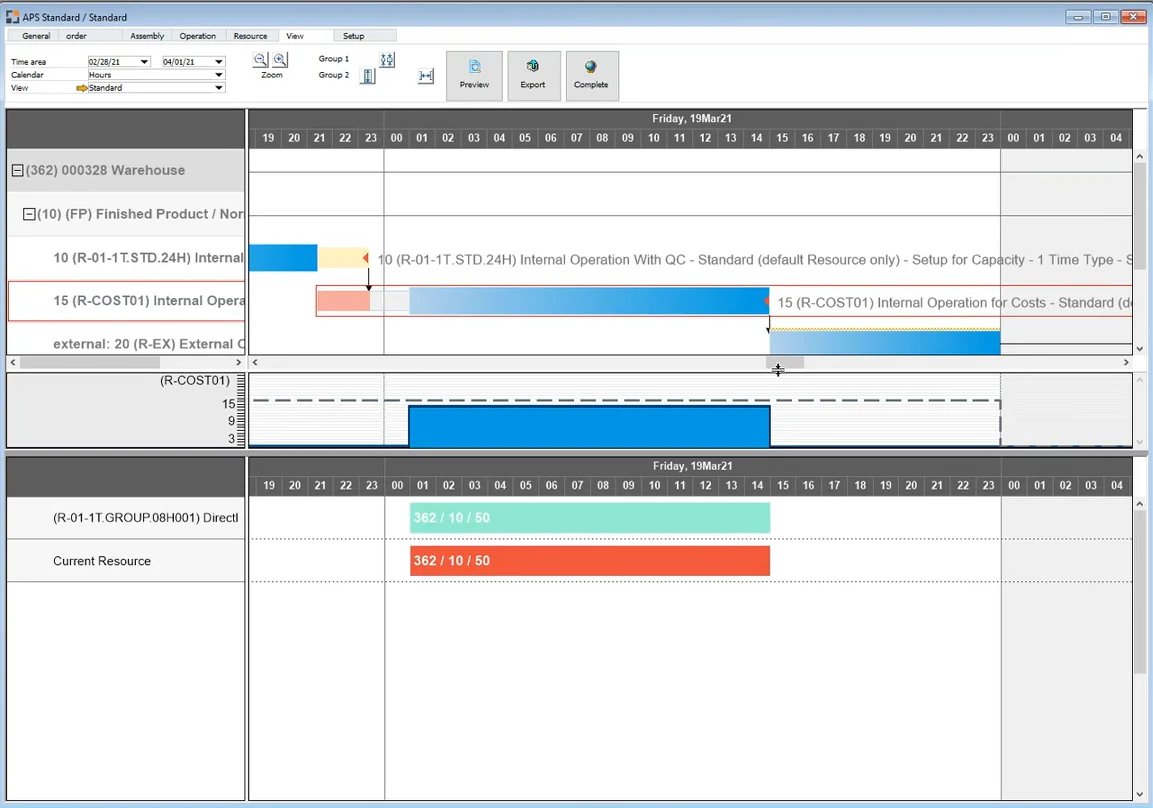
Swipe sideways to see the full screenThe Beas APS Gantt chart: every operation dispatched to a resource, inside its shift schedule.
SAP B1 vs Beas
SAP Business One vs Beas APS: what B1 allocates, what Beas dispatches
SAP Business One records resources and allocates their capacity to production orders. Beas APS decides when and on which resource each operation runs.
SAP Business Oneallocates
vs
Beas APSdispatches
Standard SAP Business One 10.0 compared with Beas Capacity Planning, APS. Resource limits, calculation types and optimisation need the Beas APS licence; the Gantt chart needs the Beas APS Gantt Viewer licence.
Planning need
SAP B1 native
Beas Capacity Planning, APS
Scheduling basis
Production order Start Date and Due Date; the Due Date is calculated from the Start Date and the parent item's lead time and can be changed manually. Route stages carry dates, and Recalculate Route Stage Dates updates the stages that follow.
APS calculation types dispatch each work order operation to a resource, using the operation times from the routing.
Capacity
Internal, Committed, Consumed and Available capacity per resource and warehouse in the Resource Capacity window. An allocation method (On Start Date, On End Date, Start Date Forwards, End Date Backwards) spreads committed capacity over days.
Net planned capacity per resource, for the number of machines or people it represents, reduced by the factory calendar. With Consider resource limits on (APS licence), the resource is not dispatched above 100%.
Calendars and shifts
Daily internal capacity per weekday, with an option to leave holidays unchanged.
Shift schedule per resource or resource group, factory calendar, and resource calendar exceptions for a period with a reason.
Planning view
The resource's capacity data and the Resource Capacity window.
APS Gantt chart per work order or per resource (Beas APS Gantt Viewer licence), and the Graphic Utilization Display of capacity against workload.
Overloads
Committed against Available capacity is shown per day.
Overloaded days are shown in red in the Graphic Utilization Display; MRP2 flags a resource as Overloaded above 90% of its dispatching index.
Alternative machines
Resources are lines on the bill of materials and production order.
Alternative resources for an operation, each with its own times. APS can select the most adequate resource (Beas APS licence).
Delivery promise
Due Date from the Start Date and the parent item's lead time.
Capable-to-Promise from the sales order or quotation line, by forward resource scheduling (APS licence).
Feedback from the floor
Issue for Production and Receipt from Production; resource capacity is consumed by backflush or manually.
Operators report start, interruption, completion, finished goods and scrap at Beas terminals (Terminal Production Data Collection licence).
See how Beas APS would plan your own machines and orders.
Beas APS capabilities: eight things the planner controls
Each capability shows how it works in Beas, which licence it needs, and what it is worth to the business.
Operational Reality (Capabilities)
The APS Gantt chart shows the APS schedule per work order or per resource, with resource workload. Planners see what runs where, and when, on one screen.
Anyone can see what runs where, so planning survives leave, attrition and a second shift, instead of living in one person's spreadsheet.
Planner hours go into decisions, not data entry
Less dependence on a single “Excel expert”
Operational Reality (Capabilities)
Each resource can be planned with “Consider resource limits”. A resource planned this way is not dispatched above 100%, and other work orders' time reservations on it are respected.
Per-resource setting
Never dispatched above 100% within its limits
Other orders’ reservations respected
Licence: Beas APS licence, which adds finite capacity planning
Executive ROI Value
The schedule reflects the machines that really limit output. You stop promising capacity the plant does not have.
Realistic plans on the machines that set throughput
Fewer late orders from double-booked machines
Operational Reality (Capabilities)
Backward scheduling uses only the end date; forward scheduling uses only the start date. Beas provides several calculation types in both directions, for simulation, for dispatching to resources, and for planning with material availability.
Backward: latest start that still meets the date
Forward: earliest possible finish
Material availability can be considered
Licence: Beas APS licence; custom calculation types can be created in APS
Executive ROI Value
Backward scheduling keeps raw material and WIP off the floor until needed, which frees working capital. Forward scheduling answers “what is the earliest we can ship?” with a real date.
Less material and WIP held early
Confident answers on urgent enquiries
Operational Reality (Capabilities)
Each resource works to a shift schedule and the factory calendar. A resource calendar holds exceptions for a period, such as extra shifts or reduced staffing, each with a reason. Planned capacity is net of cleaning, maintenance and other planned downtime.
Shift schedule per resource
Resource calendar exceptions with a reason
Factory calendar for holidays
Executive ROI Value
Adding a Sunday or third shift on one machine becomes a calendar change you can test before paying for it.
Overtime and extra shifts justified by data
No work dispatched to a resource with zero capacity
Operational Reality (Capabilities)
The Graphic Utilization Display shows planned times by day, week or month for each resource: a summary of all resource utilisation and a chart of capacity and workload in hours for the selected resource. Overloaded days show in red, and the dispatches can be listed for the resource. MRP2 (Requirement of resources) shows workload against capacity per MRP scenario and flags a resource as Overloaded above 90% of its dispatching index.
Capacity and workload per resource
Overloaded days in red
Dispatches list per resource
Executive ROI Value
Capital spending starts from evidence. Before buying another machine, you can see whether the problem is capacity, sequence or one large order.
Better use of existing machines before new capex
Early warning to sales on lead-time changes
Operational Reality (Capabilities)
Alternative resources can carry an operation, each with its own setup time and time per unit. Beas can select the most adequate resource during the APS calculation, or the planner can switch manually.
Idle machines get used while orders queue at the favourite one, and load spreads across the plant.
Higher use of installed machines
Shorter queues at overloaded resources
Operational Reality (Capabilities)
Work sequences can be moved freely in the graphical view, and the planner decides how each move is treated: marked, fixed, or dispatched within resource limits. Moved operations are flagged, so every manual change stays visible.
Planners keep control of exceptions without breaking the rest of the plan, and every manual change is visible.
Fast response to urgent orders
Manual fixes that are visible to everyone
Operational Reality (Capabilities)
Operators report start, interruption, completion, finished goods and scrap against work order operations at Beas terminals. When the plan is recalculated, work already started stays in place and the rest is planned around it.
Desktop Terminal or browser-based WebApps
Started work stays in place on recalculation
The plan starts from what was reported
Licence: Terminal: Beas App Production Data Collection licence
Executive ROI Value
The plan stays accurate because it starts from what the floor reported each shift, not from the morning's assumption.
Plan adherence you can measure
Fewer “hot” jobs jumping the queue
Core Concepts
5 Core Concepts of Production Planning
The first three are about how a schedule is built. The last two are about keeping it right once the shift starts.
01
How the schedule is builtConcept 01 · Plan to what the plant can do, not to what was ordered
Finite Capacity Planning
The shop-floor problem it solves
Plans promise more machine hours than the plant has, so the shortfall turns up later as late orders and weekend overtime.
The concept explained
A plan is a promise about time. Planning without limits schedules every order on the date it is wanted and leaves the floor to sort out the clash. Finite planning starts from the hours each resource actually has, according to its shift schedule and resource calendar. When a resource's hours are full, the next operation is dispatched to the next free time, and the work order's finish date moves with it. The plan looks less flattering, but it is true: every date on it is one the machines can meet, and overloads show up as later dates, days ahead, not as surprises on dispatch day.
Everyday analogy
A family car has five seats. You can promise a lift to seven relatives, but only five will fit. Finite planning tells the other two now that they are on the second trip, instead of at the door.
In Beas
With the Beas APS licence, which adds finite capacity planning, a resource can be planned with “Consider resource limits”, so it is not dispatched above 100%.
Swipe sideways to see the full diagramWithout limits, Tuesday is overbooked. With Consider resource limits, the extra work moves to the next free time.
02
How the schedule is builtConcept 02 · One resource decides the output of the whole plant
The Bottleneck Sets the Pace
The shop-floor problem it solves
Everyone works hard on every machine, yet output does not rise, because one overloaded resource limits everything behind it.
The concept explained
In every plant, one resource has the least spare capacity for the load placed on it. What that resource can produce is what the plant can ship. An hour lost there is an hour lost for the whole factory; an hour saved on a machine with spare capacity changes nothing. Good planning therefore finds that resource first, plans it with the most care, keeps material ready in front of it, and moves suitable work to alternative resources. Everything else is planned around it. As the product mix changes, the overloaded resource can change too.
Everyday analogy
A toll plaza on a highway. Widening the road before and after it does not move more cars per hour; only opening more booths at the plaza does.
In Beas
The Graphic Utilization Display shows capacity against workload per resource by day, week or month, with overloaded days in red. MRP2 shows workload against capacity per MRP scenario. Alternative resources let APS pick a more adequate resource (Beas APS licence).
Swipe sideways to see the full diagramIllustrative figures: the plant ships what its most loaded resource can make.
03
How the schedule is builtConcept 03 · Start each job as late as it can still finish on time
Schedule Backwards from the Delivery Date
The shop-floor problem it solves
Jobs start as soon as material arrives, tying up cash in WIP, while urgent orders wait for machines busy with work not due for weeks.
The concept explained
Starting early feels safe, but it costs money. Raw material is consumed, WIP piles up between machines, and capacity is spent on orders nobody needs yet. Backward scheduling starts from the delivery date and places each operation as late as it can run while still finishing on time, allowing for the idle time and overlap set between operations. Material is bought and capacity used only when needed, which keeps floor space and working capital free for urgent work. Forward scheduling is the companion: it starts from the start date to find the earliest possible finish, which is how a planner answers a new enquiry honestly.
Everyday analogy
Hot chapatis for guests arriving at 8. You roll and cook them at 7.45, not at 5, when they would be cold and the stove would have been busy for nothing.
In Beas
APS calculation types run the schedule in both directions: backward from the delivery date, which keeps material purchases late, and forward from the start date to each resource, which gives the earliest finish. Waiting and overlap between operations come from the routing.
Swipe sideways to see the full diagramForward scheduling finishes early and leaves WIP waiting. Backward scheduling finishes on the delivery date.
04
Keeping it rightConcept 04 · Accurate times and calendars come before clever scheduling
The Schedule Is Only as Good as the Master Data
The shop-floor problem it solves
The plan says a job takes six hours, the floor takes ten, and after a few weeks nobody trusts the schedule.
The concept explained
A scheduling engine does arithmetic on master data. If the routing names the wrong resource, uses a setup time that ignores tool changes, or a time per unit from a drawing made five years ago, the plan will be precisely wrong. The same is true of shift schedules that miss festival holidays or planned maintenance. Accurate routings, realistic times, correct calendars and defined alternative resources are the foundation, not an afterthought.
Everyday analogy
Navigation with an old map. The app calculates the route perfectly, and you still arrive late because the flyover it chose has been closed for a year.
In Beas
The routing holds each operation's resource and times. Post-calculation per work order compares accrued with planned cost, and the times reported at Beas terminals are the actuals behind it.
Swipe sideways to see the full diagramCorrect routings and calendars in, a schedule the floor can meet out.
05
Keeping it rightConcept 05 · A plan that learns from what the floor reports
Plan, Execute, Feed Back
The shop-floor problem it solves
The plan made on Monday morning is already wrong by Monday evening, because breakdowns, rejections and rush orders never reach it.
The concept explained
No plan survives the shift intact. Machines stop, a batch fails inspection, an OEM pulls a schedule forward. Planning only works as a closed loop. Work is planned in APS; operators report start, interruption, completion, finished goods and scrap against each operation as they work; and the planner recalculates from the real position, not from the morning's assumption. The same reports show where standard times are wrong. A plan that is corrected from what the floor reports is worth far more than a perfect plan that never changes.
Everyday analogy
A cricket captain sets the field before the over, then moves fielders ball by ball as he sees how the batsman is actually playing. The team-meeting plan is only the starting point.
In Beas
Operators report at Beas terminals (Terminal Production Data Collection licence). When APS recalculates, work already started stays in place and the plan moves forward from what was reported.
Swipe sideways to see the full diagramPlan, work, report, recalculate: the closed planning loop.
Best Practices
10 Best Practices for Production Planning in Beas
Each practice says what good planning looks like and what it costs to ignore it. Setting it up in your system is what BPAS consultants do.
01
01Keep routing times true to the shop floor
Master data · Routing
The rule
Every operation's setup time and time per unit drive the schedule, the precalculation and the post-calculation. They have to reflect how long the job really takes on that machine today.
Risk if ignored
APS dispatches operations from these times. A wrong time or time unit makes every schedule built on the item wrong, and post-calculation compares actual cost with a planned cost that was never realistic.
Get it right with BPAS
Not sure this is in place in your plant? Talk to a BPAS consultant.
A machine's planned capacity should be the hours it can really produce, after cleaning, maintenance and other planned downtime, and for the number of machines or people it actually represents.
Risk if ignored
Gross hours make the plant look bigger than it is: APS fills hours that are really spent on cleaning and maintenance, and delivery dates slip on the floor.
Get it right with BPAS
Not sure this is in place in your plant? Talk to a BPAS consultant.
03Plan the critical machines within their real capacity
Capacity · Beas APS licence
The rule
The machines that limit output must be planned as finite: APS should never book them beyond 100%. Resources that do not limit output should not hold the schedule back.
Risk if ignored
With limits off on a critical machine, APS books it beyond its capacity and the overload is only found on the floor. With limits on everywhere, schedules are held up by capacity nobody needs to plan.
Get it right with BPAS
Not sure this is in place in your plant? Talk to a BPAS consultant.
05Every capacity change reaches the plan, with a reason
Calendars
The rule
Extra shifts, shutdowns, maintenance days and short-staffed periods belong in the system, each with a reason, so the plan and everyone reading it know why capacity changed.
Risk if ignored
Extra shifts, shutdowns and short-staffed periods that live only in the planner's head never reach APS, so the schedule promises capacity that does not exist, or ignores capacity that does.
Get it right with BPAS
Not sure this is in place in your plant? Talk to a BPAS consultant.
06Plan subcontracted operations the way your job-workers quote them
Subcontracting
The rule
Job-work and other external operations run on the supplier's clock, not your shifts. Their lead times have to be planned the way the supplier actually quotes them.
Risk if ignored
Planned on factory shift hours, a job-worker's three days become many more planned days, and every order using that operation is dated too late.
Get it right with BPAS
Not sure this is in place in your plant? Talk to a BPAS consultant.
07Overflow work moves to machines that can do the job
Alternative machines · Beas APS licence
The rule
Where another machine can do the job, the system should know it, with that machine's own setup and run times, so work can move when the usual machine is full.
Risk if ignored
Without alternatives, overloaded machines keep their queue while suitable machines stand idle. Alternatives with copied times schedule work for the wrong duration.
Get it right with BPAS
Not sure this is in place in your plant? Talk to a BPAS consultant.
08Use the right scheduling run for the right decision
Scheduling runs
The rule
Beas offers several APS calculation types, and they behave very differently: some simulate, some dispatch, some deliberately ignore capacity. Each planning decision needs the run built for it.
Risk if ignored
A run that ignores other orders' reservations or resource limits gives dates that look fine on screen and fail on the floor.
Get it right with BPAS
Not sure this is in place in your plant? Talk to a BPAS consultant.
09Manual changes leave a plan that still fits together
Manual changes
The rule
Planners move operations by hand for urgent orders. After a move, the rest of the plan is brought back in line, so every date still fits together.
Risk if ignored
When the rest of the plan is not brought back in line, it is left with overlaps and impossible sequences, and the floor receives dates that no longer fit together.
Get it right with BPAS
Not sure this is in place in your plant? Talk to a BPAS consultant.
10Delivery dates promised to customers come from today's plan
Delivery promises · Beas APS licence
The rule
Capable-to-Promise gives sales a delivery date from the sales order or quotation line. That date is only as good as the plan behind it, so the plan has to be current every day.
Risk if ignored
Sales quotes a delivery date from a stale plan. The date looks system-backed but ignores today's orders and load, and the promise is broken.
Get it right with BPAS
Not sure this is in place in your plant? Talk to a BPAS consultant.
Illustrative scenario · not a client case studyA Plant Like Yours
Illustrative scenario: an Indian SME auto-components supplier, planned on a whiteboard
A Tier-2 machining unit supplying two-wheeler OEMs runs 32 CNC machines over two shifts on SAP Business One. Orders, stock and invoicing are in B1. Scheduling is not.
The Operational Challenge
The planner rebuilds an Excel plan every morning from B1 open orders and a whiteboard of machine status. B1 shows each production order's due date, but not that the three twin-pallet VMCs are booked solid for the next nine days.
Sales commits standard lead times regardless of load. When an OEM schedule is pulled in, the plant finds out at the machine.
On-time delivery around 70% against OEM schedules
Regular Sunday overtime to recover late orders
Express freight to avoid line-stoppage debits from the OEM
Twin-pallet VMCs overloaded while older VMCs sit idle
The Financial Transformation
With Beas APS, the VMCs are never planned beyond their resource limits, and overflow work moves to the older machines as alternative resources. The Graphic Utilization Display shows the overload nine days out, and the planner moves suitable work across.
Sales checks a Capable-to-Promise date from the sales order line before confirming. Extra shifts go into the resource calendar only where the schedule shows which orders they recover.
Delivery dates based on actual machine load
Overtime planned in advance, for specific orders
Fewer emergency dispatches by express freight
Idle older machines take overflow work
Illustrative figures for a typical Indian SME plant of this size. They add up, but they are not a client case study.
Cost line
Before (per month)
After (per month)
Difference (per year)
Unplanned overtime
₹ 3,50,000
₹ 1,40,000
₹ 25,20,000
Express freight on late orders
₹ 2,10,000
₹ 60,000
₹ 18,00,000
OEM late-delivery debits
₹ 1,20,000
₹ 30,000
₹ 10,80,000
Total
₹ 6,80,000
₹ 2,30,000
₹ 54,00,000
See the APS Gantt chart and the overloaded resources for your own plant.
Who benefits from Beas production planning: one plan, three answers
One plan
Promoter & CXOs
Is capacity the real problem?
The Graphic Utilization Display and MRP2 show whether you need a new machine, a third shift or just a better sequence, before any capex is approved.
Plant Head
Will we ship on time this week?
The APS Gantt chart shows every work order's dispatched operations, so late orders are known days ahead, not on dispatch day.
Production Planner
What runs where, next?
APS replaces the morning spreadsheet. Changes take minutes, and a recalculation reschedules the operations that follow.
Vocabulary
Production Planning Vocabulary and Definitions
From the master data a planner sets up once, to the decisions made in APS every day. Each term shows what it means, why it matters, and a household comparison.
01
Routing
Master data · how an item is made
Routing positions carry the operation times
Operational definition
The sequence of operations to make a product, on internal work centres or external providers. Each routing position names the resource and carries its times.
Why it matters in Beas
Scheduling and costing both read the routing, so the schedule is only as accurate as this master data.
Everyday analogy
A recipe's method: first chop the onions for 5 minutes, then fry on the big burner for 10, then simmer on the small one for 20. Same steps, same order, every time you cook the dish.
A machine, work centre or group of people that performs operations. Each resource has a planned capacity, a number of machines or persons, a shift schedule, a resource calendar and cost rates.
Why it matters in Beas
APS can only plan with the hours a resource really has, so planned capacity is net of cleaning, maintenance and other planned downtime.
Everyday analogy
The burners on your kitchen stove. Four burners means at most four pans cooking at once, however many dishes are ordered.
Gathers all instructions for planning and producing an item. The WO structure view shows each work order with its routings, bills of materials, assemblies, time receipts and materials, with status flags.
Why it matters in Beas
Work orders are what APS schedules: each work order operation is dispatched to a resource. Work already started stays in place when the plan is recalculated.
Everyday analogy
An order slip for a birthday cake from the neighbourhood bakery: what to make, how many, for which date, with the ingredients and steps attached.
The shift schedule sets a resource's working time, together with the factory calendar. The resource calendar holds exceptions for a period, such as extra shifts or reduced staffing, each with a reason.
Why it matters in Beas
APS only plans inside this time, so the calendar has to match how the plant really works.
Everyday analogy
A shop's opening hours board: 9 to 9 on weekdays, closed on Sunday, shut on festival holidays. You cannot book a delivery outside those hours.
Sets whether the resource has capacity limits that the calculation must respect. A resource with resource limits on is not dispatched above 100%, and other work orders' time reservations on it are respected.
Why it matters in Beas
It is what turns a wish list into a plan the machines can meet. It needs the APS licence, the licence that adds finite capacity planning.
Everyday analogy
A restaurant taking table bookings: once 8 pm is full, the next family is offered 9 pm, instead of everyone being told 8 pm and finding out at the door.
Backward scheduling works from the delivery date and uses only the end date; forward scheduling works from the start date and uses only the start date. Beas provides several calculation types in both directions, for simulation and for dispatching.
Why it matters in Beas
Backward planning keeps material and WIP late; forward planning gives an honest earliest date for each resource. The calculation types behave differently, so each decision needs the right one.
Everyday analogy
Backward: guests arrive at 7, so the biryani goes on at 5 and the onions are fried at 4.30. Forward: it is 4 now and you start cooking straight away, so dinner is ready at 6.30.
Another resource that can perform an operation, with its own setup time and time per unit. Beas can select the most adequate resource during the APS calculation, or the planner can switch manually.
Why it matters in Beas
Overloaded machines stop holding up orders while suitable machines stand idle. Automatic selection needs the APS licence.
Everyday analogy
If the big burner is busy, the dal can cook on the small one. It takes a few minutes longer, but dinner is not delayed by half an hour.
Shows planned times by day, week or month for each resource: a summary of all resource utilisation and a chart of capacity and workload in hours for the selected resource. Overloaded days show in red, and the dispatches can be listed for the resource.
Why it matters in Beas
This is where the planner sees which resource is overloaded and when, the generic idea of a bottleneck. MRP2 gives a similar workload against capacity view per MRP scenario.
Everyday analogy
The single bathroom in a house when everyone leaves for work and school at 8. The chart shows the 8 o'clock queue before anyone is late.
The graphical visualisation of the APS schedule on a Gantt chart, per work order or per resource, with resource workload. Work sequences can be moved freely in the graphical view, and every manual move is flagged.
Why it matters in Beas
It is where the planner sees the whole plan, and the consequences of a change, before the floor does. A manual move is followed by a recalculation. The graphic view needs its own station-related licence.
Everyday analogy
A family wall calendar with one column per person: who has the car on which day, who is at tuition when. Move one booking and you can see who else it affects.
Short answers, each with a link to the part of this guide that explains it.
01Does SAP Business One plan production within machine capacity?
SAP Business One records internal, committed, consumed and available capacity per resource in the Resource Capacity window, and an allocation method spreads committed capacity over days; committed against available capacity is shown per day. In Beas, APS calculation types dispatch each work order operation to a resource, and with Consider resource limits on (APS licence) the resource is not dispatched above 100%.
02Which licences does production planning in Beas need?
The Beas APS licence covers resource limits, calculation types and optimisation. The APS Gantt chart needs the Beas APS Gantt Viewer licence, which is station-related. Reporting from Beas terminals needs the Terminal Production Data Collection licence.
03What is the difference between backward and forward scheduling in Beas?
Backward scheduling works from the delivery date and uses only the end date; forward scheduling works from the start date and uses only the start date. Backward planning keeps material and WIP late; forward planning gives the earliest possible finish date.
The Graphic Utilization Display shows planned times by day, week or month for each resource, with a chart of capacity and workload in hours for the selected resource. Overloaded days show in red, and the dispatches can be listed for the resource. MRP2 flags a resource as Overloaded above 90% of its dispatching index.
Yes. Alternative resources can carry an operation, each with its own setup time and time per unit. APS can select the most adequate resource during the calculation (APS licence), or the planner can switch manually.
06What happens when a planner moves an operation in the APS Gantt chart?
Work sequences can be moved freely in the graphical view, and every manual move is flagged on the chart. The plan is then recalculated so the rest of the schedule fits around the change.
07Can Beas give a delivery date while entering a sales order?
Yes. Capable-to-Promise works from the sales order or quotation line, by forward resource scheduling, and needs the APS licence. The date is only as reliable as the plan behind it, so the plan has to be kept current every day.
See the APS Gantt chart, the overloaded resources and the dates your plant can really commit. In a BPAS gap review you get a short list of what is costing your plant dates and money today, and the order to fix it in.


 The world's first Boyum Partner Center of Excellence.Spanning the entire Boyum Solutions portfolio — SAP Business One, B1UP, Beas Manufacturing, and Produmex WMS & Scan. Hosted in the cloud, available for evaluation and proof-of-concept work.See it to believe it — get convinced by working on it.Try Beas first in the PACE sandbox→