

 SAP Business One
SAP Certified Add-ons for SAP Business One
For SME manufacturers already running SAP Business One, BPAS adds the Boyum IT solutions that extend it: B1UP, Beas Manufacturing, B1 Print & Delivery, Produmex WMS, Produmex Scan and Perfion PIM.
- SAP Certified for SAP Business One
- Works with the SAP Business One you already run
- 6 SAP Certified Boyum IT solutions for SAP Business One
- 16 SAP Business One modules, each with its Boyum extension
- 3 in-depth guides behind every module
You run SAP Business One. We extend it with Boyum IT.
SAP Business One is SAP's ERP for small and midsize businesses: finance, sales, purchasing, inventory, production, service and projects in one system.
BPAS works with SME manufacturers, and only on the Boyum IT solutions that extend SAP Business One where the standard system stops.
Exclusive Boyum Practice. India's No.1 Customer-referred Boyum IT Partner.
Why BPAS→From transactions to management decisions
Your team already posts every transaction in SAP Business One. The answers management keeps asking for are already in there.
misBoost
A management layer for SAP Business One
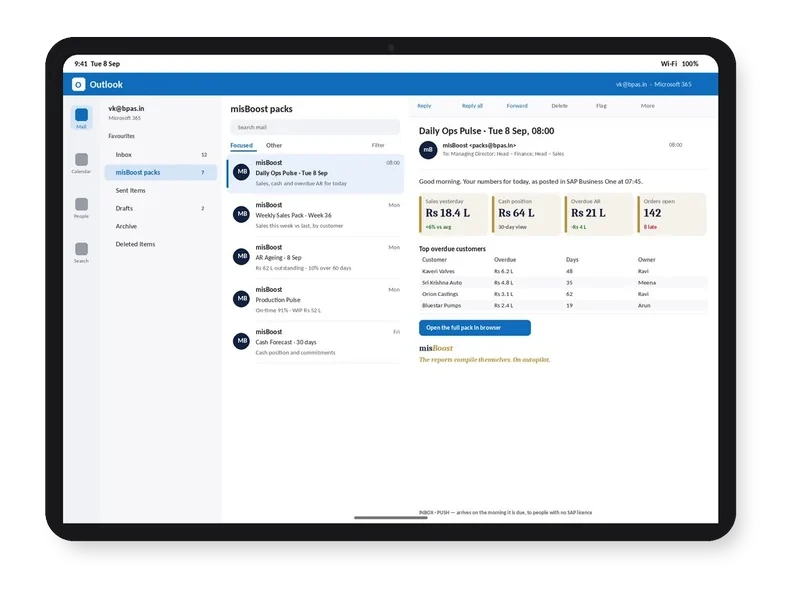
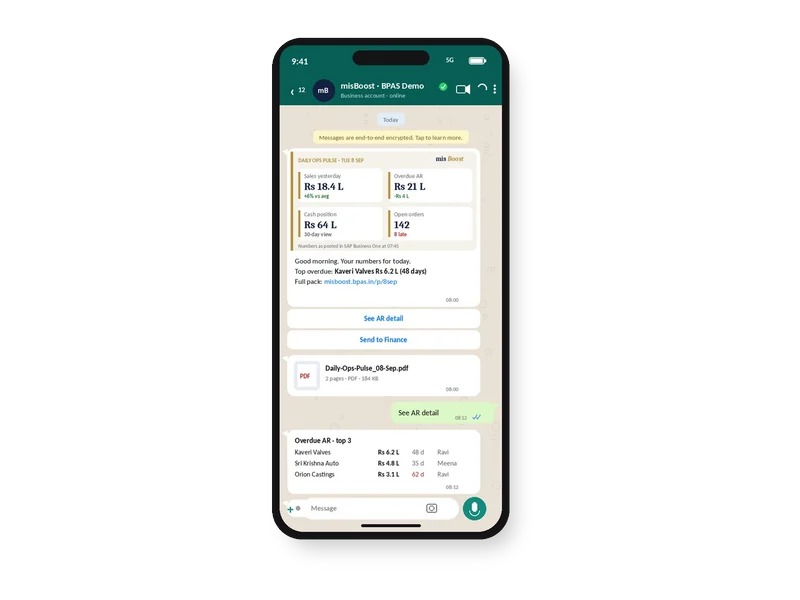
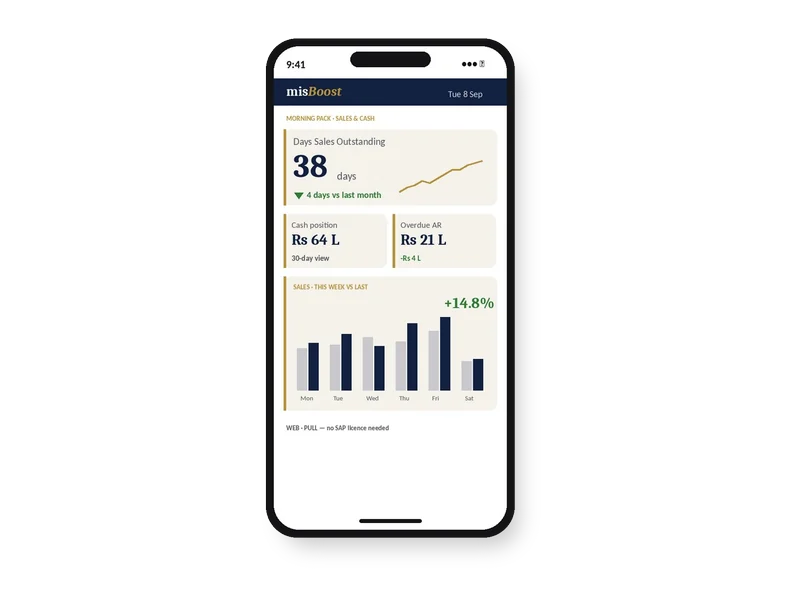
Management numbers from your SAP Business One, sent on autopilot
The packs build themselves from your SAP Business One data and arrive on their own, so nobody prepares or sends them. It works on any SAP Business One installation, with no manufacturing or warehouse project needed.
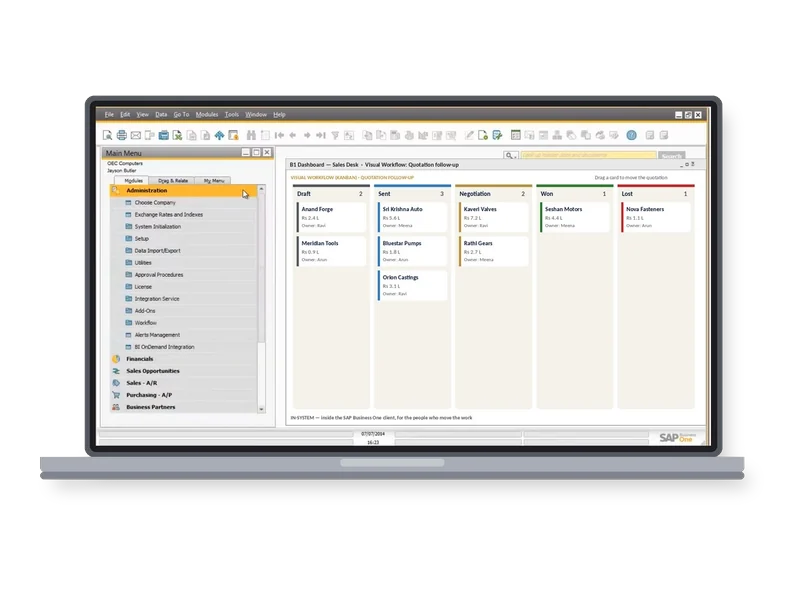
Every SAP Business One module, and how Boyum extends it
Sixteen areas of SAP Business One, and the Boyum IT solution that extends each one.
Company Setup, Approvals and Authorizations
In standard SAP Business One
- Company Details holds the company's data, and General Settings sets its defaults, tab by tab.
- Posting Periods are Unlocked, Unlocked Except Sales, Closing Period or Locked, and Document Numbering sets a numbering series for each document type.
- Approval templates hold a document as a draft until the approvers in each approval stage approve it, Alerts Management tells selected users when a set condition occurs, and Authorizations give each user or user group Full Authorization, Read-Only or No Authorization for each window and function; what a user can open also depends on their licence type.
- Approval Process and Alerts Management
- Authorizations and Data Ownership
- Posting Periods and Document Numbering
Extend with Boyum IT
- The B1 Validation System runs a check or an action when a trigger fires and its condition is met.
- Mandatory Fields stop a document being added until the fields you choose are filled, and Function Buttons add buttons to most SAP Business One windows.
Chart of Accounts, Cost Accounting and Fixed Assets
In standard SAP Business One
- The Chart of Accounts arranges G/L accounts in drawers and levels, with control accounts for business partners.
- Journal entries, posting templates and recurring postings record the books, and Exchange Rate Differences revalues open foreign-currency items at a period-end rate.
- With Use Multidimensions, cost accounting allocates costs and revenues through Cost Centers and Distribution Rules across several dimensions.
- Once Fixed Assets is enabled, it runs capitalisation, depreciation runs, transfer and retirement, posting to the general ledger.
- Chart of Accounts and Journal Entry
- Budgets, Cost Centers and Distribution Rules
- Fixed Assets and depreciation runs
Extend with Boyum IT
- B1 Validation System rules can stop a document being added when a condition is not met, and B1 Dashboard shows charts and grids from your own queries on the SAP Business One client.
Activities and Campaigns in One Place
In standard SAP Business One
- Phone calls, meetings, tasks and notes are recorded as activities for business partner contacts, and linked from documents, opportunities, service calls and project stages.
- An activity can recur daily, weekly, monthly or annually, and the Activities Overview lists activities by the criteria you choose.
- The Campaign Generation Wizard creates and runs campaigns for selected business partners.
- Activities for calls, meetings, tasks and notes
- Activities Overview and My Activities
- Campaign Generation Wizard
Extend with Boyum IT
- Function Buttons and B1 Validation System triggers can run Universal Functions such as Create Activity, and Universal Functions can also run on a schedule.
Pipeline from Lead to Won Order
In standard SAP Business One
- Each sales opportunity carries its potential amount, weighted amount, stage, partners, competitors and reasons, linked to documents and activities.
- Opportunity Stages define the stages used in sales opportunities.
- The Opportunities Pipeline and Opportunities Forecast reports cover the open pipeline, and status reports list won and lost opportunities.
- Opportunity Stages and weighted amount
- Opportunities Pipeline and Opportunities Forecast
- Won and lost opportunities
Extend with Boyum IT
- B1 Dashboard widgets built from your own SQL queries can chart the pipeline by stage and owner on the SAP Business One client.
Quotation to Invoice to Collection
In standard SAP Business One
- A sales quotation copies into a sales order, a delivery and an A/R invoice, each the target document of the one before.
- When a customer goes over the credit limit or commitment limit, a warning appears and only users with the matching authorization can go on.
- A/R down payment requests and invoices, A/R reserve invoices, returns and A/R credit memos sit in the same flow, and the Dunning Wizard creates letters for overdue invoices.
- Copy From and Copy To between sales documents
- Credit limit and commitment limit checks
- Down payments, returns and A/R credit memos
Extend with Boyum IT
B1 Print & Delivery Produmex Scan
- B1 Print & Delivery can email a sales document in its Crystal Reports layout when you press Add.
- Produmex Scan picks a pick list by barcode on the handheld and creates the delivery with the picked quantities.
Purchase Request to Vendor Invoice
In standard SAP Business One
- Purchase requests record who asked, the Purchase Quotation Generation Wizard creates vendor quotations in a batch, and the Quotation Comparison report sets them side by side.
- A Goods Receipt PO records what the vendor delivered and updates stock, and the A/P invoice posts the payable.
- Landed Costs, based on the Goods Receipt PO, add transport, customs, insurance and taxes to the item cost.
- Purchase Request and Purchase Quotation
- Goods Receipt PO against the order
- Landed Costs on imports
Extend with Boyum IT
- On the handheld, choose an open purchase order, enter or scan the items and quantities, and Post creates the Goods Receipt PO.
- Produmex Scan also reads GS1-128 barcodes, including GTIN, batch, serial and expiry date.
One Record for Every Customer and Vendor
In standard SAP Business One
- Business Partner Master Data holds customers, vendors and leads in one record, with contact persons, addresses, payment terms, accounting and tax data.
- Each partner carries its price list, credit limit and commitment limit.
- Sales and purchase blanket agreements hold longer-term terms, and Internal Reconciliations match debits and credits on the partner's account.
- Customers, vendors and leads
- Payment terms, price lists and credit limits
- Blanket agreements and Internal Reconciliations
Extend with Boyum IT
- Mandatory Fields on the business partner window mean the fields you choose must be filled before the record is added.
Payments, Deposits and Bank Reconciliation
In standard SAP Business One
- Incoming Payments record customer receipts by cash, cheque, bank transfer, credit card or bill of exchange, applied to invoices, and Outgoing Payments pay vendors.
- Deposits take cheques, credit card vouchers and cash to the bank.
- The Payment Wizard creates payments in a batch to clear open A/R and A/P invoices, and bank statements are reconciled against open transactions.
- Incoming Payments and Outgoing Payments
- Payment Wizard
- External Reconciliation
Extend with Boyum IT
- B1 Validation System rules and Function Buttons can be added to the banking windows, so checks and actions run where payments are entered.
Stock by Warehouse, Bin, Batch and Serial
In standard SAP Business One
- Item Master Data marks each item as an inventory, sales and/or purchase item, with its item group, unit of measure group and planning data.
- Stock sits in multiple warehouses and, where they are enabled, bin locations, with batch and serial numbers traced forward and back.
- Goods Receipt, Goods Issue and Inventory Transfer move stock, Inventory Counting and Inventory Posting correct it, and the Pick and Pack Manager releases orders for picking.
- With perpetual inventory, each stock movement posts its value to the ledger.
- Warehouses and bin locations
- Batches and serial numbers with trace reports
- Moving Average, Standard and FIFO valuation
Extend with Boyum IT
Produmex Scan Produmex WMS Perfion PIM
- Produmex Scan runs stock transfers and counting by barcode against SAP Business One documents.
- Produmex WMS models warehouses, zones and bins in its Organizational Structure, and runs reception, put-away, picking, packing and shipping on the Produmex Mobile Client (WMS Professional and WMS Terminal licences).
- Perfion PIM keeps product information in one place, with values per language, and brings it into SAP Business One through B1UP.
Machines and People as Resources, with Capacity and Cost
In standard SAP Business One
- Resource Master Data defines resources of type Machine, Labor or Other, each in a resource group, with up to ten standard cost components per unit (perpetual inventory).
- The Resource Capacity window shows Internal, Committed, Consumed and Available capacity per resource by day.
- Resources go on bills of materials and production orders, so capacity and cost are planned alongside materials.
- Resource types Machine, Labor and Other
- Resource Capacity by day
- Standard cost components per resource
Extend with Boyum IT
- Beas Manufacturing adds “Consider resource limits” per resource and automatic optimisation to a faster alternative resource (both need the APS licence).
- It also adds resource calendar exceptions and maintenance plans (Maintenance licence).
Bills of Materials and Production Orders
In standard SAP Business One
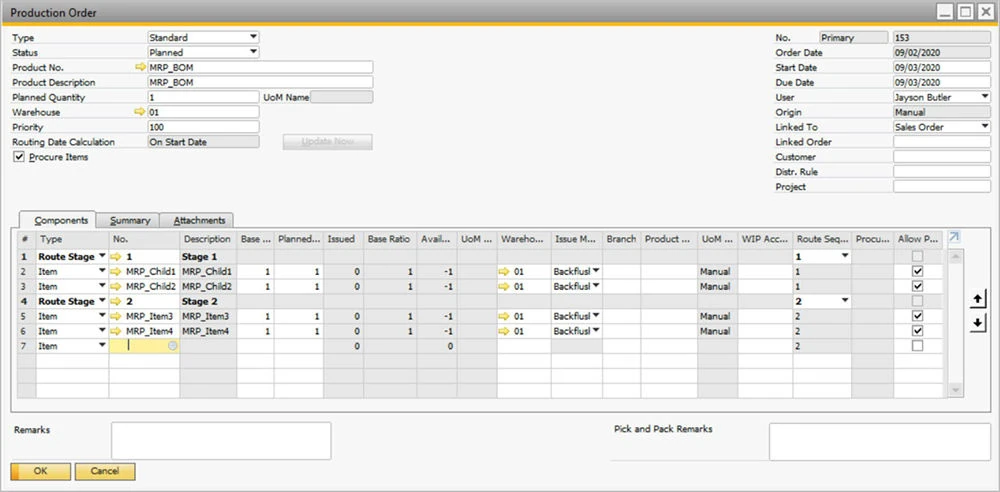
- A Bill of Materials is of type Production, Assembly, Sales or Template, with lines of type Item, Resource, Text or Route Stage.
- A Production Order is Standard, Special or Disassembly, and moves through Planned, Released, Closed and Canceled.
- Components are issued by hand or backflushed on receipt, Receipt from Production brings finished items and by-products into stock, and closing the order clears WIP to the variance account.
- Bill of Materials types
- Issue for Production and Receipt from Production
- WIP and variance on closing
Extend with Boyum IT
- Beas Manufacturing adds routings, factory data capture, the Production Cockpit, QC-inspection plans, item versions and post-calculation per work order.
Demand Turned into Purchase and Production Plans
In standard SAP Business One
- Forecasts hold expected demand per item, daily, weekly or monthly, entered by hand or generated from sales history.
- The MRP Wizard runs saved MRP scenarios from item selection, inventory, documents, forecasts and each item's planning data.
- The Order Recommendation report lists the production orders, purchase orders, purchase quotations, purchase requests and inventory transfer requests to create, and documents are created from the rows you select.
- Forecasts
- MRP Wizard and MRP scenarios
- Order Recommendation
Extend with Boyum IT
- Beas Manufacturing adds its own MRP Wizard with scenarios and purchase and production recommendations, and MRP2 for resource load against capacity.
Service Calls, Contracts and Equipment
In standard SAP Business One
- Service Calls record each customer issue with its assignee, queue and status.
- Service Contracts cover a customer, an item group or a serial number, with templates that set coverage and resolution time.
- Customer Equipment Cards hold each serial number with its contracts and call history, and the Solutions Knowledge Base keeps problems and their solutions on record.
- Service Calls by queue and status
- Service Contracts and Contract Templates
- Customer Equipment Cards
Extend with Boyum IT
- Function Buttons and B1 Validation System rules can be added to the Service Call window to run Universal Functions, such as Create Activity.
Employee Records and Time Sheets
In standard SAP Business One
- Employee Master Data holds company employees with their department and absence information: date range, absence type, reason and approver.
- The Time Sheet records activity times for employees, users or others against activity type, financial project, stage and service call.
- Employee Master Data
- Absence information
- Time Sheet
Extend with Boyum IT
- Mandatory Fields can be set on the Employee Master Data window, so the fields you choose must be filled before a record is added.
Projects in Stages, Tasks and Documents
In standard SAP Business One
- Once Project Management is enabled, projects and subprojects run in stages, with tasks, owners and dates.
- Each stage records its open issues and links sales, purchasing and inventory documents, journal entries and service calls.
- The Summary tab compares the phase budget with A/P and A/R totals and shows the variance.
- Stages, tasks and open issues
- Linked documents per stage
- Phase budget against actual
Extend with Boyum IT
- B1 Dashboard widgets built from your own SQL queries can chart project budget against actual.
Financial, Sales and Stock Reports
In standard SAP Business One
- The Balance Sheet, Trial Balance, Profit and Loss Statement and Cash Flow run with comparison and budget versions.
- Customer Receivables Aging and Vendor Liabilities Aging list open items, and Sales Analysis and Purchase Analysis break results down by partner, item and sales employee.
- The Query Generator and Query Wizard build your own reports, saved in the Query Manager, and Drag & Relate shows related data by business object.
- Financial statements and aging reports
- Sales Analysis and Purchase Analysis
- Query Generator and Query Manager
Extend with Boyum IT
- B1 Dashboard puts charts, grids and SQL reports on the SAP Business One client.
- B1 Print & Delivery shows, prints, saves and emails documents and reports in Crystal Reports layouts, from the standard buttons, in mass delivery, or on a schedule with its server component.
BPAS delivers the Boyum IT solutions for SAP Business One: B1UP, Beas Manufacturing, B1 Print & Delivery, Produmex WMS, Produmex Scan and Perfion PIM. An SME manufacturer putting in SAP Business One as its first ERP? Our sister company MEIS implements it
Browse all 16 module guidesNo ERP yet? Meet MEIS
For SME manufacturers putting in their first ERP, MEIS implements SAP Business One or Business Central.
Live in weeks, not months.
Visit meis.in ↗ (opens in a new tab)- Choose your ERP SAP Business One or Business Central
- MEIS implements it Your manufacturing ERP, live
- Add the Boyum solutions The ones on this page, for your ERP
See the Boyum IT solutions on SAP Business One
Bring one process your team still runs in spreadsheets or on paper, and see the Boyum IT solution that covers it, working inside SAP Business One.
 The world's first Boyum Partner Center of Excellence. Spanning the entire Boyum Solutions portfolio — SAP Business One, B1UP, Beas Manufacturing, and Produmex WMS & Scan. Hosted in the cloud, available for evaluation and proof-of-concept work. See it to believe it — get convinced by working on it. Try Beas first in the PACE sandbox→