

 Microsoft AppSource-approved App
FORNAV for Business Central
Ready-made Business Central reports you can edit, print straight to your printers and send with your own email templates. BPAS works with SME manufacturers across India.
One document, four questions answered
-
01 · Design Can we edit the layout ourselves? The FORNAV Designer edits a report layout and saves it back.
-
02 · Print Straight to the printer? Direct print sends print jobs to a printer without user interaction.
-
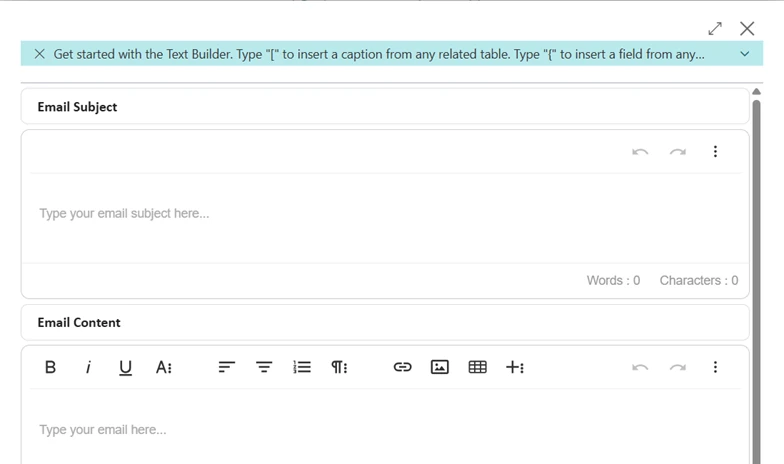
03 · Send Does every email read the same? Email templates fill subject and body from Business Central data.
-
04 · Keep Do we keep a copy? The Document Archive keeps a copy of chosen reports when printed or previewed.
- Design
- Send
- Keep
Three Business Central areas, extended by FORNAV
If your documents still need hand editing before they go out, you do not need to replace your ERP. FORNAV works with the reports, printers and emails your team already uses from Business Central. Each card shows what Business Central does on its own and what FORNAV adds.
-
Business Central Area 02
FORNAV Extension for Business Central Sales
- Business Central on its own
- A sales quote offers products on negotiable terms and can be converted to a sales order or sales invoice when the sale is agreed. Posted, unpaid invoices can be corrected or cancelled; once paid, a sales credit memo or sales return order reverses the sale.
- FORNAV adds
- Order confirmations, sales quotes, sales invoices, credit memos and sales shipments as FORNAV reports, sent straight to a printer with Direct Print and emailed with FORNAV email templates.
-
Business Central Area 03
FORNAV Extension for Business Central Purchasing
- Business Central on its own
- Purchase invoices and purchase orders record purchase costs, track accounts payable and, where inventory is controlled, update inventory levels. A purchase quote reflects a request for quote from a vendor and can be converted to a purchase order.
- FORNAV adds
- Purchase orders, purchase quotes, purchase invoices, credit memos, purchase receipts and return documents as FORNAV reports, with text templates on purchase layouts.
-
Business Central Area 16
FORNAV Extension for Business Central Reporting & Analytics
- Business Central on its own
- Business Central comes with more than 300 built-in reports that can be used in Excel, printed or saved as a file. Data analysis groups, filters and pivots data on list pages, and Open in Excel opens list pages in Excel.
- FORNAV adds
- FORNAV Direct Print sends print jobs from Business Central straight to a printer without user interaction, in the cloud or on-premises, and the FORNAV File Service works with local files from Business Central running in the cloud.
What FORNAV does with your documents, and what it returns
Open any feature to see how it works in Business Central and what it means for time, accuracy and cash. Each one gets its own guide, with core concepts, best practices and a vocabulary.
Reports and Design
Operational Reality (Capabilities)
The FORNAV Customizable Report Pack holds ready-made reports for sales, purchase, service, warehouse, transfer and production documents, finance reports, labels and statements. ForNAV Setup, run from the Assisted Setup page for each company, changes the report selection so Business Central uses the FORNAV reports, and the original setup can be restored from the ForNAV Setup page.
- Sales, purchase and warehouse documents
- Labels, statements and finance reports
- Report selection switched and restorable
Executive ROI Value
Customers and suppliers receive documents with one look, without building every layout from scratch.
- Consistent documents across the company
- Ready-made layouts to build on
Operational Reality (Capabilities)
In the FORNAV Designer, dragging a field from the Field List onto a section creates a new control, and dragging several fields creates a table. Connected to a Business Central online sandbox or to Business Central on-premises, the Designer downloads or creates reports, edits the dataset and the layout, previews the result and saves the report or custom layout back into Business Central.
- Drag and drop from the Field List
- Dataset and layout in one place
- Saved back into Business Central
Executive ROI Value
Layout changes such as a new field on an invoice are made in the Designer, without rewriting the report.
- Faster document changes
- Less dependence on development
Operational Reality (Capabilities)
The Report Settings page overrides a FORNAV report’s number of copies, watermark, language and format region without changing the report itself, for one company or for all companies; its language choice takes priority over every other language source on the report.
- Number of copies and watermark
- Language and format region
- Per company or for all companies
Licence and prerequisites: FORNAV 8.3.0.0 or later; the format region override needs Business Central 22 or later
Executive ROI Value
Each company prints the right number of copies, in the right language, without a separate report for each.
- Fewer report variants to maintain
- Correct language per company
Operational Reality (Capabilities)
FORNAV tests the health of reports and settings: the tests run in a background task when the ForNAV Setup page opens, and the Check DataItems test runs on the report card. The ForNAV Health List shows every issue found, and the ForNAV Health card gives detailed information about the cause and hints on how to fix it.
- Tests run in the background
- A list of every issue found
- Hints on how to fix each issue
Executive ROI Value
Problems with reports and settings show up in a list, instead of on a customer’s document.
- Fewer broken documents
- Faster fixes after changes
Printing
Operational Reality (Capabilities)
The direct print component sends print jobs from Business Central directly to a printer without any user interaction, started by a user action or the report request page, or from AL code in APIs or the job queue. It works from Business Central in the cloud or on-premises, prints FORNAV, RDLC and Word reports, and also prints existing PDF documents such as technical drawings.
- No user interaction needed
- Cloud and on-premises
- FORNAV, RDLC, Word reports and PDFs
Executive ROI Value
Pick lists, labels and documents come out of the right printer without someone opening and printing each one.
- Less time spent printing
- Technical drawings printed from Business Central
Operational Reality (Capabilities)
Client-print runs on the user’s Windows computer in the logged-in user’s context, which suits roaming and home-office users. Service-print is installed on one or more servers as a central print solution that monitors a print queue in Business Central, so it can print from API calls, non-Windows devices and the job queue. Both can be used in the same Business Central installation.
- Client-print on the user’s computer
- Service-print as a central print queue
- Both together in one installation
Executive ROI Value
Office users print from their own computer, while jobs from the job queue reach the shop-floor printers centrally.
- Printing that fits each location
- Central logging with service-print
Operational Reality (Capabilities)
Direct print supports ZPL (Zebra printing language) and other raw print jobs alongside Windows printing. ZPL jobs, built as part of a Business Central extension and sent through the FORNAV print queue to a Zebra label or receipt printer, give faster printing, cutting, dynamic page heights and programming of RFID chips, and the FORNAV Designer supports barcode types including Code128, EAN13, GS1-128, DataMatrix and QRCode.
- ZPL and raw print jobs
- Faster label printing and cutting
- Barcodes in the Designer
Licence and prerequisites: ZPL printing: FORNAV Customizable Report Pack 6.3.0.7 or later (or FORNAV 6.3.0.2289 or later), and a valid FORNAV licence
Executive ROI Value
Label printers on the shop floor and in dispatch can receive print jobs from Business Central, and report layouts can carry the barcodes customers ask for.
- Labels printed where goods are packed
- Barcodes in report layouts
Emails and Texts
Operational Reality (Capabilities)
Email templates hold reusable email bodies and subjects built with merge fields and recipient rules for To, CC and BCC. When a document is emailed, FORNAV selects the matching approved template, fills it with Business Central data and resolves the recipients before Business Central sends the email.
- Reusable subjects and bodies
- Recipient rules for To, CC and BCC
- Filled from Business Central data
Licence and prerequisites: Business Central version 25 or later; Template Status from FORNAV Report Pack 8.2.0.17
Executive ROI Value
Invoices, order confirmations and purchase orders go out with the approved wording and the recipients set for each scenario.
- Consistent customer communication
- Fewer emails sent to the wrong person
Operational Reality (Capabilities)
Text templates are reusable HTML texts that merge Business Central data, with an optional language and active period. Types flagged Use On Document flow into sales and purchase layouts, and the predefined PRE and POST types are already wired into the standard sales and purchase reports. Only templates with the Template Status Approved are used.
- Reusable texts with merge fields
- PRE and POST texts on documents
- Draft, Pending Approval, Approved, Retired
Licence and prerequisites: Template Status: FORNAV Report Pack 8.2.0.17 or later
Executive ROI Value
Terms, delivery notes and messages on documents are written once, approved and reused.
- One approved wording per message
- Text changes without layout changes on standard documents
Operational Reality (Capabilities)
From FORNAV 8.3, text templates and email template bodies support repeater tables, which print one row per record, including nested repeaters and field totals, and barcodes. Merge fields support format strings for numbers, amounts, dates and times, and currency amounts use the document’s currency symbol or code.
- Repeater tables with field totals
- Barcodes in templates
- Formatted numbers, dates and amounts
Licence and prerequisites: Repeater tables and barcodes: FORNAV 8.3 or later; format strings: FORNAV Report Pack 8.2.0.17 or later
Executive ROI Value
Order lines, totals and a barcode can appear inside an email or a document text, not only in the report layout.
- Richer emails without new reports
- Amounts shown in the right format
Records and Control
Operational Reality (Capabilities)
FORNAV archives a report when it is previewed, downloaded as Word, HTML or PDF, or printed, for the reports entered in the ForNAV Archive Setup page. On the ForNAV Document Archive page, super users search documents by their primary keys, download them, export them to a zip file for backup, purge their contents and see the history of actions; they cannot delete or modify the history.
- Archive on preview, download or print
- Search, download and zip backup
- A history that cannot be changed
Licence and prerequisites: FORNAV Report Pack 5.4 or higher (Business Central online, or on-premises version 16 or higher); archive pages for super users only
Executive ROI Value
A copy of what was sent to a customer or supplier can be found when a question or a dispute comes up.
- Proof of what was sent
- Backups of documents by month or year
Operational Reality (Capabilities)
A FORNAV report can be designed to sign its PDF output with a valid PFX certificate, and can protect PDF files with an owner password and a user password, controlling whether data extraction, printing, modification and interaction are allowed with the user password.
- Digital signatures with a PFX certificate
- Owner and user passwords
- Data extraction, printing and modification permissions
Executive ROI Value
Documents leaving the company can carry a digital signature, and sensitive ones can be locked against changes.
- Trusted documents for customers
- Control over what recipients can do
Operational Reality (Capabilities)
On the ForNAV Setup page, Backup exports the FORNAV setup, layouts, language and file storage to a zip file, all at once or only the selected lines, and Import brings them into another environment. Conflicts with existing data are shown in the Error column of the import worksheet.
- Setup, layouts and language in one zip
- Export all or selected lines
- Conflicts shown before import
Executive ROI Value
Report changes are built on a test copy and moved to the live company as one backup file.
- Safer report changes
- No retyping between environments
Operational Reality (Capabilities)
Source Control tracks changes to the FORNAV setup tables: every change must be committed with a message, and FORNAV keeps a log of the commits. Changes can also be pushed to and pulled from a remote repository on GitHub or Azure DevOps, compared side by side and resolved where they conflict.
- Commits with a message
- GitHub and Azure DevOps remotes
- Side-by-side comparison
Licence and prerequisites: Business Central 23.0 or later; FORNAV Report Pack 8.1.0.15 or later; Azure DevOps remote repositories: FORNAV 8.2 or later
Executive ROI Value
Each setup change carries a commit message, and with a remote repository the full change history is kept.
- A record of report changes
- Uncommitted changes can be discarded
Files and Excel
Operational Reality (Capabilities)
The File Service lets Business Central running in the cloud or a hosted environment work with local files. Aliases in its configuration decide which folders are available to Business Central, and these folders can be registered as a standard Business Central File Account, so that features such as Document Attachments can read and write them; from FORNAV 8.3 it supports the External File Storage Connector.
- Local folders from the cloud
- Folders chosen with aliases
- Document Attachments in local folders
Licence and prerequisites: A valid FORNAV licence (the File Service runs in trial mode for 30 days after installation); the External File Storage Connector needs FORNAV 8.3 or later and Business Central 28.0 or later
Executive ROI Value
Drawings and documents stay on the company’s own file server while Business Central runs in the cloud.
- No move to new storage needed
- Files where the team keeps them
Operational Reality (Capabilities)
The Report Pack contains Excel reports that export aggregated data from the Business Central ledger tables, run from their parent pages such as the Customer List and Vendor List. They aggregate data per month by dimension, with filters on dimension, posting date and the root table, hyperlinks from every decimal number back into Business Central and a standard pivot table.
- Monthly totals by dimension
- Hyperlinks back to the details
- A ready pivot table
Licence and prerequisites: FORNAV Report Pack 7.0 or later
Executive ROI Value
Finance gets monthly customer and vendor figures in Excel, with each number traceable to its entries.
- Faster month-end analysis
- Numbers traceable to the source
FORNAV licence. The FORNAV Customizable Report Pack is available on Microsoft AppSource for Business Central online. For Business Central on-premises, FORNAV also offers the Report Pack (Universal Code) for OnPrem, which renders reports on your own server without the FORNAV service and requires the same licence as FORNAV OnPrem; the File Service and ZPL printing need a valid FORNAV licence. Some features name a minimum FORNAV or Business Central version, shown on their rows.
FORNAV works inside your Business Central
ForNAV Setup switches the report selection to FORNAV reports from the Customizable Report Pack, and the original setup can be restored. Direct Print and email templates then print and send those documents.
- ◆Exclusive Boyum Practice. India's No.1 Customer-referred Boyum IT Partner.
- ★Boyum APJ Partner Excellence Award 2024
Swipe sideways to see the full diagram
-
01
Microsoft AppSource-approved
The FORNAV Customizable Report Pack is available on Microsoft AppSource for Business Central online, and as the Report Pack (Universal Code) for on-premises.
-
02
Back to standard at any time
ForNAV Setup changes the report selection so Business Central uses FORNAV reports, and the original setup can be restored from the ForNAV Setup page.
-
03
Cloud and on-premises printing
Direct print works from Business Central in the cloud or on-premises through a client program or a print service on your own network, and no firewall must be opened for incoming requests.
-
04
Reports checked automatically
Health checks test FORNAV reports and settings, and list each issue with hints on how to fix it.
From hand-edited documents to FORNAV in Business Central
Three steps from the first conversation to FORNAV running in your Business Central.
-
01Step 01
Gap Review on Your Plant
In a BPAS gap review you get a short list of what is costing your plant dates and money today, and the order to fix it in.
You get Your fix list, in order
-
02Step 02
FORNAV Deployment on a Test Copy
FORNAV runs on a test copy of your Business Central company with your own documents, printers and email templates, before it touches live data.
You get FORNAV proven on your own documents
-
03Step 03
Go-Live and Ongoing Support
Your team prints and sends FORNAV documents from go-live, and BPAS stays with your plant after it.
You get Your documents printed and sent with FORNAV
One FORNAV idea every week
Every week BPAS posts a short carousel for SME manufacturers on printing and sending Business Central documents with FORNAV. Swipe through this week's here, or follow BPAS to get the next one in your feed.
In every carousel
- A document problem 01
- Where standard Business Central stops 02
- How FORNAV handles it 03
- Illustrative ₹ impact for an Indian SME plant 04
This week's carousel appears here.
What's new in FORNAV
The latest FORNAV releases in plain words: what changed in each version.
3 releases, newest first
All release updates →- FORNAV
FORNAV 8.3: Report Settings per company and support for Business Central 2026 release wave 2
A Report Settings page sets copies, watermark, language and format region for one company or for all of them; text and email templates support repeater tables and barcodes; and the File Service supports the External File Storage Connector.
Read the update → - FORNAV
FORNAV Report Pack 8.2.0.17: template status and formatting in text and email templates
Merge fields in text and email templates take format strings for numbers, amounts, dates and times; a Template Status of Draft, Pending Approval, Approved or Retired means only approved templates are used; and a Warehouse Picking List report is added.
Read the update → - FORNAV
FORNAV 8.2: Direct Print Process Isolation and Stay in Memory
Support for Business Central 2026 release wave 1; Direct Print Process Isolation, when enabled, keeps a failed print job from disrupting other documents, Stay in Memory keeps client-print running after the first job, and Source Control adds Azure DevOps remote repositories.
Read the update →
See your own documents in FORNAV
Bring the invoice, order confirmation or label your team edits by hand today. We show you the same document as a FORNAV report, printed and emailed from Business Central, before you commit to anything.