BPAS

Boyum ITSAP Certified Boyum Add-on

Produmex Scan for SAP Business One

Barcode scanning for goods receipts, picking, deliveries, transfers and stock counts, with each posting creating or updating its SAP Business One document. BPAS works with SME manufacturers across India.

One order, four questions answered

  1. 01 · Receive Has it arrived? GR PO on the scanner creates the Goods Receipt PO in SAP Business One.
  2. 02 · Move Where should it go? Incoming and Replenishment recommendations are processed on the device as stock transfers.
  3. 03 · Pick Is the order picked? Picking closes the pick list line and creates the delivery with the picked quantities.
  4. 04 · Count Is the stock right? Counting is performed on an SAP Business One Inventory Counting document.
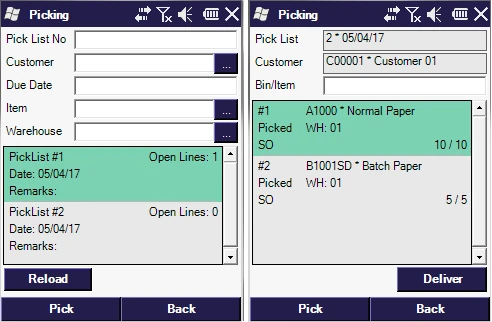
Two Produmex Scan Picking screens: the list of pick lists with open lines, then the lines of one pick list with picked quantities and the Deliver button
Picking on the scanner: choose a pick list created in SAP Business One, pick its lines, then deliver.
Where Standard SAP B1 Stops

Four B1 modules, extended by Produmex Scan

If receipts, picks and counts are still keyed in from paper, you do not need to replace your ERP. Produmex Scan brings barcode scanning to the SAP Business One modules your team already uses. Each card shows what B1 does on its own, what Produmex Scan adds, and where to read more.

  • B1 Module 05

    Produmex Scan Extension for SAP B1 Sales – A/R

    SAP B1 on its own
    Sales documents are copied from a base document to a target document, for example quotation to order to delivery to A/R invoice.
    Produmex Scan adds
    Deliveries from sales orders and A/R reserve invoices; picking of pick lists created in SAP Business One; packing; batch-number sales flows; Sales Return and Credit Note on the scanner.
  • B1 Module 06

    Produmex Scan Extension for SAP B1 Purchasing – A/P

    SAP B1 on its own
    A Goods Receipt PO records the delivery of goods from a vendor and updates inventory; in a perpetual inventory system it posts the inventory value.
    Produmex Scan adds
    GR PO and Free GR PO create the Goods Receipt PO on the scanner, with batches, serial numbers and bin locations; Goods Return from the Goods Return Request; receipt labels.
  • B1 Module 09

    Produmex Scan Extension for SAP B1 Inventory

    SAP B1 on its own
    Inventory Counting with single or multiple counters and item freeze, and Inventory Posting for the differences.
    Produmex Scan adds
    Stock Transfers, Stock Transfer Requests and Mass Transfer; Incoming and Replenishment recommendations; Goods Receipt and Goods Issue; Counting, Quick Counting and Guided Counting on the Inventory Counting document.
  • B1 Module 11

    Produmex Scan Extension for SAP B1 Production

    SAP B1 on its own
    Components are issued for production manually, or backflushed automatically on receipt from production.
    Produmex Scan adds
    Issue for Production for released production orders and Return Components for issued components; Receipt for Production with rejected quantities and batch splits; by-products; picking for production orders.
BPAS proprietary

misBoost

A management layer for SAP Business One

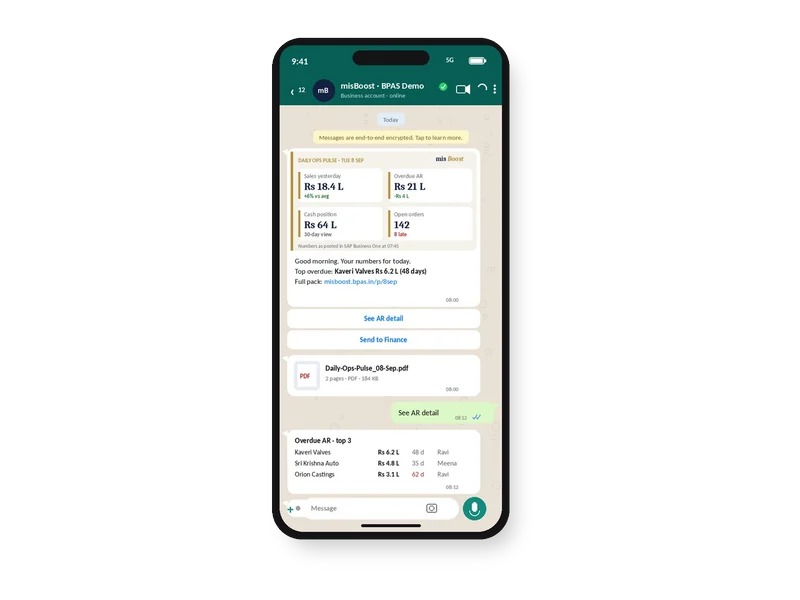
Management numbers from your SAP Business One, sent on autopilot

The packs build themselves from your SAP Business One data and arrive on their own, so nobody prepares or sends them. It works on any SAP Business One installation, with no manufacturing or warehouse project needed.
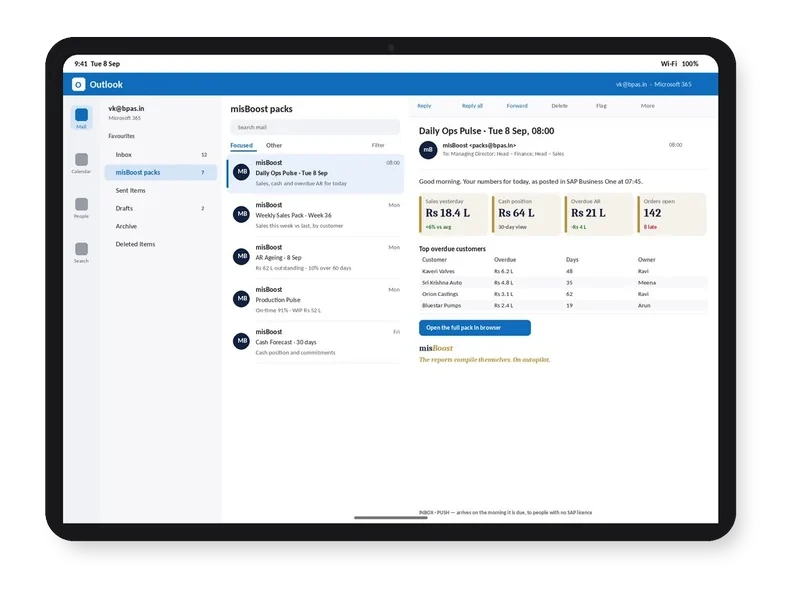
misBoost morning pack arriving in Outlook on a tablet, headline numbers in the email itself
Email
misBoost pack on WhatsApp on a phone, headline numbers with the PDF attached
WhatsApp
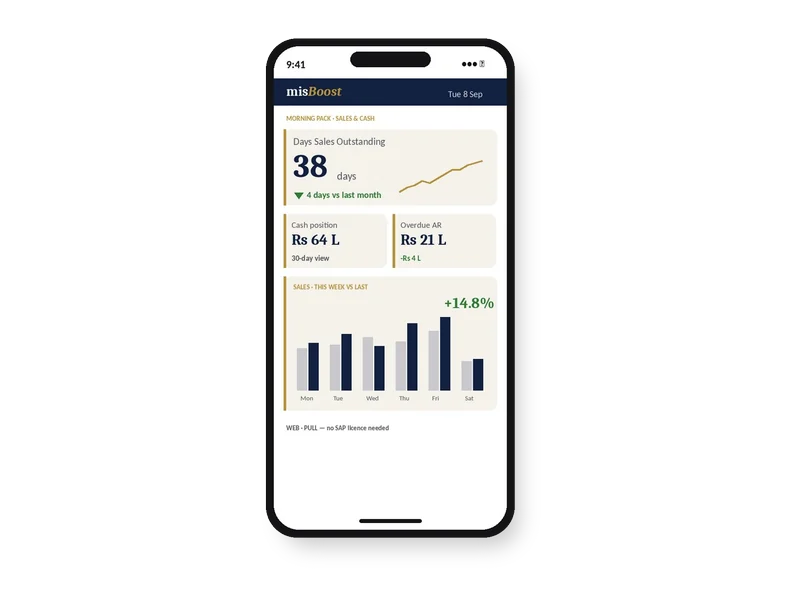
misBoost KPIs and dashboards on a phone, as a published page with no app
Mobile
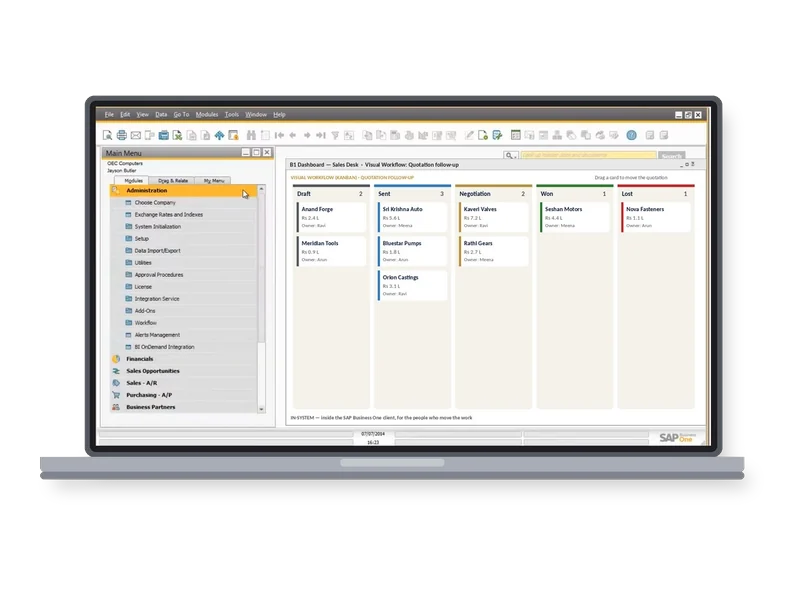
misBoost Visual Workflow board inside the SAP Business One client on a laptop
Inside SAP
Explore misBoost
235
boosters in ten domains Sent on autopilot
Produmex Scan Features

What Produmex Scan does on the floor, and what it returns

Open any feature to see how it works in the system and what it means for stock, time and cash. Each one gets its own guide, with core concepts, best practices and a vocabulary.

Purchasing

Operational Reality (Capabilities)

GR PO creates a Goods Receipt PO in SAP Business One from the purchase order, and items that are not on the purchase order cannot be added. Free GR PO receives stock without a purchase order and, where an existing purchase order matches on vendor, item and warehouse, links the Goods Receipt PO to its lines in due-date order. Batches, serial numbers and bin locations are entered on the scanner, and receipt labels can be printed.

  • GR PO and Free GR PO
  • Batches, serial numbers and bin locations scanned
  • Receipt labels and, on Android, photos added
Executive ROI Value

Goods are booked into SAP Business One at the dock as they are counted, against the purchase order.

  • No receipts re-keyed from paper
  • Only ordered items accepted on GR PO
Guide in preparation Extends SAP B1: Purchasing – A/P · Inventory

Operational Reality (Capabilities)

Goods Return uses the Goods Return Request as its base document and creates the Goods Return document in SAP Business One with the prepared quantities. Any batch in stock can be released, not only the batches on the Goods Receipt PO.

  • Based on the Goods Return Request
  • Goods Return document with the prepared quantities
  • Any batch in stock can be returned
Executive ROI Value

Rejected goods leave with a matching SAP Business One document, so the stock stays correct.

  • Returns recorded at the dock
  • A clear record of what went back
Guide in preparation Extends SAP B1: Purchasing – A/P · Inventory

Production

Operational Reality (Capabilities)

Issue for Production lists the released production orders and their components with the Manual issue method, and Post creates the Issue for Production document in SAP Business One. Materials can be issued from several bin locations and batches. Return Components creates the Return From Production document.

  • Released production orders listed
  • Several bin locations and batches per issue
  • Return Components back to stock
Executive ROI Value

Components are booked to the production order as they are issued, not at the end of the day.

  • Material on the order as it is issued
  • Returned components back in stock
Guide in preparation Extends SAP B1: Production · Inventory

Operational Reality (Capabilities)

Receipt for Production creates the Receipt From Production document in SAP Business One. A flawed product is received with the Rejected checkbox, and received products can be split into several batches. The By-product function lists released production orders that contain a by-product and creates the Receipt from production document for it.

  • Rejected checkbox for flawed products
  • Received products split into batches
  • By-products received on the scanner
Executive ROI Value

Finished and rejected quantities are recorded where the work ends.

  • Output booked as it is made
  • Rejected quantities flagged at receipt
Guide in preparation Extends SAP B1: Production · Inventory

Deliveries

Operational Reality (Capabilities)

The Sales Orders function creates a delivery from a sales order or an A/R reserve invoice in SAP Business One. For a Sales BoM item only the components are issued, and Assembly BoMs are not supported. Cash & Carry creates a delivery for a customer while the items are picked, and only inventory items can be scanned.

  • From a sales order or an A/R reserve invoice
  • Sales BoM components issued
  • Cash & Carry deliveries
Executive ROI Value

The delivery is created from the order as the goods are scanned, not typed in afterwards.

  • Delivery quantities taken from the scan
  • Counter sales recorded at once
Guide in preparation Extends SAP B1: Sales – A/R

Operational Reality (Capabilities)

After a pick list is created in SAP Business One, it is picked on the scanner. For a sales order or an A/R reserve invoice, Produmex Scan closes the pick list line and creates the delivery with the picked quantities; for a production order it creates the Issue for production document; for an Inventory Transfer Request, the Inventory Transfer document. Real-Time Picking adds the picked quantity to the SAP Business One Pick List each time the operator posts. Pick lists with mixed base document types are not supported.

  • Sales orders, production orders and transfer requests
  • Delivery, issue or transfer created from the pick
  • Real-Time Picking updates the SAP B1 Pick List
Executive ROI Value

Pick lists made in the office reach the scanner, and each pick ends in the right SAP Business One document.

  • One picking process for sales, production and transfer pick lists
  • Picked quantities visible in SAP B1
Guide in preparation Extends SAP B1: Sales – A/R · Production · Inventory

Operational Reality (Capabilities)

The Packing function starts from the Warehouse main menu and works on Delivery documents. The operator numbers each package and packs items into it by line or by scanning the item code, and when the operator taps Done, the packing data is recorded in SAP Business One.

  • Packing by delivery
  • Items packed by line or by item code
  • Packing data recorded in SAP B1
Executive ROI Value

What went into each package is on the delivery, not only on a handwritten slip.

  • Package contents on record
  • Fewer queries about what was shipped
Guide in preparation Extends SAP B1: Sales – A/R

Operational Reality (Capabilities)

BN Create SO builds a sales order from scanned batch numbers: it is kept as a preliminary sales order on the scanner, and Post creates the sales order in SAP Business One. BN Delivery picks the batches allocated to those sales orders and creates the Delivery document. BN Transfer moves stock by batch number, and BN SO Transfer serves the sales orders created with BN Create SO; both create a Stock Transfer document.

  • BN Create SO and BN Delivery
  • BN Transfer and BN SO Transfer
  • Sales order, Delivery and Stock Transfer in SAP B1
Executive ROI Value

Batch-managed products are sold, picked and moved by the batch on the label.

  • The batch scanned is the batch shipped
  • Orders built from the stock on hand
Guide in preparation Extends SAP B1: Sales – A/R · Inventory

Operational Reality (Capabilities)

Sales Return SDN uses a Delivery document as its input and creates a Sales Return document; Sales Return SRR uses a Sales Return Request as its input. Deliveries that are already invoiced are returned with the Credit Note function, which takes an A/R Invoice and creates an A/R Credit Memo. Sales Return SDN and Credit Note accept only the batch numbers on the delivery; Sales Return SRR without a related line accepts any batch previously delivered to the customer.

  • Sales Return from a delivery or a Return Request
  • Credit Note from an A/R Invoice
  • Returned batch checked against what was delivered
Executive ROI Value

Returned goods come back with the document that matches how they left.

  • Returns matched to what was delivered
  • Credit memo raised from the scan
Guide in preparation Extends SAP B1: Sales – A/R · Inventory

Stock Transfers

Operational Reality (Capabilities)

Stock Transfer moves stock between bin locations, also in different warehouses, and creates the stock transfer document in SAP Business One. Stock Transfer Request loads requests created in SAP Business One onto the device and creates the stock transfer from the request. Mass Transfer moves all stock from one bin location to another.

  • Stock Transfer between bins and warehouses
  • Stock Transfer Request from SAP B1
  • Mass Transfer of a whole bin location
Executive ROI Value

Stock moved on the floor is moved in SAP Business One at the same time.

  • Bin stock that matches the shelf
  • Whole bins moved in one transaction
Guide in preparation Extends SAP B1: Inventory

Operational Reality (Capabilities)

Produmex Scan supports automatic strategies that recommend stock movements: the Incoming strategy and the Replenishment strategy. The server module creates the recommendations as Stock Transfer Draft documents, which are processed on the device, and Stock Transfer documents are then created. Recommended locations must be scanned again to confirm them.

  • Incoming strategy and Replenishment strategy
  • Recommendations as Stock Transfer Drafts
  • Recommended locations confirmed by scanning
Executive ROI Value

Operators are told where stock should go, and each move is confirmed with a scan.

  • Put-away and replenishment suggested
  • Moves confirmed at the location
Guide in preparation Extends SAP B1: Inventory

Inventory

Operational Reality (Capabilities)

Goods Receipt and Goods Issue are found under Inventory Transactions on the main menu. A started document is kept as a preliminary document and can be reloaded to continue. Where an item has several units of measure, a different one can be selected; Goods Issue accepts inventory items only, and serial numbers are scanned.

  • Goods Receipt and Goods Issue
  • Preliminary documents reloaded to continue
  • Unit of measure selected per item
Executive ROI Value

Stock adjustments are recorded where the stock is, with the item and quantity scanned.

  • Adjustments booked at the shelf
  • Units of measure chosen on the spot
Guide in preparation Extends SAP B1: Inventory

Operational Reality (Capabilities)

Counting is performed on an SAP Business One Inventory Counting document, in three processes: Counting, which shows no stock while counting; Quick Counting, which shows the stock of the bin location or warehouse; and Guided Counting, where only the items on the document can be counted. Up to 5 individual counters or 10 team counters can be selected. By default, the counted items are added to the Inventory Counting document as soon as the counter finishes.

  • Counting, Quick Counting and Guided Counting
  • Up to 5 individual or 10 team counters
  • Counts added to the SAP B1 counting document
Executive ROI Value

Counts are entered on the scanner against the SAP Business One counting document, not on paper sheets.

  • No count sheets to key in
  • Several counters on one document
Guide in preparation Extends SAP B1: Inventory

Operational Reality (Capabilities)

Query Stocks finds stock by warehouse or bin location, item code, or batch or serial number, and can be opened from other functions with Find stocks. Print labels prints labels for bin locations. Bin Locking marks a bin location as Inactive in the Bin Location Master Data; a bin location with open inventory counting documents or with positive or negative inventory cannot be locked.

  • Query Stocks by location, item or batch
  • Bin location labels
  • Bin Locking
Executive ROI Value

Operators find stock from the scanner instead of walking the aisles or calling the office.

  • Less time searching for stock
  • Bins taken out of use on the spot
Guide in preparation Extends SAP B1: Inventory

Control & Devices

Operational Reality (Capabilities)

Mobile Transactions in the SAP Business One Inventory menu list the transactions under preparation, pending, processed and cancelled. A pending transaction is one whose SAP Business One document could not be created: Process tries to create it again, and Cancel leaves it to be created manually. Picking transactions are not listed.

  • Search Mobile Transactions in SAP B1
  • Under preparation, pending, processed, cancelled
  • Pending postings processed again
Executive ROI Value

A posting that did not reach SAP Business One is found and dealt with, not lost.

  • Failed postings visible in the office
  • A record of what was posted from the floor
Guide in preparation Extends SAP B1: Inventory

Operational Reality (Capabilities)

The client runs on Windows CE and Windows Mobile devices and, from version 19.3, as an Android app on an Android scanner or smartphone, with all features of the earlier versions. Produmex Scan reads GS1 Application Identifiers such as GTIN, batch or lot number, expiration date, serial number and quantity, and a smartphone camera can scan GS1-128 barcodes without group separators. When a barcode used for several items is scanned, the Item Selection screen lists those items.

  • Android scanners and smartphones
  • GS1 Application Identifiers
  • Item Selection for shared barcodes

Licence and prerequisites: Android client: an Android scanner or smartphone with Android 6 or later, and Produmex Scan 19.3 or later

Executive ROI Value

GS1 barcodes already on suppliers' labels are read as they are, on the devices the team carries.

  • Supplier GS1 labels scanned as printed
  • A choice of scanners and phones
Guide in preparation Extends SAP B1: Inventory
Device licensing

Produmex Scan – Device license. Produmex Scan devices have concurrent licensing: the number of licences depends on the number of devices used at the same time, and a free licence is allocated to a device when it logs in. The Produmex Scan add-on needs no extra SAP Business One licence; the SAP Business One licence needed depends on the SAP Business One function used to prepare documents.

SAP Certified, Built on SAP Business One

Every scan becomes an SAP B1 document

When an operator posts, the SAP Business One document is created in the company database, not in a separate system.

  • Exclusive Boyum Practice. India's No.1 Customer-referred Boyum IT Partner.
  • Boyum APJ Partner Excellence Award 2024
Inside SAP Business One: GR PO, stock transfer and production postings on Produmex Scan devices create SAP B1 documents through the Service Broker, and Mobile Transactions in the Inventory menu list them. SAP BUSINESS ONE Produmex Scan GR PO Transfers Production SAP B1 documents created on posting listed in MobileTransactions Inventory menu pending ones processed again
Receipts, transfers and production postings on the scanner create SAP B1 documents.
  1. SAP Certified

    Produmex Scan is a Boyum IT product, SAP certified for SAP Business One: a barcode scanning solution that automates warehouse and inventory tasks.

  2. Documents created in SAP B1

    When an operator posts, the relevant SAP Business One document is created, such as the Goods Receipt PO, the delivery, the stock transfer or the Receipt From Production.

  3. Postings traceable

    Mobile Transactions list the scanner transactions, other than picking, as under preparation, pending, processed or cancelled, and a pending one can be processed again.

  4. Several operators on one task

    Several devices can work on the same task at the same time, for example two employees unloading the same shipment.

How BPAS Deploys Produmex Scan

From paper pick lists to Produmex Scan on your floor

Three steps from the first conversation to Produmex Scan running in your warehouse.

  1. Step 01

    Gap Review on Your Plant

    In a BPAS gap review you get a short list of what is costing your plant dates and money today, and the order to fix it in.

    You get Your fix list, in order

  2. Step 02

    Produmex Scan Deployment on a Test Copy

    Produmex Scan runs on a test copy of your SAP Business One company with your own items, warehouses and bin locations, before it touches live data.

    You get Produmex Scan proven on your own data

  3. Step 03

    Go-Live and Ongoing Support

    Warehouse staff scan their own receipts, pick lists and counts from go-live, and BPAS stays with your plant after it.

    You get Your warehouse running in Produmex Scan

BPAS proprietary · ViSA Services

BPAS ViSA Services for SAP Business One

Seven services around the Boyum solutions on your SAP Business One, from the first maturity check to AI inside SAP Business One.

The ViSA wheelViSA, Vipin’s Solution Approach for SME business transformation, at the centre of five segments. Body of Knowledge: 32+ years in IT services; process, automation, analytics. Strategy: transformation clarity; BMM, CJM, KPIs. Process: process implementation; best practices, process models, APQC PCF. Automation: transaction automation; Boyum IT, SAP Business One. Institutionalisation: continuous growth; ADKAR, BSC, audits.Body of Knowledge 32+ years in IT services Process · Automation · AnalyticsStrategy Transformation clarity BMM · CJM · KPIsProcess Process implementation Best practices · Process models · APQC PCFAutomation Transaction automation Boyum IT · SAP Business OneInstitutionalisation Continuous growth ADKAR · BSC · AuditsViSA Vipin’s Solution Approach for SME business transformation
The ViSA wheel: Vipin’s Solution Approach for SME business transformation, the foundation of every service.
Explore ViSA Services
  1. LocategapScanA maturity check and gap discovery: an as-is score for every step, and a clear next move.
  2. AlignprocEnactStrategy first, then the process, then the software.
  3. DeploytoolDeployImplements the Boyum Solutions on your existing SAP Business One, process-first.
  4. ExtenddevCenterCustomises Beas Manufacturing, Produmex WMS and B1UP where standard configuration stops.
  5. SupportmaxValueSupport in measured cycles, from the day after go-live.
  6. CostcostAbsorbAbsorption costing in Beas Manufacturing, on stock held and on goods sold.
  7. IntelligenceaiEnableAI inside SAP Business One, once there is real manufacturing history to learn from.
This Week on LinkedIn

One Produmex Scan idea every week

Every week BPAS posts a short carousel for SME manufacturers on running a warehouse with Produmex Scan. Swipe through this week's here, or follow BPAS to get the next one in your feed.

In every carousel

  • A warehouse problem
  • Where standard SAP B1 stops
  • How Produmex Scan handles it
  • Illustrative ₹ impact for an Indian SME plant
New carousel every week

This week's carousel appears here.

BPAS Weekly carousel · Produmex Scan
Slide 1 · Hook Your weekly carousel appears here Seven slides, posted on LinkedIn every week.
Slide 2 · Shop-floor pain One problem every plant knows Swipe or use the arrows to move through the slides.
Slide 3 · How Produmex Scan works The Produmex Scan answer, step by step Then open the post on LinkedIn to comment or share.
Release Updates

What's new in Produmex Scan

The latest Produmex Scan releases in plain words: what changed in each version.

Latest Boyum IT releases Newest Produmex Scan release Jun 2026

3 releases, newest first

All release updates
  1. Produmex Scan

    Produmex Scan 2025.12: Valid Value Selection Screen and photos on goods receipts

    A new Valid Value Selection Screen (Select From List) lets custom Produmex Scan screens offer a list of valid values instead of free text, on Android and Windows Mobile devices. With Image Capture, photos can be attached to GRPO, Free GRPO and Sales Return documents from the device.

See It Working

See your own warehouse running on Produmex Scan

Bring one item, a recent purchase order and a sales order. We show you the goods receipt, the picking and the delivery on a scanner, with the documents appearing in SAP Business One, before you commit to anything.

World first · 2025 The world's first Boyum Partner Center of Excellence. Spanning the entire Boyum Solutions portfolio — SAP Business One, B1UP, Beas Manufacturing, and Produmex WMS & Scan. Hosted in the cloud, available for evaluation and proof-of-concept work. See it to believe it — get convinced by working on it. Try Produmex Scan first in the PACE sandbox