BPAS

Boyum ITSAP Certified Boyum Add-on

B1 Usability Package for SAP Business One

Rules, buttons, dashboards and data tools that make the SAP Business One your team already uses smoother and easier to work with. BPAS works with SME manufacturers across India.

One window, four questions answered

  1. 01 · Check Is the entry complete? Mandatory Fields make chosen fields mandatory on any SAP Business One window.
  2. 02 · Automate Can SAP B1 do it for me? In the B1 Validation System, a B1 Validation Configuration decides when a Universal Function runs, and the function does the work.
  3. 03 · Click What's the next step? Function Buttons on the right of most windows open the next document or run a function.
  4. 04 · See How are we doing? B1 Dashboard turns the background of the SAP Business One client into a dashboard.
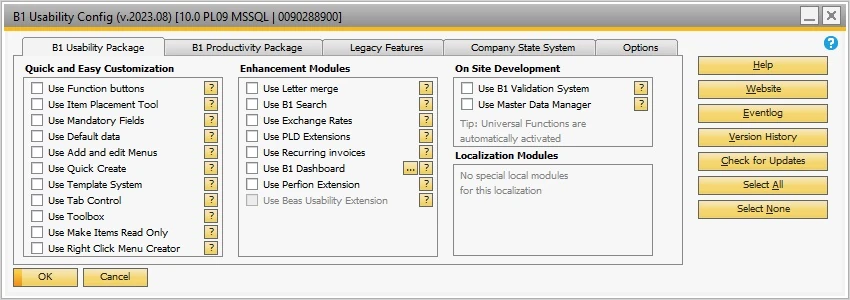
The B1 Usability Config window in SAP Business One, with the modules grouped as Quick and Easy Customization, Enhancement Modules, On Site Development and Localization Modules, each with its own check box
The B1 Usability Package configuration window: each module is switched on with its own check box.
Where Standard SAP B1 Stops

Four B1 modules, extended by B1UP

If SAP Business One windows feel slow to work in, you do not need to replace your ERP. B1UP works inside the modules your team already uses. Each card shows what B1 does on its own, what B1UP adds, and where to read more.

  • B1 Module 05

    B1UP Extension for SAP B1 Sales – A/R

    SAP B1 on its own
    Sales documents are copied from a base document to a target document, for example quotation to order to delivery to A/R invoice.
    B1UP adds
    Mandatory Fields on the Sales Order; line search on sales documents; Mass update Lines to close order lines; Function Buttons that open the delivery or the invoice; Quick Create of items from sales windows.
  • B1 Module 06

    B1UP Extension for SAP B1 Purchasing – A/P

    SAP B1 on its own
    A Goods Receipt PO records the delivery of goods from a vendor and updates inventory; in a perpetual inventory system it posts the inventory value.
    B1UP adds
    Line search on purchase documents; Mass update Lines on purchase requests, quotations and orders; Quick Create of items from purchase windows; the File Importer, which developers program in C# to import data from any file format.
  • B1 Module 09

    B1UP Extension for SAP B1 Inventory

    SAP B1 on its own
    Inventory Counting with single or multiple counters and item freeze, and Inventory Posting for the differences.
    B1UP adds
    Master Data Manager batch changes to master data; Default Data for new Items; Function Buttons that open a goods receipt, goods issue or inventory transfer; WMS dashboards and Kanbans with Produmex WMS.
  • B1 Module 11

    B1UP Extension for SAP B1 Production

    SAP B1 on its own
    Components are issued for production manually, or backflushed automatically on receipt from production.
    B1UP adds
    A Production Orders Kanban board with Planned, Released and Closed columns; BOM Item Navigation; Beas dashboards, Beas functions and the Beas Usability Extension with Beas Manufacturing.
BPAS proprietary

misBoost

A management layer for SAP Business One

Management numbers from your SAP Business One, sent on autopilot

The packs build themselves from your SAP Business One data and arrive on their own, so nobody prepares or sends them. It works on any SAP Business One installation, with no manufacturing or warehouse project needed.
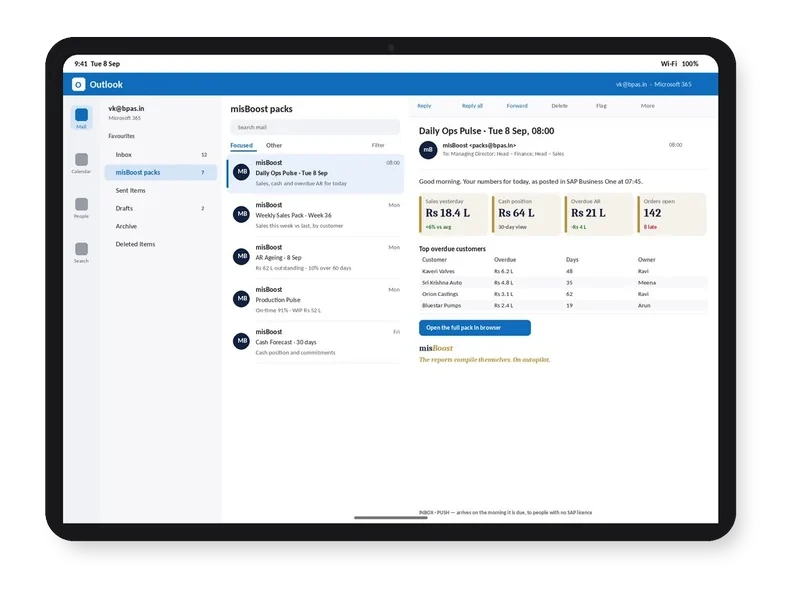
misBoost morning pack arriving in Outlook on a tablet, headline numbers in the email itself
Email
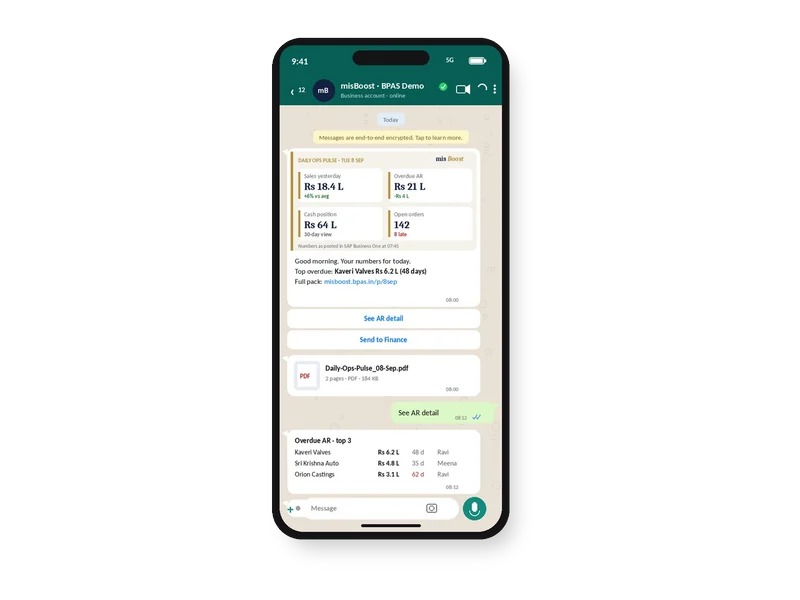
misBoost pack on WhatsApp on a phone, headline numbers with the PDF attached
WhatsApp
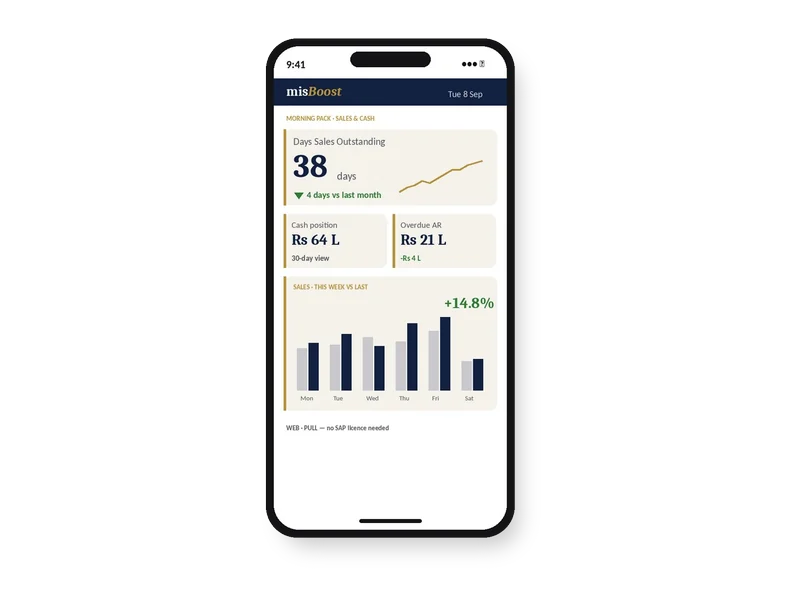
misBoost KPIs and dashboards on a phone, as a published page with no app
Mobile
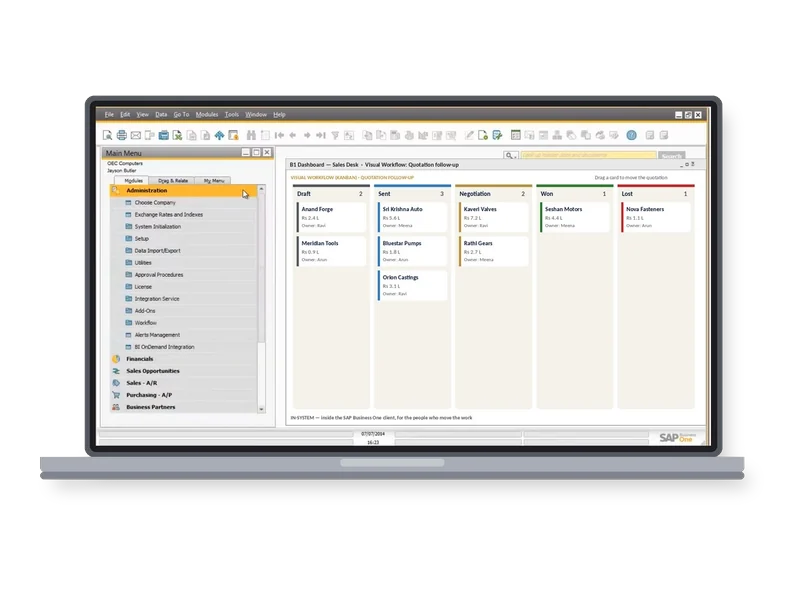
misBoost Visual Workflow board inside the SAP Business One client on a laptop
Inside SAP
Explore misBoost
235
boosters in ten domains Sent on autopilot
B1UP Features

What B1UP does in SAP Business One, and what it returns

Open any feature to see how it works in the system and what it means for time, accuracy and cash. Each one gets its own guide, with core concepts, best practices and a vocabulary.

Automation & Rules

Operational Reality (Capabilities)

The B1 Validation System creates new functionality for SAP Business One: the B1 Validation Configuration decides when the functionality should happen, and a Universal Function decides what should happen. A trigger reacts to events on any SAP Business One window, a simple or SQL condition can limit it, and an event set before the action can block the SAP Business One event.

  • Triggers on any SAP Business One window
  • No condition, simple condition or SQL condition
  • Events before the action can block an entry

Licence and prerequisites: Configured by super-users, consultants or developers with in-depth knowledge of the structure of SAP Business One

Executive ROI Value

Company rules are applied at the moment a document is entered, not found later in a report.

  • Wrong entries stopped as they happen
  • The same rule for every user
Guide in preparation Extends SAP B1: Sales – A/R · Purchasing – A/P · Inventory · Production

Operational Reality (Capabilities)

Universal Functions are a collection of functions activated by the B1 Validation Configuration, by Function Buttons or by the Item Placement Tool, and there can be as many as needed, several of the same type. Function types include Macro, which simulates and scripts events in SAP Business One, Line Loop, SQL Report, Crystal Report, Dashboard, Create Activity, Internal Message, HTTP Trigger, File Importer and File Exporter.

  • As many Universal Functions as needed
  • Macro, Line Loop, SQL Report, Crystal Report and more
  • Started by a rule, a button or the Item Placement Tool
Executive ROI Value

Repeated clicks and manual steps become one function that runs the same way every time.

  • Fewer manual steps per document
  • The same result for every user
Guide in preparation Extends SAP B1: Sales – A/R · Purchasing – A/P · Inventory · Production

Operational Reality (Capabilities)

Function Buttons place buttons on the right-hand side of any window in SAP Business One. A button can trigger a formatted search, open any other SAP Business One window or run a special function, for example opening an order, a delivery, an invoice, a goods receipt or an inventory transfer, and a button can start a Universal Function. Some windows, such as the Main Menu and pop-up windows, do not support Function Buttons.

  • Buttons on the right-hand side of a window
  • Formatted searches, windows and special functions
  • Universal Functions started from a button
Executive ROI Value

The next step for a document is one click away on the window the user already has open.

  • Fewer menu searches
  • Common steps one click away
Guide in preparation Extends SAP B1: Sales – A/R · Purchasing – A/P · Inventory · Production

Operational Reality (Capabilities)

With the File Importer (UFFI), data is imported from any file format using C#; with the File Exporter (UFFE), data is exported from SAP Business One to any format using C#, SQL or a mix. Both can be launched as a normal Universal Function or run on a schedule, and they are the function types used in batch configurations.

  • File Importer (UFFI)
  • File Exporter (UFFE)
  • Batch configurations on a schedule

Licence and prerequisites: Import and export logic is written in C# (and SQL for exports) by a developer; scheduled runs need the server component

Executive ROI Value

Data from other systems moves in and out of SAP Business One by file, without re-keying.

  • No re-keying of file data
  • Exports that run on their own
Guide in preparation Extends SAP B1: Sales – A/R · Purchasing – A/P · Inventory · Production

Windows & Data Entry

Operational Reality (Capabilities)

Mandatory Fields make chosen fields mandatory on any window in SAP Business One, at header and/or column level. The check can run during add, during update and during OK, each switched on separately, and the warning-only option sets a field as mandatory with an override.

  • Header and column level
  • Checks during add, update and OK
  • Warning-only option with override
Executive ROI Value

Documents reach the next team with the fields they need already filled.

  • Fewer incomplete documents
  • Fewer follow-up calls for missing data
Guide in preparation Extends SAP B1: Sales – A/R · Purchasing – A/P · Inventory · Production

Operational Reality (Capabilities)

The Item Placement Tool rearranges data on any window in SAP Business One: fields move between tab-pages, fields never used are hidden, and new tabs can show a Universal Function SQL Report. It works with header-level items, not rows or columns inside a matrix. The Tab Wizard, part of the Item Placement Tool, creates a custom tab or a SQL Report tab, and Make Items Read Only defines items that are read only on any window.

  • Fields moved between tab-pages or hidden
  • Custom tabs and SQL Report tabs
  • Items made read only
Executive ROI Value

Each team sees the fields it uses where it expects them, and cannot change the ones it should not.

  • Simpler windows for each role
  • Protected values stay unchanged
Guide in preparation Extends SAP B1: Sales – A/R · Purchasing – A/P · Inventory · Production

Operational Reality (Capabilities)

The Template System creates a template for selected data in almost every window in SAP Business One, so a selection window is filled out the same way every time; it does not control the matrix. Default Data sets what is default when a new Business Partner or Item is added, and Quick Create creates an item quickly from Item Master Data or directly from purchase and sales windows.

  • Templates for selection windows
  • Defaults for new Business Partners and Items
  • Quick Create from purchase and sales windows
Executive ROI Value

New records and repeated selections start from the same values for everyone.

  • Consistent master data
  • Items created without leaving the order
Guide in preparation Extends SAP B1: Sales – A/R · Purchasing – A/P · Inventory

Operational Reality (Capabilities)

The Toolbox is a series of smaller functionalities, each too small to be a module, and it holds over 40 of them. Examples: Use Line search allows line search on all sales and purchase documents; BOM Item Navigation decides how golden arrows react when they are linked to a Bill of Materials item; Delete draft when used deletes a draft when it is used, always or with a prompt.

  • Over 40 smaller functionalities
  • Line search on sales and purchase documents
  • BOM Item Navigation and draft clean-up
Executive ROI Value

Small daily irritations in SAP Business One are removed without development.

  • Faster line look-up on long documents
  • Fewer leftover drafts
Guide in preparation Extends SAP B1: Sales – A/R · Purchasing – A/P · Production

Dashboards & Insight

Operational Reality (Capabilities)

B1 Dashboard turns the background of the SAP Business One client into a dashboard, with widgets such as Dashboard, Kanban, Open Items List, Process Flow, SQL Report, Messages and Alerts and the AI Assistant. Beas dashboards appear with Beas Manufacturing 9.3 PL02 or higher, and WMS dashboards with Produmex WMS 2021.12 or higher. Dashboards can be saved or delivered to files or emails on a schedule, as an image or PDF.

  • Widgets on the SAP B1 background
  • Beas and Produmex WMS dashboards
  • Scheduled delivery as an image or PDF

Licence and prerequisites: Scheduled delivery: the Boyum Pack server component installed and email settings provided. Not available in Browser Access or alongside the SAP Business One for HANA Fiori cockpit

Executive ROI Value

Managers see the figures they need when they open SAP Business One, without running reports.

  • Figures in view at login
  • Dashboards delivered on a schedule
Guide in preparation Extends SAP B1: Sales – A/R · Purchasing – A/P · Inventory · Production

Operational Reality (Capabilities)

The B1 AI Assistant is a dashboard widget for interacting with SAP Business One data using natural language, with data queries, manual queries and conversation. For a data query, the AI generates a SQL query, runs it against the database and shows the results in an interactive table; only SELECT statements are allowed. Queries can be saved and, by super-users, made public for others, and the output is a starting point rather than absolute truth.

  • Data queries, manual queries and conversation
  • Read-only SELECT queries
  • Saved queries shared with others

Licence and prerequisites: A separate licence from the main B1UP licence, assigned to each user by an administrator

Executive ROI Value

Managers get answers from SAP Business One without waiting for a report to be written.

  • Fewer report requests
  • Answers in an interactive table
Guide in preparation Extends SAP B1: Sales – A/R · Purchasing – A/P · Inventory · Production

Operational Reality (Capabilities)

Kanban Boards show SAP objects on a board. The Production Orders board has three columns, Planned, Released and Closed (last 30 days), and a card is dragged and dropped to switch its status. Other boards cover Sales Opportunities, Service Calls and Projects, and WMS Kanbans appear with Produmex WMS 2021.12 or higher.

  • Planned, Released and Closed columns
  • Drag and drop to switch status
  • Sales Opportunities, Service Calls and Projects
Executive ROI Value

The planner sees the status of each production order on one board and changes it with a drag.

  • Order status visible at a glance
  • Status changed without opening the order
Guide in preparation Extends SAP B1: Production · Sales – A/R

Operational Reality (Capabilities)

With the SQL Report function, reports or charts are created using SQL, including collapsible reports. A SQL Report can sit on its own tab through the Tab Wizard or, for a grid report without dynamic syntax, appear as a widget on the dashboard.

  • Reports and charts from SQL
  • Collapsible reports
  • SQL Report tabs and dashboard widgets
Executive ROI Value

The reports a team needs sit where the work happens, on the window or the dashboard.

  • Reports inside SAP B1
  • Less exporting to spreadsheets
Guide in preparation Extends SAP B1: Sales – A/R · Purchasing – A/P · Inventory · Production

Data & Documents

Operational Reality (Capabilities)

The Master Data Manager performs administration and maintenance tasks on common master data in the current database as a batch, without external tools like Data Transfer Workbench, and changes can run on a minutely, hourly, daily, weekly or monthly schedule. Mass update Lines closes several lines at once on sales quotations, sales orders, purchase requests, purchase quotations and purchase orders, the Draft Data Manager mass deletes drafts that are not part of an approval procedure, and the Authorization Manager applies authorizations to several users.

  • Batch changes to master data
  • Changes on a schedule
  • Mass update Lines, drafts and authorizations

Licence and prerequisites: Super-users by default; schedules need the server component installed and activated

Executive ROI Value

Changes to many records are made in one batch instead of one by one.

  • Bulk changes without re-keying
  • Open lines closed in one step
Guide in preparation Extends SAP B1: Sales – A/R · Purchasing – A/P · Inventory

Operational Reality (Capabilities)

A Universal Function launches Crystal Reports, and the B1P&D macro command starts a B1 Print & Delivery action such as Preview, Print, Email or PDF. PLD Extensions import and export PLD Reports to and from XML, and Letter Merge merges Business Partner Master Data into a Microsoft Word document.

  • Crystal Reports launched from a function
  • B1 Print & Delivery actions
  • PLD Extensions and Letter Merge

Licence and prerequisites: B1 Print & Delivery actions need a B1 Print & Delivery licence for the user; the Crystal Report designer is not included

Executive ROI Value

Documents are printed, emailed or saved at the step where they are needed.

  • Fewer manual print runs
  • Layouts moved between databases as XML
Guide in preparation Extends SAP B1: Sales – A/R · Purchasing – A/P

Operational Reality (Capabilities)

B1 Usability Package consists of modules that are turned on and off, and by default all modules are disabled. Configurations are imported and exported as XML, Mass Export and Mass Import move most configurations at once, and the Company State System distinguishes the production database from the Sandbox database.

  • Modules turned on and off
  • Configurations moved as XML
  • Production and Sandbox databases told apart
Executive ROI Value

Configurations built in one database can be moved to another, and only the modules in use are switched on.

  • Only the modules in use switched on
  • Live and test databases kept apart
Guide in preparation Extends SAP B1: Sales – A/R · Purchasing – A/P · Inventory · Production

Beas & Perfion

Operational Reality (Capabilities)

The Beas Usability Extension is used in Beas Manufacturing. With B1UP and Beas installed together, BeasFunction executes Beas-specific functions, such as an MRP calculation, and the Beas Syntax reads values of Beas screens. The Perfion Extension shows product data from Perfion inside SAP Business One and imports products through the Perfion API.

  • Beas Usability Extension
  • Beas functions and Beas screen values
  • Perfion product data inside SAP B1

Licence and prerequisites: Beas Usability Extension: Beas 9.3 PL0 or higher; BeasFunction: Beas 2021.11 or higher; Perfion Extension: a Perfion subscription, and a B1UP user licence for each user who views Perfion data

Executive ROI Value

B1UP also works with Beas Manufacturing and Perfion, not only standard SAP Business One.

  • One tool across Beas and Perfion
  • Product data in view while selling
Guide in preparation Extends SAP B1: Production · Sales – A/R
Licensing

B1UP licence. Regular B1UP licences are applied automatically when users sign in to SAP Business One, and a licence gives access to all current and future modules within the B1UP edition, with newer releases run while maintenance is current. The B1 Productivity Package adds optional modules that are purchased separately and assigned manually, and the B1 AI Assistant needs a separate licence assigned to each user. B1UP needs no special option in the SAP Business One licence.

SAP Certified, Built on SAP Business One

B1UP works inside your SAP B1

B1UP works inside the SAP Business One client: its rules, buttons and dashboards act on the windows and the company database your team already uses.

  • Exclusive Boyum Practice. India's No.1 Customer-referred Boyum IT Partner.
  • Boyum APJ Partner Excellence Award 2024
Inside SAP Business One: B1UP rules, Function Buttons and dashboards work on the SAP Business One windows and the company database the team already uses, set up mainly by configuration. SAP BUSINESS ONE B1UP Rules Buttons Dashboards SAP B1 windows the ones in use today set up mainly byconfiguration SAP B1 data the same company database
B1UP works on the SAP B1 windows and data the team already uses.
  1. SAP Certified

    B1 Usability Package is a Boyum IT product, SAP certified for SAP Business One, with SAP Certified Integration since 2007.

  2. One add-on, modules on and off

    B1UP consists of a number of modules that are turned on and off, and modules that are not needed can be turned off.

  3. Configuration, not development

    B1UP allows consultants to carry out configuration tasks that were previously only possible for developers.

  4. Inside the windows in use

    Function Buttons, Mandatory Fields and the Item Placement Tool work on the SAP Business One windows the team already uses.

How BPAS Deploys B1UP

From slow windows to B1UP on every desk

Three steps from the first conversation to B1UP running in your SAP Business One.

  1. Step 01

    Gap Review on Your Plant

    In a BPAS gap review you get a short list of what is costing your plant dates and money today, and the order to fix it in.

    You get Your fix list, in order

  2. Step 02

    B1UP Deployment on a Test Copy

    B1UP runs on a test copy of your SAP Business One company with your own windows, rules and reports, before it touches live data.

    You get B1UP proven on your own data

  3. Step 03

    Go-Live and Ongoing Support

    Your team works with its own rules, buttons and dashboards from go-live, and BPAS stays with your plant after it.

    You get Your SAP Business One running with B1UP

BPAS proprietary · ViSA Services

BPAS ViSA Services for SAP Business One

Seven services around the Boyum solutions on your SAP Business One, from the first maturity check to AI inside SAP Business One.

The ViSA wheelViSA, Vipin’s Solution Approach for SME business transformation, at the centre of five segments. Body of Knowledge: 32+ years in IT services; process, automation, analytics. Strategy: transformation clarity; BMM, CJM, KPIs. Process: process implementation; best practices, process models, APQC PCF. Automation: transaction automation; Boyum IT, SAP Business One. Institutionalisation: continuous growth; ADKAR, BSC, audits.Body of Knowledge 32+ years in IT services Process · Automation · AnalyticsStrategy Transformation clarity BMM · CJM · KPIsProcess Process implementation Best practices · Process models · APQC PCFAutomation Transaction automation Boyum IT · SAP Business OneInstitutionalisation Continuous growth ADKAR · BSC · AuditsViSA Vipin’s Solution Approach for SME business transformation
The ViSA wheel: Vipin’s Solution Approach for SME business transformation, the foundation of every service.
Explore ViSA Services
  1. LocategapScanA maturity check and gap discovery: an as-is score for every step, and a clear next move.
  2. AlignprocEnactStrategy first, then the process, then the software.
  3. DeploytoolDeployImplements the Boyum Solutions on your existing SAP Business One, process-first.
  4. ExtenddevCenterCustomises Beas Manufacturing, Produmex WMS and B1UP where standard configuration stops.
  5. SupportmaxValueSupport in measured cycles, from the day after go-live.
  6. CostcostAbsorbAbsorption costing in Beas Manufacturing, on stock held and on goods sold.
  7. IntelligenceaiEnableAI inside SAP Business One, once there is real manufacturing history to learn from.
This Week on LinkedIn

One B1UP idea every week

Every week BPAS posts a short carousel for SME manufacturers on getting more from SAP Business One with B1UP. Swipe through this week's here, or follow BPAS to get the next one in your feed.

In every carousel

  • An office problem
  • Where standard SAP B1 stops
  • How B1UP handles it
  • Illustrative ₹ impact for an Indian SME plant
New carousel every week

This week's carousel appears here.

BPAS Weekly carousel · B1UP
Slide 1 · Hook Your weekly carousel appears here Seven slides, posted on LinkedIn every week.
Slide 2 · Shop-floor pain One problem every plant knows Swipe or use the arrows to move through the slides.
Slide 3 · How B1UP works The B1UP answer, step by step Then open the post on LinkedIn to comment or share.
Release Updates

What's new in B1UP

The latest B1UP releases in plain words: what changed in each version.

Latest Boyum IT releases Newest B1UP release Jul 2026

3 releases, newest first

All release updates